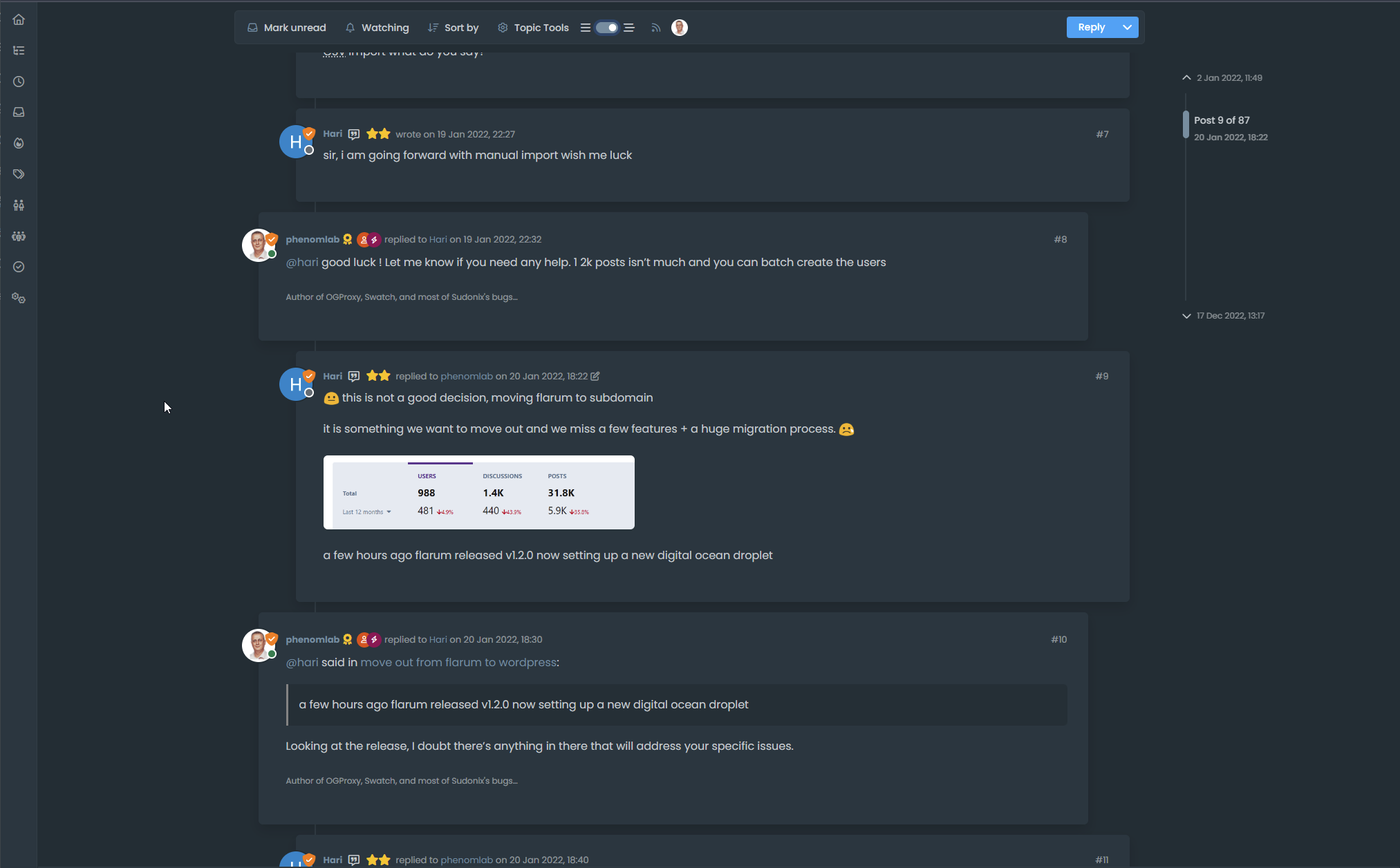
Threaded post support for NodeBB


-
NOTE: Minor bugfixes applied
-
this is very cool. Thanks @phenomlab
-
Very cool like as already said above and a big thanks for hard work (I see the th function.js and woowwww
 )
)I test it now and I have see this with plugin user-browsers :

Do you know where it could come from?
This also breaks the display of the site title
Can we do the same thing but without expanding the topic toolbar on header ?
EDIT :
I see that you seem put other things in the function.js on github like banner, logo, fancybox…
I said to myself that I found this file way too long without asking too many questions !–> But I have the bug display with user browsers plugin which I will try to solve
PW and WS Spirit alive
-
Very cool like as already said above and a big thanks for hard work (I see the th function.js and woowwww
)I test it now and I have see this with plugin user-browsers :
Do you know where it could come from?
This also breaks the display of the site title
Can we do the same thing but without expanding the topic toolbar on header ?
EDIT :
I see that you seem put other things in the function.js on github like banner, logo, fancybox…
I said to myself that I found this file way too long without asking too many questions !–> But I have the bug display with user browsers plugin which I will try to solve
@DownPW hmm. Not sure why I copied all of that code, but will change asap. I also have a fix for the browsing users plugin issue but didn’t include it because others might not be using it.
I’ll get to this as soon as I can.
EDIT - Done
EDIT 2 - I just noticed on your DEV box that you have (thanks to me - sorry) a ton of JS code you don’t need. You should probably clean that up.Mark Cutting also advises organisations as a Fractional CIO, Fractional CISO and Executive Advisor, helping boards improve technology governance, cyber resilience and executive decision making. Learn more at Gratmore Ltd
-
Very cool like as already said above and a big thanks for hard work (I see the th function.js and woowwww
)I test it now and I have see this with plugin user-browsers :
Do you know where it could come from?
This also breaks the display of the site title
Can we do the same thing but without expanding the topic toolbar on header ?
EDIT :
I see that you seem put other things in the function.js on github like banner, logo, fancybox…
I said to myself that I found this file way too long without asking too many questions !–> But I have the bug display with user browsers plugin which I will try to solve
@DownPW said in Threading support for NodeBB:
Can we do the same thing but without expanding the topic toolbar on header ?
Yes, but then you’ll have elements that are wider than the sticky bar which looks odd on scroll.
-
Very cool like as already said above and a big thanks for hard work (I see the th function.js and woowwww
)I test it now and I have see this with plugin user-browsers :
Do you know where it could come from?
This also breaks the display of the site title
Can we do the same thing but without expanding the topic toolbar on header ?
EDIT :
I see that you seem put other things in the function.js on github like banner, logo, fancybox…
I said to myself that I found this file way too long without asking too many questions !–> But I have the bug display with user browsers plugin which I will try to solve
@DownPW said in Threading support for NodeBB:
Do you know where it could come from?
Yes, just fixed it in your dev environment. I assumed (probably incorrectly) that people may not have this installed, so omitted it. I fixed it in prod because I do have it there, but wanted to keep DEV as vanilla as possible.
I’ll need to write a function that checks for the existence of this plugin then determines where to inject the toggle switch
For now, see the below
$('.topic .sticky-tools ul .hidden-xs').append(threadView);
                // If you have browsing users plugin, comment out the above line and uncomment the one below
                //$('.topic .sticky-tools ul [component="topic/browsing-users"]:last-of-type').append(threadView);
Result (might need some position tweaking…)

-
Good, thanks!!!
Test asap, i’m on intervention AT work -
@DownPW hmm. Not sure why I copied all of that code, but will change asap. I also have a fix for the browsing users plugin issue but didn’t include it because others might not be using it.
I’ll get to this as soon as I can.
EDIT - Done
EDIT 2 - I just noticed on your DEV box that you have (thanks to me - sorry) a ton of JS code you don’t need. You should probably clean that up.@phenomlab said in Threading support for NodeBB:
EDIT 2 - I just noticed on your DEV box that you have (thanks to me - sorry) a ton of JS code you don’t need. You should probably clean that up.
no I need it

@phenomlab said in Threading support for NodeBB:
@DownPW said in Threading support for NodeBB:
Can we do the same thing but without expanding the topic toolbar on header ?
Yes, but then you’ll have elements that are wider than the sticky bar which looks odd on scroll.
Could you still explain to me how to obtain this result so that I can see what I prefer?
PW and WS Spirit alive
-
@phenomlab said in Threading support for NodeBB:
EDIT 2 - I just noticed on your DEV box that you have (thanks to me - sorry) a ton of JS code you don’t need. You should probably clean that up.
no I need it
@phenomlab said in Threading support for NodeBB:
@DownPW said in Threading support for NodeBB:
Can we do the same thing but without expanding the topic toolbar on header ?
Yes, but then you’ll have elements that are wider than the sticky bar which looks odd on scroll.
Could you still explain to me how to obtain this result so that I can see what I prefer?
@DownPW said in Threading support for NodeBB:
Could you still explain to me how to obtain this result so that I can see what I prefer?
Yes, of course. Locate the below block in the CSS, and comment out
margin-left: -8%;.topic .threaded.sticky-tools { margin-left: -8%; margin-top: 0px; margin-bottom: 0px; transition: margin-left 0.3s ease, margin-right 0.3s ease; } -
Great, thank you Mark !
–> I also have a little suggestion to add a tooltip on the button mouse hover like "Thread view On and thread View Off depending on the state or maybe just one?
What do you think about it ?
PW and WS Spirit alive
-
Great, thank you Mark !
–> I also have a little suggestion to add a tooltip on the button mouse hover like "Thread view On and thread View Off depending on the state or maybe just one?
What do you think about it ?
@DownPW said in Threading support for NodeBB:
What do you think about it ?
Great idea. I’ll add that.
-
maybe with an HTML SPAN class like this ?
<span class="title-tooltip top" tooltip-text="Thread View On">PW and WS Spirit alive
-
maybe with an HTML SPAN class like this ?
<span class="title-tooltip top" tooltip-text="Thread View On">@DownPW yes, that should work, although probably better to use one tooltip with on/off text.
-
Small specific request.
I try to adapt the code to my environment.
I modified the background of the following classes:
.page-topic .topic .posts.timeline .timeline-event,
.page-topic .topic .posts.timeline > [component="post/placeholder"],
.page-topic .topic .posts.timeline > [component="post"] {
  border-left: none;
  transition: transform 0.3s ease !important;
  background: var(--bs-body-bg);
  background: var(--bs-body-navbar);
}
.post-container.threaded { background: var(--bs-body-bg) !important; background: var(--bs-body-navbar)!important; }li.pt-4.self-post:not(.self-post .topic-owner-post).threaded { transform: translateX(0px) !important; transition: transform 0.3s ease !important; background: var(--bs-body-bg); background: var(--bs-body-navbar)!important; padding-right: 30px; }and other code, for example :
.page-topic .topic .posts.timeline [component="topic/event"].timeline-event, .page-topic .topic .posts.timeline [component="topic/necro-post"].timeline-event {
    background: transparent;
}
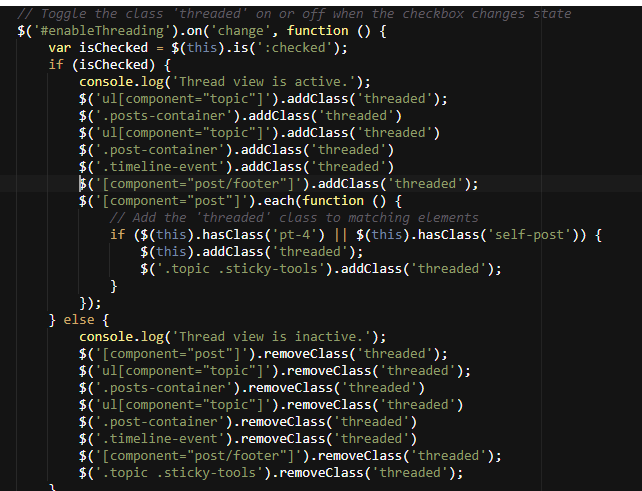
.page-topic .topic .posts.timeline .timeline-event:last-child, .page-topic .topic .posts.timeline>[component="post/placeholder"]:last-child, .page-topic .topic .posts.timeline>[component=post]:last-child { margin-left: 0.5rem; }When I activate mode it works without problem but it does not disappear when I deactivate the mode. (Return to vanilla)
I think I understand by reading the code that it is necessary to specify the classes chnaged in the function.js (with add .threaded) but I don’t really see how to add more
PW and WS Spirit alive
-
Small specific request.
I try to adapt the code to my environment.
I modified the background of the following classes:
.page-topic .topic .posts.timeline .timeline-event,
.page-topic .topic .posts.timeline > [component="post/placeholder"],
.page-topic .topic .posts.timeline > [component="post"] {
  border-left: none;
  transition: transform 0.3s ease !important;
  background: var(--bs-body-bg);
  background: var(--bs-body-navbar);
}
.post-container.threaded { background: var(--bs-body-bg) !important; background: var(--bs-body-navbar)!important; }li.pt-4.self-post:not(.self-post .topic-owner-post).threaded { transform: translateX(0px) !important; transition: transform 0.3s ease !important; background: var(--bs-body-bg); background: var(--bs-body-navbar)!important; padding-right: 30px; }and other code, for example :
.page-topic .topic .posts.timeline [component="topic/event"].timeline-event, .page-topic .topic .posts.timeline [component="topic/necro-post"].timeline-event {
    background: transparent;
}
.page-topic .topic .posts.timeline .timeline-event:last-child, .page-topic .topic .posts.timeline>[component="post/placeholder"]:last-child, .page-topic .topic .posts.timeline>[component=post]:last-child { margin-left: 0.5rem; }When I activate mode it works without problem but it does not disappear when I deactivate the mode. (Return to vanilla)
I think I understand by reading the code that it is necessary to specify the classes chnaged in the function.js (with add .threaded) but I don’t really see how to add more
@DownPW any reason as to why you’ve defined
backgroundtwice ?See
background: var(--bs-body-bg); background: var(--bs-body navbar)!important; -
I have just forget to delete the first but this nothing change.
PW and WS Spirit alive
-
@DownPW just curious 🤭
The second would override the first anyway.
I’m in transit currently and not in front of a pc but will review this as soon as I can.
-
-
Mark Cutting also advises organisations as a Fractional CIO, Fractional CISO and Executive Advisor, helping boards improve technology governance, cyber resilience and executive decision making. Learn more at Gratmore Ltd
-
 undefined phenomlab referenced this topic on
-
@phenomlab thank you Mark i did not read this one.




Hello! It looks like you're interested in this conversation, but you don't have an account yet.
Getting fed up of having to scroll through the same posts each visit? When you register for an account, you'll always come back to exactly where you were before, and choose to be notified of new replies (either via email, or push notification). You'll also be able to save bookmarks and upvote posts to show your appreciation to other community members.
With your input, this post could be even better 💗
Register LoginRelated Topics
-
-
-
-
-
Gettin Erors NodeBB
Solved Configure -
Forum Icons NodeBB
Solved Customisation -
-
NodeBB metadata
Solved Configure