NODEBB: Nginx error performance & High CPU


-
I think you’re right Mark and that’s why I come here looking for your valuable advice and expertise

Basically, the illegal site that closed was a movie download site A topic was opened on our forum to talk about it and many came looking for answers on why and how.
You’re actually right about the fact that we can’t be sure of anything and there are bot attacks or ddos in the lot of connexions
I activated the under attack mode on Cloudflare as you advised me to see (just now.) and we will see like you said
As you advised, I also reset the default nginx configuration values and removed my nginx modifications specified above.
I would like to take advantage of your expertise, see a hand from you to properly configure nginx for ddos and high traffic. (What precise modifications to specify as well as the precise values.)
@DownPW ok, good. Let’s see what the challenge does to the site traffic. Those whom are legitimate users won’t mind having to perform a one time additional authentication step, but bots of course will simply stumble at this hurdle.
Mark Cutting also advises organisations as a Fractional CIO, Fractional CISO and Executive Advisor, helping boards improve technology governance, cyber resilience and executive decision making. Learn more at Gratmore Ltd
-
@DownPW ok, good. Let’s see what the challenge does to the site traffic. Those whom are legitimate users won’t mind having to perform a one time additional authentication step, but bots of course will simply stumble at this hurdle.
number of user is better (408) but a lot of loose connexion. navigation is hard
PW and WS Spirit alive
-
number of user is better (408) but a lot of loose connexion. navigation is hard
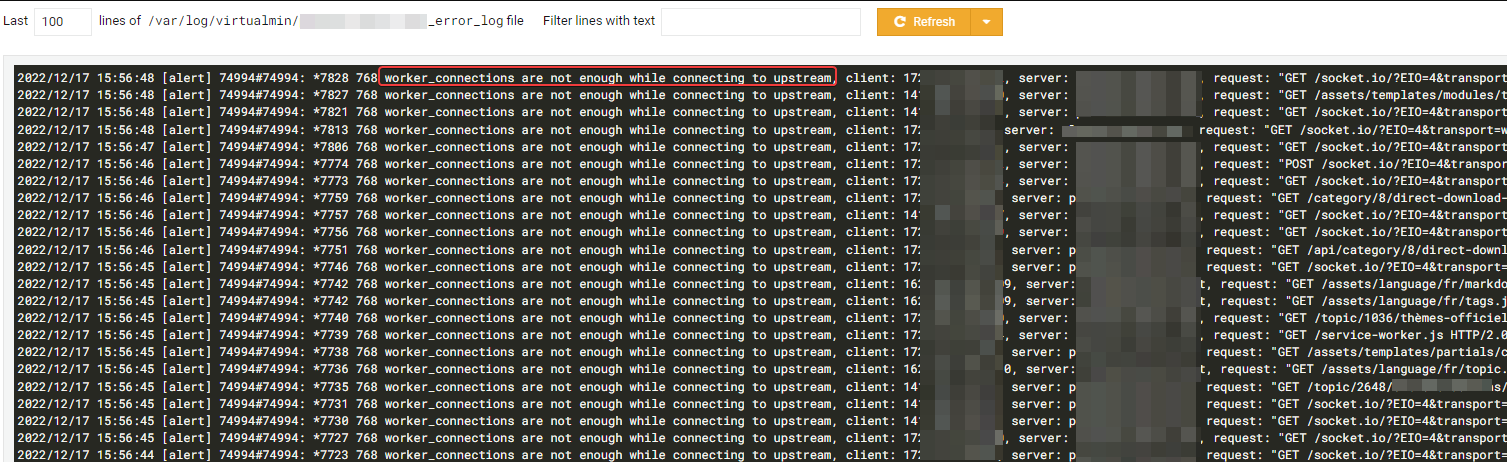
I have chaneg nginx conf with :
worker_rlimit_nofile 70000;
events {
worker_connections 65535;
multi_accept on;
}CF is under attack mode
PW and WS Spirit alive
-
I have chaneg nginx conf with :
worker_rlimit_nofile 70000;
events {
worker_connections 65535;
multi_accept on;
}CF is under attack mode
@DownPW I still have access to your Cloudflare tenant so will have a look shortly.
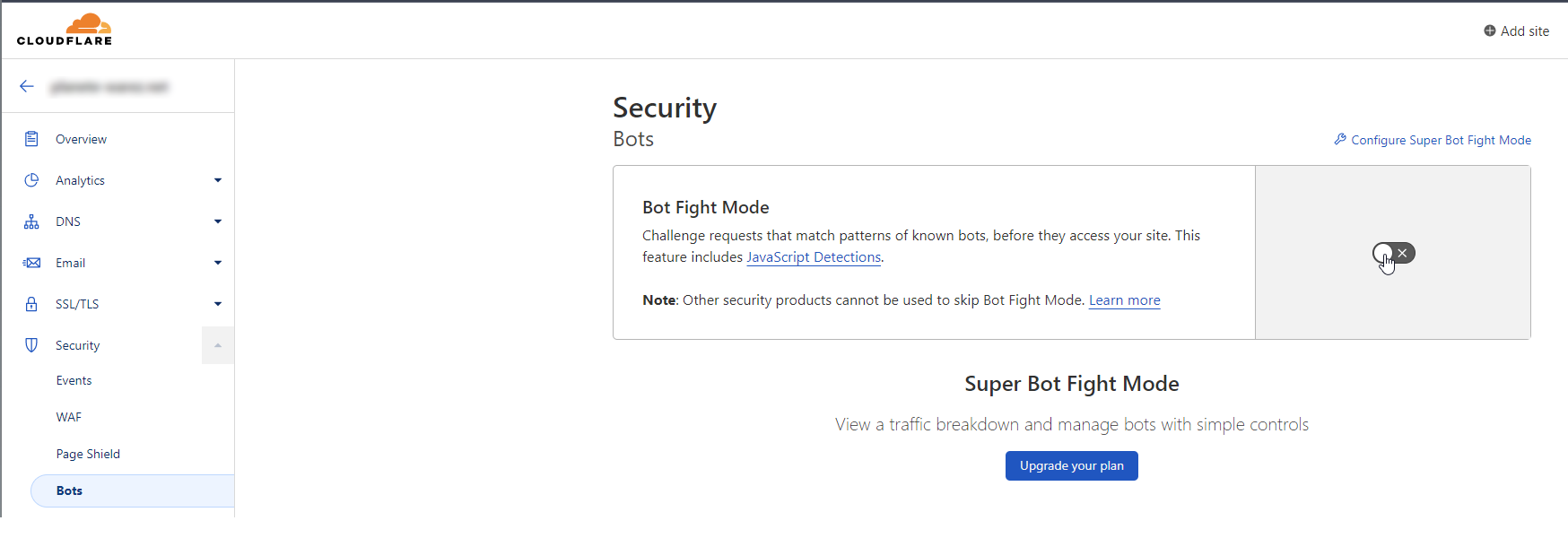
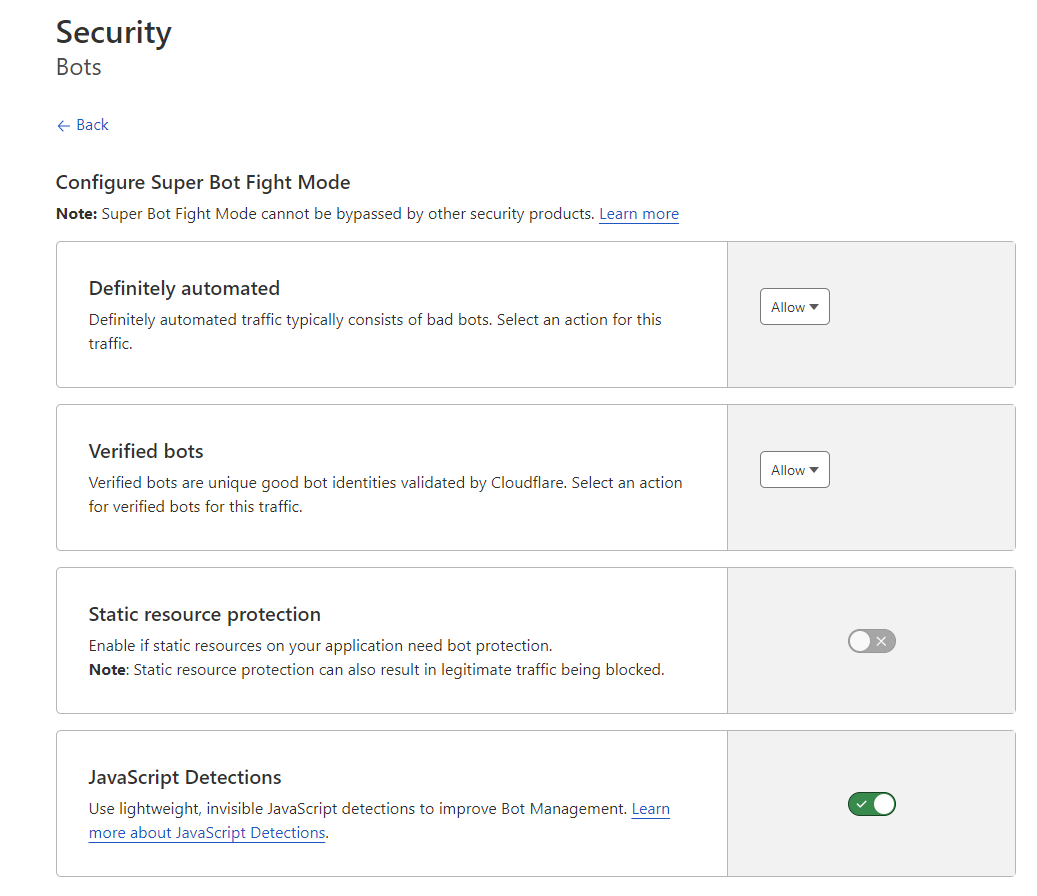
EDIT: I am in now - personally, I would also enable this (and configure it)
Mark Cutting also advises organisations as a Fractional CIO, Fractional CISO and Executive Advisor, helping boards improve technology governance, cyber resilience and executive decision making. Learn more at Gratmore Ltd
-
@DownPW I still have access to your Cloudflare tenant so will have a look shortly.
EDIT: I am in now - personally, I would also enable this (and configure it)
@phenomlab I have already activate it and add a waf rules for russian country
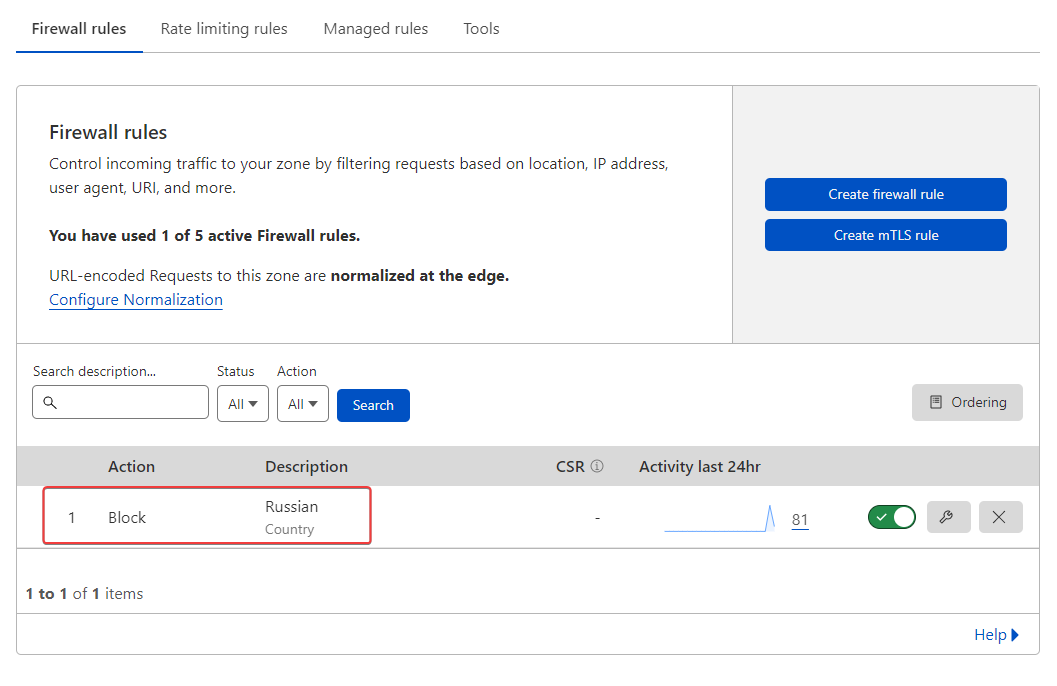
With this bots settings :
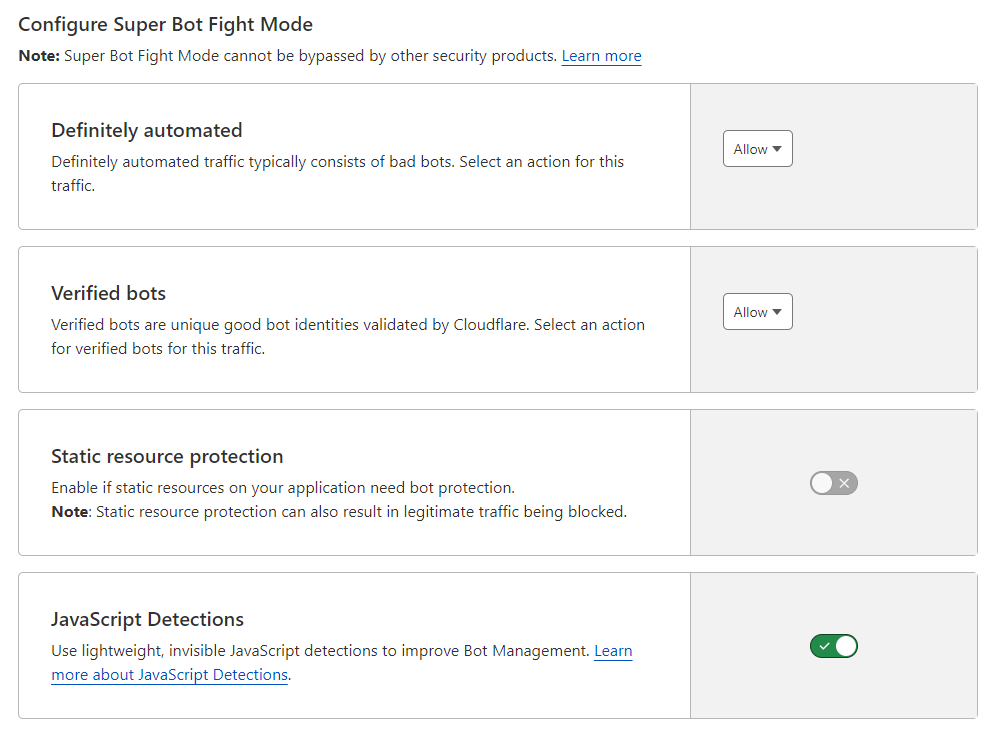
and this settings for ddos protection :
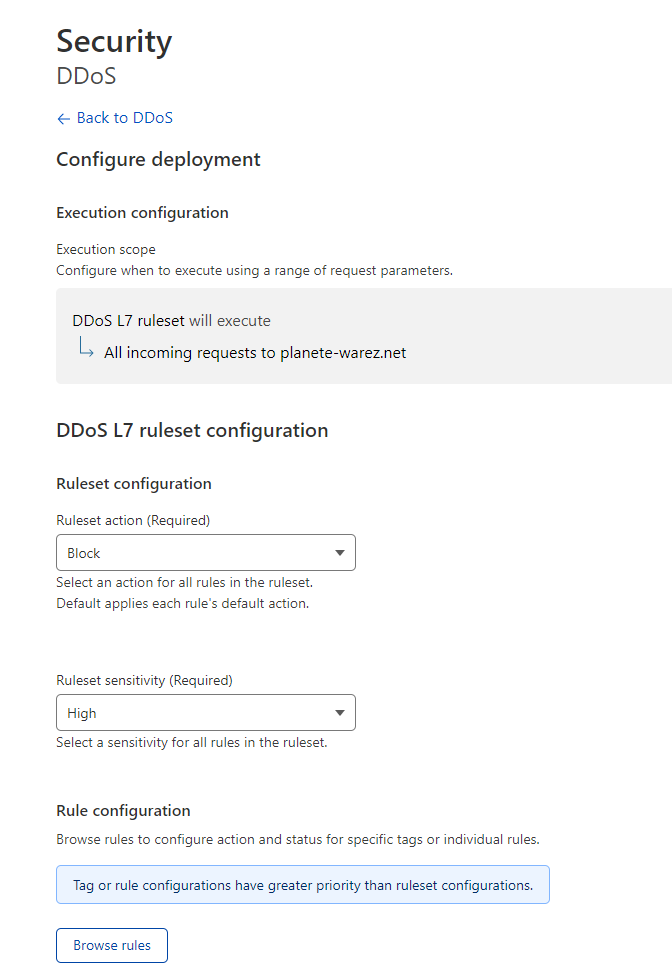
PW and WS Spirit alive
-
@phenomlab I have already activate it and add a waf rules for russian country
With this bots settings :
and this settings for ddos protection :
@DownPW said in NODEBB: Nginx error performance & High CPU:
I have already activate it
Are you sure? When I checked your tenant it wasn’t active - it’s from where I took the screenshot

Mark Cutting also advises organisations as a Fractional CIO, Fractional CISO and Executive Advisor, helping boards improve technology governance, cyber resilience and executive decision making. Learn more at Gratmore Ltd
-
@DownPW said in NODEBB: Nginx error performance & High CPU:
I have already activate it
Are you sure? When I checked your tenant it wasn’t active - it’s from where I took the screenshot
yep I activate it after
PW and WS Spirit alive
-
yep I activate it after
For your information @phenomlab ,
- I have ban via iptables suspicious ip address find on /etc/nginx/accesss.log and virtualhost access.log like this :
iptables -I INPUT -s IPADDRESS -j DROP - Activate bot option on CF
- Create contry rules (Russie and China) on CF WAF
- I left under attack mode option activated on CF
- I have just change nginx.conf like this for test (If you have best value, I take it ! ) :
worker_rlimit_nofile 70000;

events {

	worker_connections 65535;
	multi_accept on;
}

http {

	##
	# Basic Settings
	##

	limit_req_zone $binary_remote_addr zone=flood:10m rate=100r/s;
	limit_req zone=flood burst=100 nodelay;
	limit_conn_zone $binary_remote_addr zone=ddos:10m;
	limit_conn ddos 100;
100r/s iit’s already a lot !!
and for vhost file :
server {
	.....

        location / {

				limit_req zone=flood; #Test
				limit_conn ddos 100; #Test
}
–> If you have other ideas, I’m interested
–> If you have better values to use in what I modified, please let me know.PW and WS Spirit alive
- I have ban via iptables suspicious ip address find on /etc/nginx/accesss.log and virtualhost access.log like this :
-
For your information @phenomlab ,
- I have ban via iptables suspicious ip address find on /etc/nginx/accesss.log and virtualhost access.log like this :
iptables -I INPUT -s IPADDRESS -j DROP - Activate bot option on CF
- Create contry rules (Russie and China) on CF WAF
- I left under attack mode option activated on CF
- I have just change nginx.conf like this for test (If you have best value, I take it ! ) :
worker_rlimit_nofile 70000;

events {

	worker_connections 65535;
	multi_accept on;
}

http {

	##
	# Basic Settings
	##

	limit_req_zone $binary_remote_addr zone=flood:10m rate=100r/s;
	limit_req zone=flood burst=100 nodelay;
	limit_conn_zone $binary_remote_addr zone=ddos:10m;
	limit_conn ddos 100;
100r/s iit’s already a lot !!
and for vhost file :
server {
	.....

        location / {

				limit_req zone=flood; #Test
				limit_conn ddos 100; #Test
}
–> If you have other ideas, I’m interested
–> If you have better values to use in what I modified, please let me know.@DownPW my only preference would be to not set
worker_connectionsso highMark Cutting also advises organisations as a Fractional CIO, Fractional CISO and Executive Advisor, helping boards improve technology governance, cyber resilience and executive decision making. Learn more at Gratmore Ltd
- I have ban via iptables suspicious ip address find on /etc/nginx/accesss.log and virtualhost access.log like this :
-
Ok so what value do you advise?
PW and WS Spirit alive
-
Ok so what value do you advise?
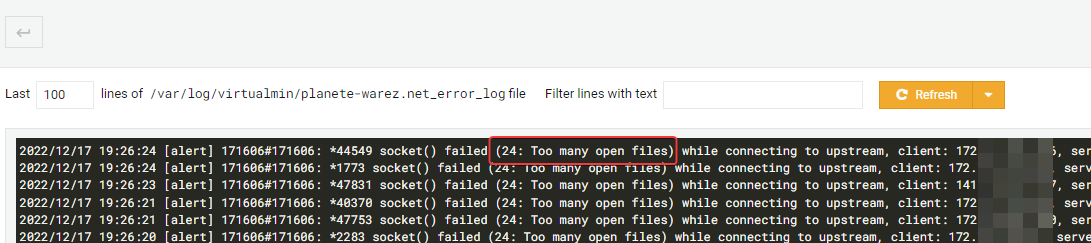
@DownPW you should base it on the output of
ulimit- see belowWith that high value you run the risk of overwhelming your server.
Mark Cutting also advises organisations as a Fractional CIO, Fractional CISO and Executive Advisor, helping boards improve technology governance, cyber resilience and executive decision making. Learn more at Gratmore Ltd
-
@DownPW you should base it on the output of
ulimit- see belowWith that high value you run the risk of overwhelming your server.
PW and WS Spirit alive
-
@DownPW And the
worker_processesvalue ? I expect this to be between 1 and 4 ?Mark Cutting also advises organisations as a Fractional CIO, Fractional CISO and Executive Advisor, helping boards improve technology governance, cyber resilience and executive decision making. Learn more at Gratmore Ltd
-
worker_processes auto;PW and WS Spirit alive
-
worker_processes auto;@DownPW ok. You should refer to that some article I previously provided. You can probably set this to a static value.
Mark Cutting also advises organisations as a Fractional CIO, Fractional CISO and Executive Advisor, helping boards improve technology governance, cyber resilience and executive decision making. Learn more at Gratmore Ltd
-
@DownPW ok. You should refer to that some article I previously provided. You can probably set this to a static value.
Ok I will see it for better worker_processes value
I add a rate limite request and limit_conn_zone on http block and vhost block :
– nginx.conf:
http {

	#Requete maximun par ip
	limit_req_zone $binary_remote_addr zone=flood:10m rate=100r/s;
	#Connexions maximum par ip
	limit_conn_zone $binary_remote_addr zone=ddos:1m;
-- vhost.conf : location / { limit_req zone=flood burst=100 nodelay; limit_conn ddos 10;–> I have test other value for rate and burst but they cause problem access to the forum. If you have better, I take it
I add today a proxy_read_timeout on vhost.conf (60 by default)
proxy_read_timeout 180;I have deactivate underattack mode on CF and change for high Level
I have add other rules on CF waf :
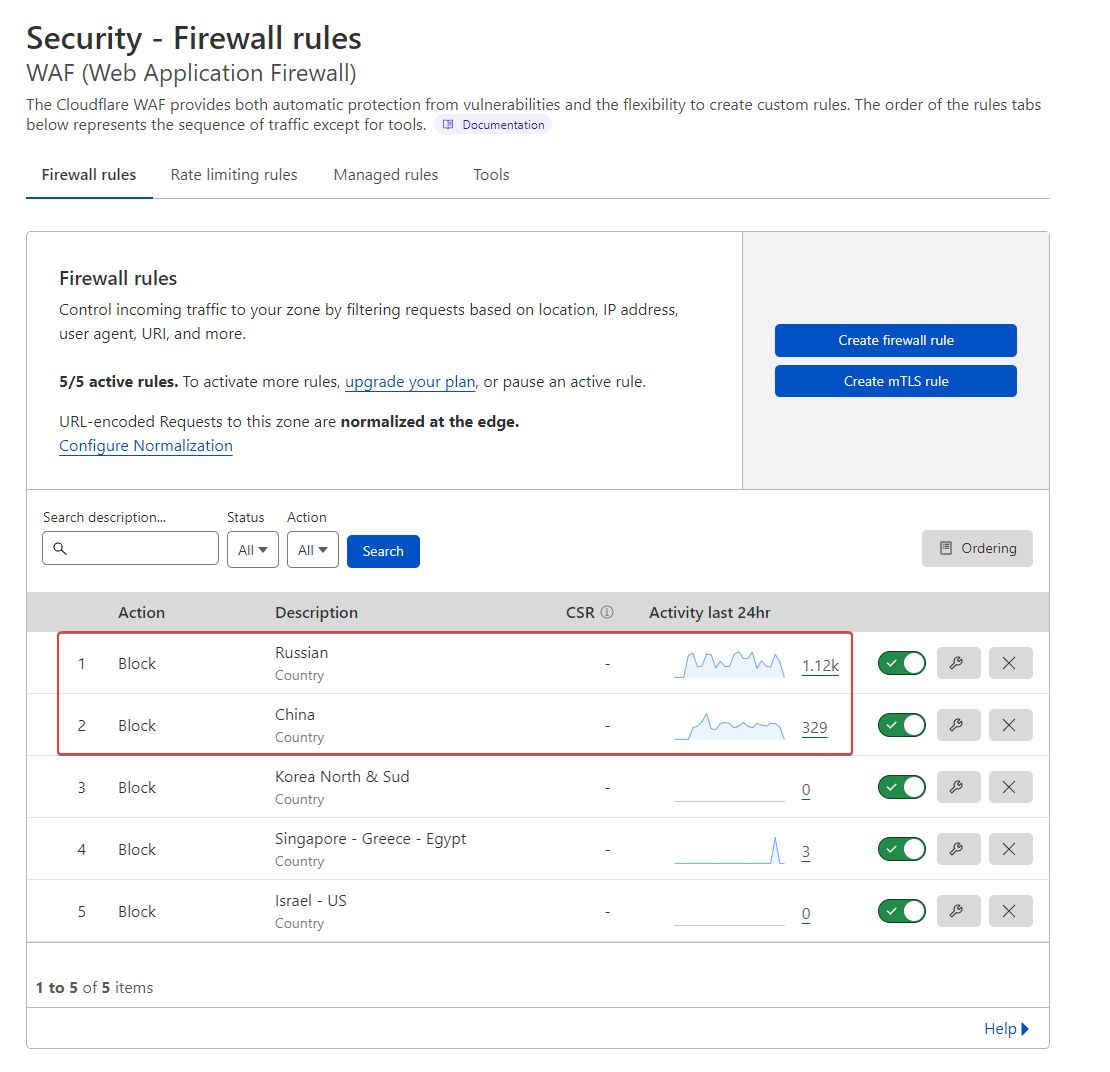
PW and WS Spirit alive
-
Ok I will see it for better worker_processes value
I add a rate limite request and limit_conn_zone on http block and vhost block :
– nginx.conf:
http {

	#Requete maximun par ip
	limit_req_zone $binary_remote_addr zone=flood:10m rate=100r/s;
	#Connexions maximum par ip
	limit_conn_zone $binary_remote_addr zone=ddos:1m;
-- vhost.conf : location / { limit_req zone=flood burst=100 nodelay; limit_conn ddos 10;–> I have test other value for rate and burst but they cause problem access to the forum. If you have better, I take it
I add today a proxy_read_timeout on vhost.conf (60 by default)
proxy_read_timeout 180;I have deactivate underattack mode on CF and change for high Level
I have add other rules on CF waf :
@DownPW what settings do you have in advanced (in settings) for rate limit etc?
Mark Cutting also advises organisations as a Fractional CIO, Fractional CISO and Executive Advisor, helping boards improve technology governance, cyber resilience and executive decision making. Learn more at Gratmore Ltd
-
@phenomlab said in NODEBB: Nginx error performance & High CPU:
@DownPW what settings do you have in advanced (in settings) for rate limit etc?
In cloudflare ?
PW and WS Spirit alive
-
I wanted to test awstats on virtualmin with root account and it hasn’t updated since August 2022.
I wanted to regenerate the files but I have a problem of rights.
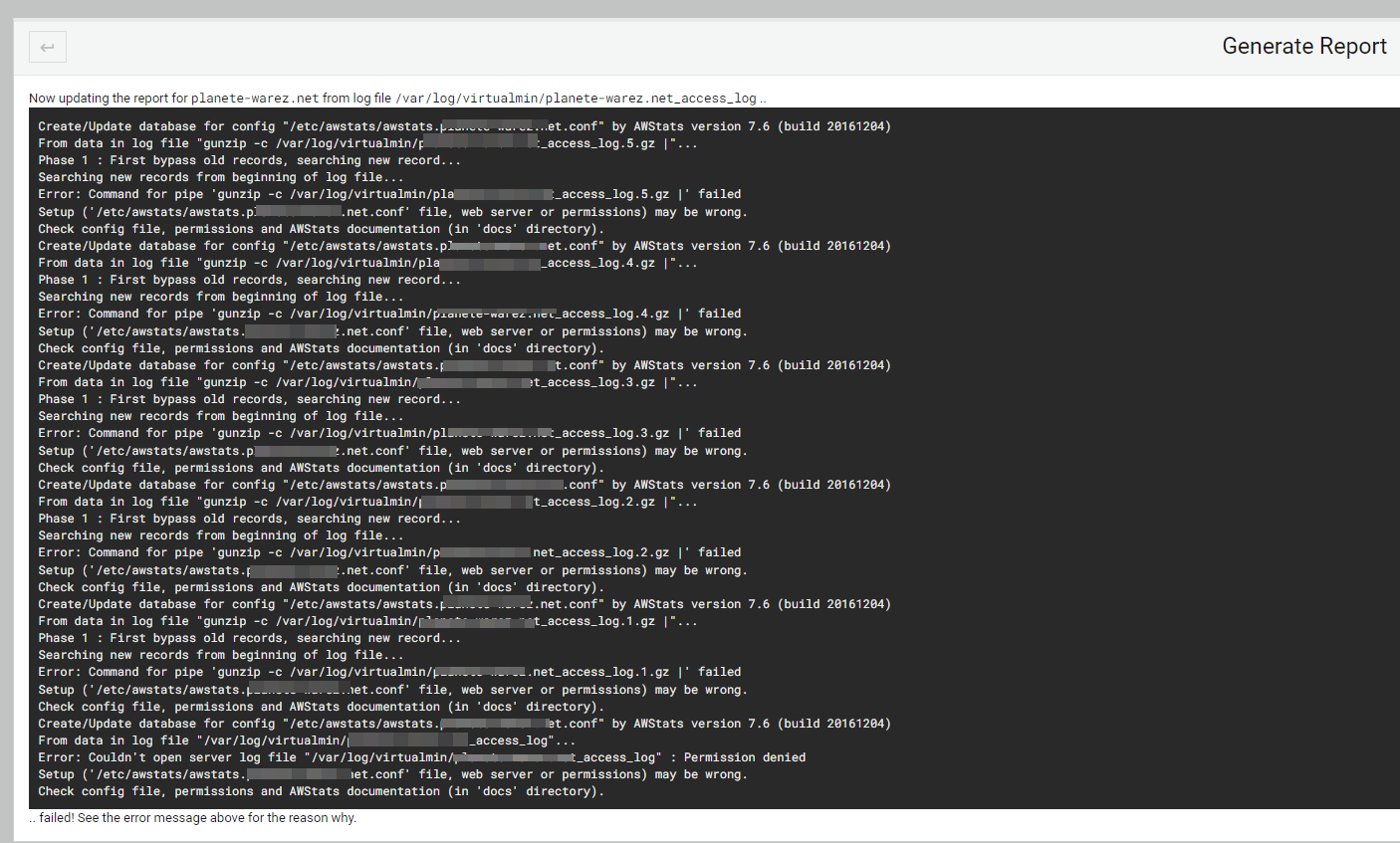
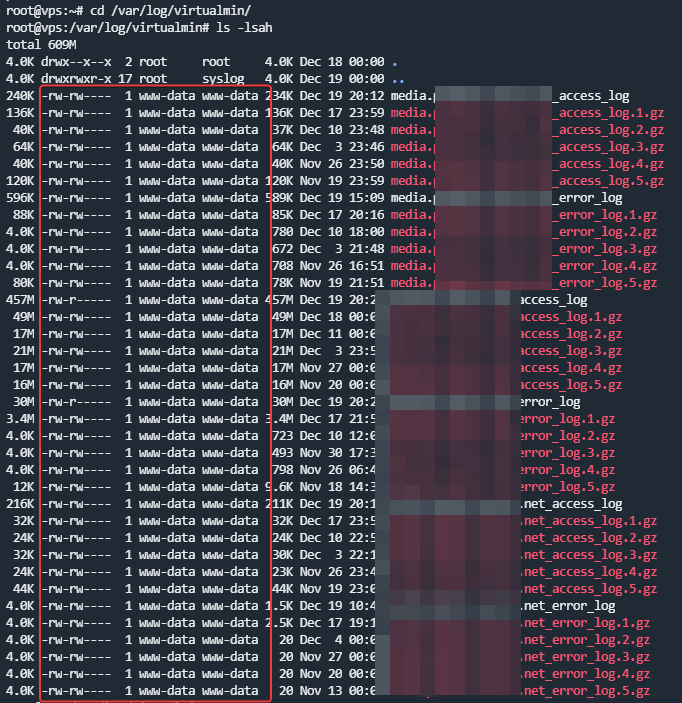
What do you think ? and how t ore-generate a rapport correctly
I would like to use it to better manage the @ips that connect to the server
PW and WS Spirit alive
-
@phenomlab said in NODEBB: Nginx error performance & High CPU:
@DownPW what settings do you have in advanced (in settings) for rate limit etc?
In cloudflare ?
@DownPW no, sorry - in NodeBB ACP
Mark Cutting also advises organisations as a Fractional CIO, Fractional CISO and Executive Advisor, helping boards improve technology governance, cyber resilience and executive decision making. Learn more at Gratmore Ltd


Hello! It looks like you're interested in this conversation, but you don't have an account yet.
Getting fed up of having to scroll through the same posts each visit? When you register for an account, you'll always come back to exactly where you were before, and choose to be notified of new replies (either via email, or push notification). You'll also be able to save bookmarks and upvote posts to show your appreciation to other community members.
With your input, this post could be even better 💗
Register LoginDid this solution help you?
Related Topics
-
-
-
-
Nodebb design
Solved General -
-
NodeBB upgrade now cant post
Solved Bugs -
-