Fresher in Nodebb install
-
Whats up guys. Hows everyone doing?
Agree with the situation. There is nothing worst that to have allot of discussions and later on realise that you picked the wrong platform. Not bashing Flarum, its not their fault. Like most, I should have realised that composer platforms are not for me. I think NodeBB is composer as well. Correct me if Im wrong. Any way, since I been bisy with my own thing, I completely lost track of whats out there? Any new forum or blog type platforms out there? Not Laravel of course.
@MadWay welcome on NodeBB board

-
@phenomlab not for free hosting I assume. There is no install.php or similar, If I remember. Does it have that option to have full first post display on front page i stead of just a title?
-
@phenomlab not for free hosting I assume. There is no install.php or similar, If I remember. Does it have that option to have full first post display on front page i stead of just a title?
@phenomlab He always arrives safe

@Hari i agree on that, url structure can be seo effective. I am going to work on WordPress this next week, remember you were able to bring down TTF to 200ms on flarum?
 , so let’s aim under that and play small load time and leave everything there and watch how will play out. At least this time we have a wider ground, and able to pay just anyone to work on the simpler worldwide code unlike some place 🤭 We looked like we were captives in some sense. You can’t do a minor change because the extension it’s used by everyone. Now we free d**n!
If we all have something great, imagine how we can benefit on backlinks, and how will be so simple! Not forgetting phenomlab is good in security.

-
@phenomlab not for free hosting I assume. There is no install.php or similar, If I remember. Does it have that option to have full first post display on front page i stead of just a title?
@MadWay NodeBB is in fact based on NodeJS so doesn’t use PHP at all.
Mark Cutting also advises organisations as a Fractional CIO, Fractional CISO and Executive Advisor, helping boards improve technology governance, cyber resilience and executive decision making. Learn more at Gratmore Ltd
-
@phenomlab He always arrives safe
@Hari i agree on that, url structure can be seo effective. I am going to work on WordPress this next week, remember you were able to bring down TTF to 200ms on flarum?
, so let’s aim under that and play small load time and leave everything there and watch how will play out. At least this time we have a wider ground, and able to pay just anyone to work on the simpler worldwide code unlike some place 🤭 We looked like we were captives in some sense. You can’t do a minor change because the extension it’s used by everyone. Now we free d**n!If we all have something great, imagine how we can benefit on backlinks, and how will be so simple! Not forgetting phenomlab is good in security.
@Sala said in Fresher in Nodebb install:
bring down TTF to 200ms on flarum?
I can’t see how this is achievable. At least I never managed to get below 600ms in most cases and this was on powerful hardware.
-
@phenomlab He always arrives safe
@Hari i agree on that, url structure can be seo effective. I am going to work on WordPress this next week, remember you were able to bring down TTF to 200ms on flarum?
, so let’s aim under that and play small load time and leave everything there and watch how will play out. At least this time we have a wider ground, and able to pay just anyone to work on the simpler worldwide code unlike some place 🤭 We looked like we were captives in some sense. You can’t do a minor change because the extension it’s used by everyone. Now we free d**n!If we all have something great, imagine how we can benefit on backlinks, and how will be so simple! Not forgetting phenomlab is good in security.
@Sala said in Fresher in Nodebb install:
I am going to work on WordPress this next week, remember you were able to bring down TTF to 200ms on flarum?
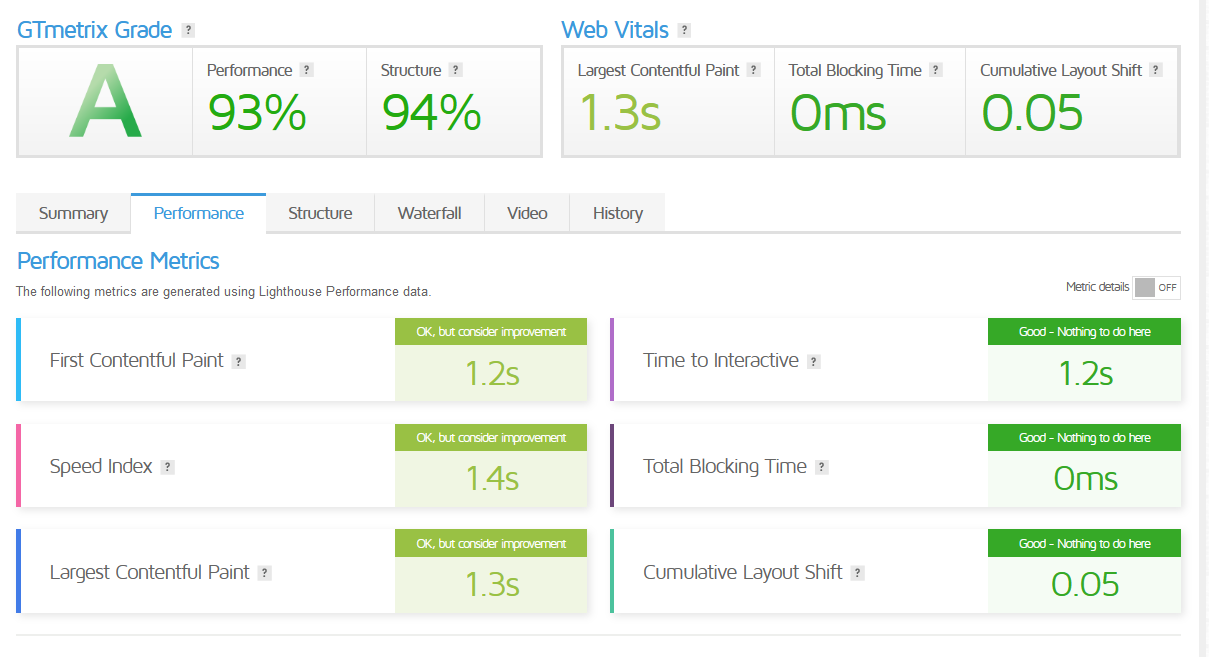
these are my wordpress forum metrics using Cloudflare APO


-
@Sala said in Fresher in Nodebb install:
I am going to work on WordPress this next week, remember you were able to bring down TTF to 200ms on flarum?
these are my wordpress forum metrics using Cloudflare APO
-
 undefined phenomlab forked this topic on
-
-
@Sala it’s worth noting that making excessive changes chasing the holy grail of A+ for performance can actually have a negative impact on the overall experience. Because of this, I’d strongly recommend thoroughly testing each change in an incognito browser session to ensure the user experience isn’t impacted.
-
@Sala was away from keys for a few weeks to visit TajMahal
try this! $5/ month but it is worth it.
-
@Sala was away from keys for a few weeks to visit TajMahal
try this! $5/ month but it is worth it.
@Hari I’ve been reading a lot about APO. Looks impressive.
-
undefined phenomlab referenced this topic on





Hello! It looks like you're interested in this conversation, but you don't have an account yet.
Getting fed up of having to scroll through the same posts each visit? When you register for an account, you'll always come back to exactly where you were before, and choose to be notified of new replies (either via email, or push notification). You'll also be able to save bookmarks and upvote posts to show your appreciation to other community members.
With your input, this post could be even better 💗
Register LoginRelated Topics
-
MogoDB v6 to v7 upgrade
Solved Configure -
-
Nodebb design
Solved General -
-
-
-
-
Nodebb Hashtag plugin
Solved General