NodeBB inline videoplayer
-
Since starting my nodebb forum I had many attempts at installing a player to show youtube inline rather than redirecting to youtube page.
it would have been great if there was one listed in the searchable plugins but as there wasnt, I found one on github
ns-embed
I installed it from CLI, but it doesn’t do anything.
Does anyone know why that might be?
Im curious if this site has embedded video, so trying
Edit: it works, which plugin is used?
-
@phenomlab yes, youtube links still not showing inline
Where do I find that rules page to accept?@eveh have a look in
/admin/plugins/embedMark Cutting also advises organisations as a Fractional CIO, Fractional CISO and Executive Advisor, helping boards improve technology governance, cyber resilience and executive decision making. Learn more at Gratmore Ltd
-
Since starting my nodebb forum I had many attempts at installing a player to show youtube inline rather than redirecting to youtube page.
it would have been great if there was one listed in the searchable plugins but as there wasnt, I found one on github
ns-embed
I installed it from CLI, but it doesn’t do anything.
Does anyone know why that might be?
Im curious if this site has embedded video, so trying
Edit: it works, which plugin is used?
@eveh It is in fact
nodebb-plugin-ns-embed. If you install this, out of the box, it should work - or you can try the below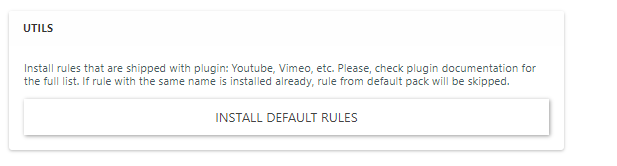
Does this not work for you ?
Mark Cutting also advises organisations as a Fractional CIO, Fractional CISO and Executive Advisor, helping boards improve technology governance, cyber resilience and executive decision making. Learn more at Gratmore Ltd
-
@eveh It is in fact
nodebb-plugin-ns-embed. If you install this, out of the box, it should work - or you can try the belowDoes this not work for you ?
@phenomlab
i didnpm install nodebb-plugin-ns-embedin the terminal
Nothing happened (after rebuid and restart of forum)
The box you show above, where should I have seen that?I never saw anything giving me the option to use default rules
-
@phenomlab
i didnpm install nodebb-plugin-ns-embedin the terminal
Nothing happened (after rebuid and restart of forum)
The box you show above, where should I have seen that?I never saw anything giving me the option to use default rules
@eveh After you install any plugin, it has to be activated. Check
/admin/extend/plugins#deactive, activate it, then rebuild and restart.Mark Cutting also advises organisations as a Fractional CIO, Fractional CISO and Executive Advisor, helping boards improve technology governance, cyber resilience and executive decision making. Learn more at Gratmore Ltd
-
@eveh After you install any plugin, it has to be activated. Check
/admin/extend/plugins#deactive, activate it, then rebuild and restart.@phenomlab said in NodeBB inline videoplayer:
@eveh After you install any plugin, it has to be activated. Check
/admin/extend/plugins#deactive, activate it, then rebuild and restart.Is this from the terminal. If I go to nodebb directory there is no admin directory below that?
If you mean go on the forum admin to Extend>plugins, that NS player is not in the list still -
@phenomlab said in NodeBB inline videoplayer:
@eveh After you install any plugin, it has to be activated. Check
/admin/extend/plugins#deactive, activate it, then rebuild and restart.Is this from the terminal. If I go to nodebb directory there is no admin directory below that?
If you mean go on the forum admin to Extend>plugins, that NS player is not in the list still@eveh Sorry, no - this is from the ACP.
-
@phenomlab said in NodeBB inline videoplayer:
@eveh After you install any plugin, it has to be activated. Check
/admin/extend/plugins#deactive, activate it, then rebuild and restart.Is this from the terminal. If I go to nodebb directory there is no admin directory below that?
If you mean go on the forum admin to Extend>plugins, that NS player is not in the list still@eveh said in NodeBB inline videoplayer:
If you mean go on the forum admin to Extend>plugins, that NS player is not in the list still
Does it appear under the “inactive” tab ?
Mark Cutting also advises organisations as a Fractional CIO, Fractional CISO and Executive Advisor, helping boards improve technology governance, cyber resilience and executive decision making. Learn more at Gratmore Ltd
-
@eveh said in NodeBB inline videoplayer:
If you mean go on the forum admin to Extend>plugins, that NS player is not in the list still
Does it appear under the “inactive” tab ?
-
@phenomlab Ah yes

@eveh Good. Activate it, then rebuild and restart.
Mark Cutting also advises organisations as a Fractional CIO, Fractional CISO and Executive Advisor, helping boards improve technology governance, cyber resilience and executive decision making. Learn more at Gratmore Ltd
-
@phenomlab yes, youtube links still not showing inline
Where do I find that rules page to accept? -
@phenomlab yes, youtube links still not showing inline
Where do I find that rules page to accept?@eveh have a look in
/admin/plugins/embedMark Cutting also advises organisations as a Fractional CIO, Fractional CISO and Executive Advisor, helping boards improve technology governance, cyber resilience and executive decision making. Learn more at Gratmore Ltd
-
@phenomlab
YAY! It works
Thanks so much -
 undefined phenomlab has marked this topic as solved on

Hello! It looks like you're interested in this conversation, but you don't have an account yet.
Getting fed up of having to scroll through the same posts each visit? When you register for an account, you'll always come back to exactly where you were before, and choose to be notified of new replies (either via email, or push notification). You'll also be able to save bookmarks and upvote posts to show your appreciation to other community members.
With your input, this post could be even better 💗
Register LoginDid this solution help you?
Related Topics
-
-
-
-
-
-
NodeBB Footer
Solved Customisation -
-
NodeBB metadata
Solved Configure