New message CSS problem
-
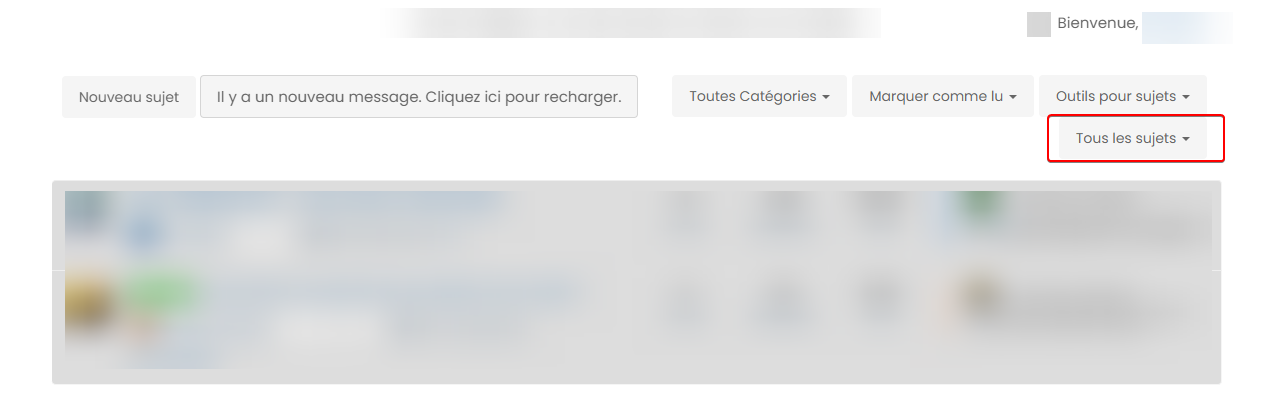
In the unread messages menu, when a new message is posted and the message “There is a new message. Click here to reload” appears, the “All topics” button is shifted below because there is no more space on the line.
Is it possible to fix this by modifying for example the location of the button “There is a new message. Click here to reload” ?
Thanks in advance
PW and WS Spirit alive
-
In the unread messages menu, when a new message is posted and the message “There is a new message. Click here to reload” appears, the “All topics” button is shifted below because there is no more space on the line.
Is it possible to fix this by modifying for example the location of the button “There is a new message. Click here to reload” ?
Thanks in advance
@DownPW without checking the css, you could use
nodebb-plugin-customizeto modify the language used in order to reduce the text. I’ve done this successfully with the subscribe text.If you’d prefer a css solution, I’ll provide one.
Mark Cutting also advises organisations as a Fractional CIO, Fractional CISO and Executive Advisor, helping boards improve technology governance, cyber resilience and executive decision making. Learn more at Gratmore Ltd
-
@DownPW without checking the css, you could use
nodebb-plugin-customizeto modify the language used in order to reduce the text. I’ve done this successfully with the subscribe text.If you’d prefer a css solution, I’ll provide one.
I prefer yes.
I don’t like nodebb-plugin-customizeI have test with
position absolutebut bof bofPW and WS Spirit alive
-
I prefer yes.
I don’t like nodebb-plugin-customizeI have test with
position absolutebut bof bof@DownPW ok. Is this from your production site ?
-
yep yep mister
PW and WS Spirit alive
-
@DownPW Haven’t forgotten about this. I’ve created an account on your site so I can test out some code I have in mind.
-
@DownPW I get this when a new post arrives on your site

It looks different (not the language used obviously) to the screenshot you posted - can you share a URL where this happens ? Also, what screen estate are you using ?
-
Hmm I think because you are in English Language and me French
PW and WS Spirit alive
-
@DownPW that’s a good point. However, I dont think that means 4 buttons in French and 3 in English?
-
-
@DownPW hi. Sorry for digging up an old post, but I’m going through items still unresolved and was looking to get an understanding of where you are currently with this?


Hello! It looks like you're interested in this conversation, but you don't have an account yet.
Getting fed up of having to scroll through the same posts each visit? When you register for an account, you'll always come back to exactly where you were before, and choose to be notified of new replies (either via email, or push notification). You'll also be able to save bookmarks and upvote posts to show your appreciation to other community members.
With your input, this post could be even better 💗
Register Login