Threaded post support for NodeBB


-
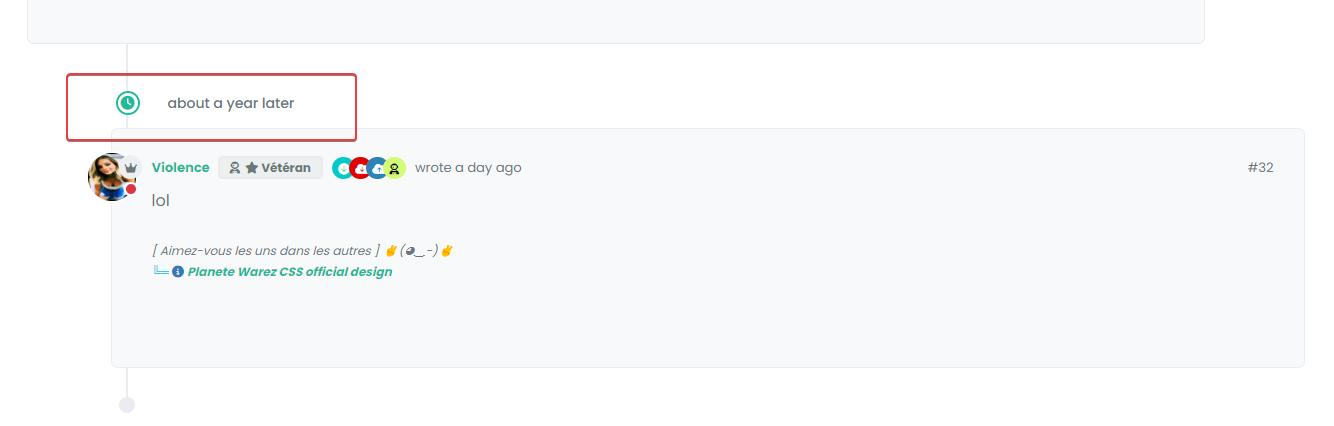
And this margin :
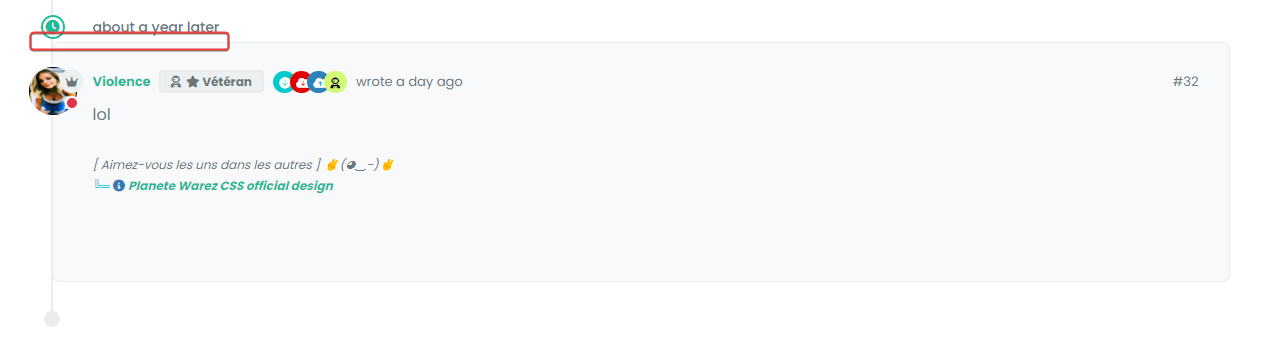
I have added before a margin between the topic and the timeline icon.
we’ll come to an understanding

But I admit that I don’t really understand.
@DownPW said in Threading support for NodeBB:
But I admit that I don’t really understand.
Neither do I !

-
For this we can use in Threading ON :
.page-topic .topic .posts.timeline .timeline-event:last-child, .page-topic .topic .posts.timeline>[component="post/placeholder"]:last-child, .page-topic .topic .posts.timeline>[component=post]:last-child {
    margin-left: 0.5rem !important;
}
And this :
.page-topic .topic .posts.timeline [component="topic/event"].timeline-event, .page-topic .topic .posts.timeline [component="topic/necro-post"].timeline-event {
    margin-bottom: 10px !important;
}
RESULT :
-
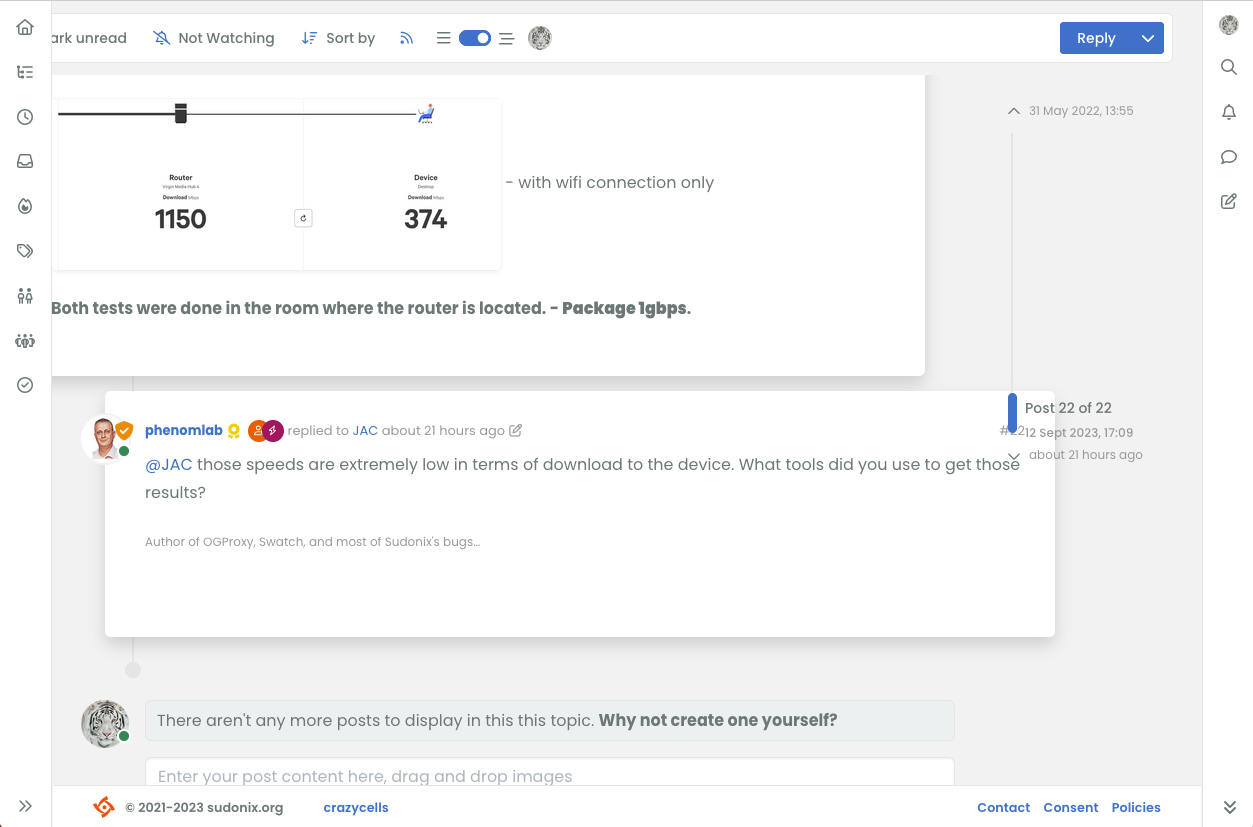
hi @phenomlab , it is nice that the switch only appears when the screen can be changed however, when the screen size is around 1250 pixels, I guess it does not produce the intended view, maybe you should increase the screen size further to make sure this switch is only available when the screen can accommodate nice thread view?
-
It looks like I got something working by adding this code
li.pt-4.self-post:not(.self-post .topic-owner-post).threaded { margin-left: 0rem; } li.pt-4.self-post.threaded { margin-left: 0rem; } li.necro-post.text-muted.timeline-event.d-flex.gap-2.pt-4.threaded { background: transparent !important; margin-bottom: 10px !important; } -
Better for me now @phenomlab .
I have just seen this bug (see the video below)
EXPLAIN:
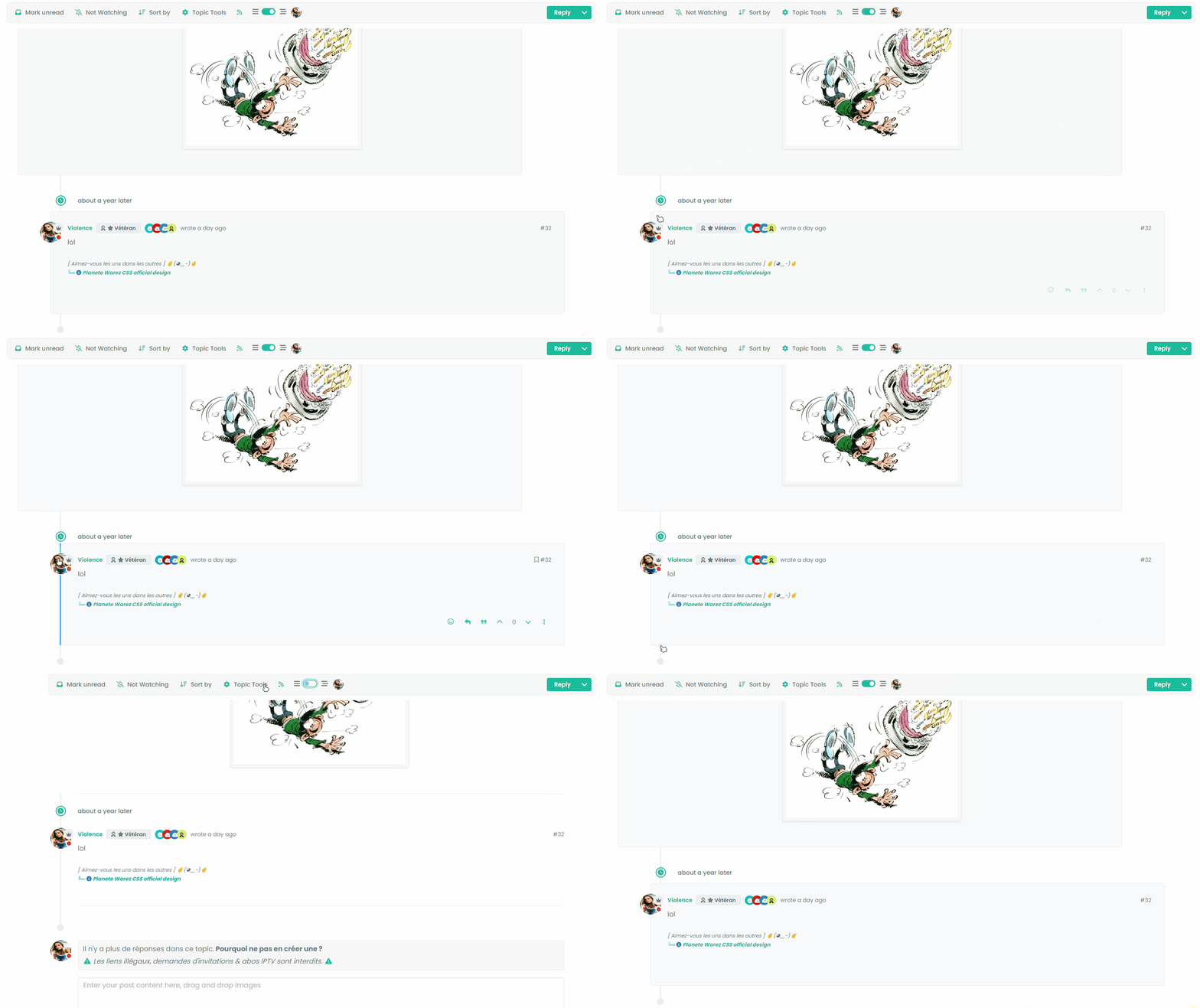
I have Threading mode ON, Space bettween timeline event and topic is good. I refresh the page with CTRL + F5.
The last post is displayed highlighted then the div moves to its original place (too bad, it’s long) with the desired margin and then the beetween timeline event and topic space is no longer the same. To find the correct space that we had before refreshing the page, I have to deactivate Thread mode and reactivate it
- It’s a shame to wait until the last message is highlighted for the margin to take effect.
- It’s also a shame to deactivate/reactivate the mode to find the correct margin.
VIDEO FOR BETTER EXPLAIN :
Other things, I deactivate threadeChat function in function.js because don’t work for now now

PW and WS Spirit alive
-
Better for me now @phenomlab .
I have just seen this bug (see the video below)
EXPLAIN:
I have Threading mode ON, Space bettween timeline event and topic is good. I refresh the page with CTRL + F5.
The last post is displayed highlighted then the div moves to its original place (too bad, it’s long) with the desired margin and then the beetween timeline event and topic space is no longer the same. To find the correct space that we had before refreshing the page, I have to deactivate Thread mode and reactivate it
- It’s a shame to wait until the last message is highlighted for the margin to take effect.
- It’s also a shame to deactivate/reactivate the mode to find the correct margin.
VIDEO FOR BETTER EXPLAIN :
Other things, I deactivate threadeChat function in function.js because don’t work for now now
@DownPW thanks. Let me review
@crazycells good point. 1200 is a bit too generic I think and perhaps we need to only execute on a more forgiving resolution.
-
Better for me now @phenomlab .
I have just seen this bug (see the video below)
EXPLAIN:
I have Threading mode ON, Space bettween timeline event and topic is good. I refresh the page with CTRL + F5.
The last post is displayed highlighted then the div moves to its original place (too bad, it’s long) with the desired margin and then the beetween timeline event and topic space is no longer the same. To find the correct space that we had before refreshing the page, I have to deactivate Thread mode and reactivate it
- It’s a shame to wait until the last message is highlighted for the margin to take effect.
- It’s also a shame to deactivate/reactivate the mode to find the correct margin.
VIDEO FOR BETTER EXPLAIN :
Other things, I deactivate threadeChat function in function.js because don’t work for now now
@DownPW Having reviewed this, it looks like layout shift is causing this - let me have a look at the most efficient way to counter this.
-
Better for me now @phenomlab .
I have just seen this bug (see the video below)
EXPLAIN:
I have Threading mode ON, Space bettween timeline event and topic is good. I refresh the page with CTRL + F5.
The last post is displayed highlighted then the div moves to its original place (too bad, it’s long) with the desired margin and then the beetween timeline event and topic space is no longer the same. To find the correct space that we had before refreshing the page, I have to deactivate Thread mode and reactivate it
- It’s a shame to wait until the last message is highlighted for the margin to take effect.
- It’s also a shame to deactivate/reactivate the mode to find the correct margin.
VIDEO FOR BETTER EXPLAIN :
Other things, I deactivate threadeChat function in function.js because don’t work for now now
@DownPW Not layout shift in fact, but a lack of CSS being added during the
ajaxify.end- in other words, this class is not being added on page loadli.necro-post.text-muted.timeline-event.d-flex.gap-2.pt-4.threaded { background: transparent !important; margin-bottom: 10px !important; }I believe this is because this component type is being added after the page loads, so in fact, it is not in the
DOMwhen the page loads initially, so it is skipped. I have the same issue on Sudonix, but work around it using the below additional CSS.page-topic .topic .posts.timeline [component="topic/event"].timeline-event, .page-topic .topic .posts.timeline [component="topic/necro-post"].timeline-event { margin-bottom: 10px; }I’ve added this to the CSS on your site, which “fixes” (albeit dirty) the problem
-
@phenomlab said in Threading support for NodeBB:
@DownPW Not layout shift in fact, but a lack of CSS being added during the
ajaxify.end- in other words, this class is not being added on page loadli.necro-post.text-muted.timeline-event.d-flex.gap-2.pt-4.threaded { background: transparent !important; margin-bottom: 10px !important; }I believe this is because this component type is being added after the page loads, so in fact, it is not in the
DOMwhen the page loads initially, so it is skipped. I have the same issue on Sudonix, but work around it using the below additional CSS.page-topic .topic .posts.timeline [component="topic/event"].timeline-event, .page-topic .topic .posts.timeline [component="topic/necro-post"].timeline-event { margin-bottom: 10px; }I’ve added this to the CSS on your site, which “fixes” (albeit dirty) the problem
Don’t see this directive on ACP/CSS. I add it myself seems that work.
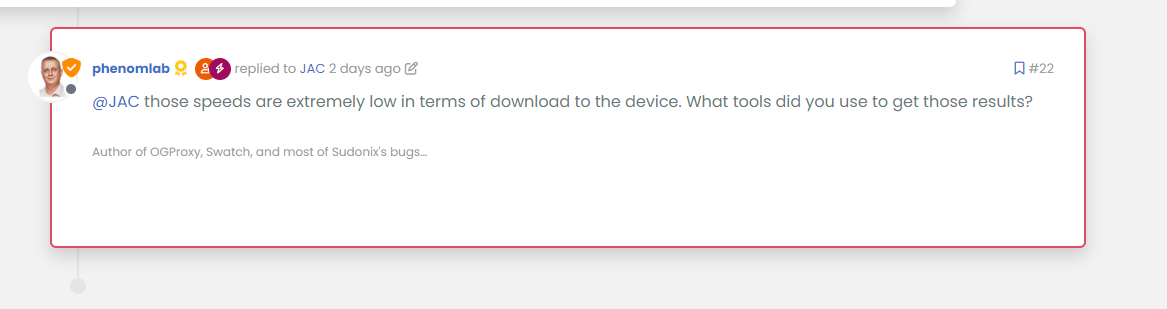
Currently, the last message is highlighted (in blue on the gif) and then the reply block shifts to the left (using the margin)
Is there a possibility that the block will move to the margin directly rather than waiting for the blue indicator to disappear?
It’s a shame to wait until the blue border-left disappears and then the block shifts to the left.
It would have to shift directly without waitingedit :
thats seems to work here, no delay :
PW and WS Spirit alive
-
@phenomlab said in Threading support for NodeBB:
@DownPW Not layout shift in fact, but a lack of CSS being added during the
ajaxify.end- in other words, this class is not being added on page loadli.necro-post.text-muted.timeline-event.d-flex.gap-2.pt-4.threaded { background: transparent !important; margin-bottom: 10px !important; }I believe this is because this component type is being added after the page loads, so in fact, it is not in the
DOMwhen the page loads initially, so it is skipped. I have the same issue on Sudonix, but work around it using the below additional CSS.page-topic .topic .posts.timeline [component="topic/event"].timeline-event, .page-topic .topic .posts.timeline [component="topic/necro-post"].timeline-event { margin-bottom: 10px; }I’ve added this to the CSS on your site, which “fixes” (albeit dirty) the problem
Don’t see this directive on ACP/CSS. I add it myself seems that work.
Currently, the last message is highlighted (in blue on the gif) and then the reply block shifts to the left (using the margin)
Is there a possibility that the block will move to the margin directly rather than waiting for the blue indicator to disappear?
It’s a shame to wait until the blue border-left disappears and then the block shifts to the left.
It would have to shift directly without waitingedit :
thats seems to work here, no delay :
@DownPW yes, because I don’t use a border, but a box shadow to avoid the layout shift. If you add the
highlightclass I any of the posts here you can capture the CSS. -
seem you use a border non ?
.page-topic .topic .posts.timeline .timeline-event.highlight, .page-topic .topic .posts.timeline > [component="post/placeholder"].highlight, .page-topic .topic .posts.timeline > [component=post].highlight {
    border: 2px solid var(--bs-post-unread) !important;
}
PW and WS Spirit alive
-
seem you use a border non ?
.page-topic .topic .posts.timeline .timeline-event.highlight, .page-topic .topic .posts.timeline > [component="post/placeholder"].highlight, .page-topic .topic .posts.timeline > [component=post].highlight { border: 2px solid var(--bs-post-unread) !important; }@DownPW no, it’s a box shadow
-
odd i see this code in dev console, search better
I see too
li.pt-4.self-post.highlight.threadedI don’t have thisEDIT :
yes resolved by this code :
.page-topic .topic .posts.timeline .timeline-event.highlight, .page-topic .topic .posts.timeline > [component="post/placeholder"].highlight, .page-topic .topic .posts.timeline > [component=post].highlight.threaded {
    border: 2px solid var(--bs-post-unread) !important;
    border-radius: var(--bs-border-radius);
}

li.pt-4.self-post.highlight.threaded {
    margin-left: 0rem !important;
  }
– RESULT :
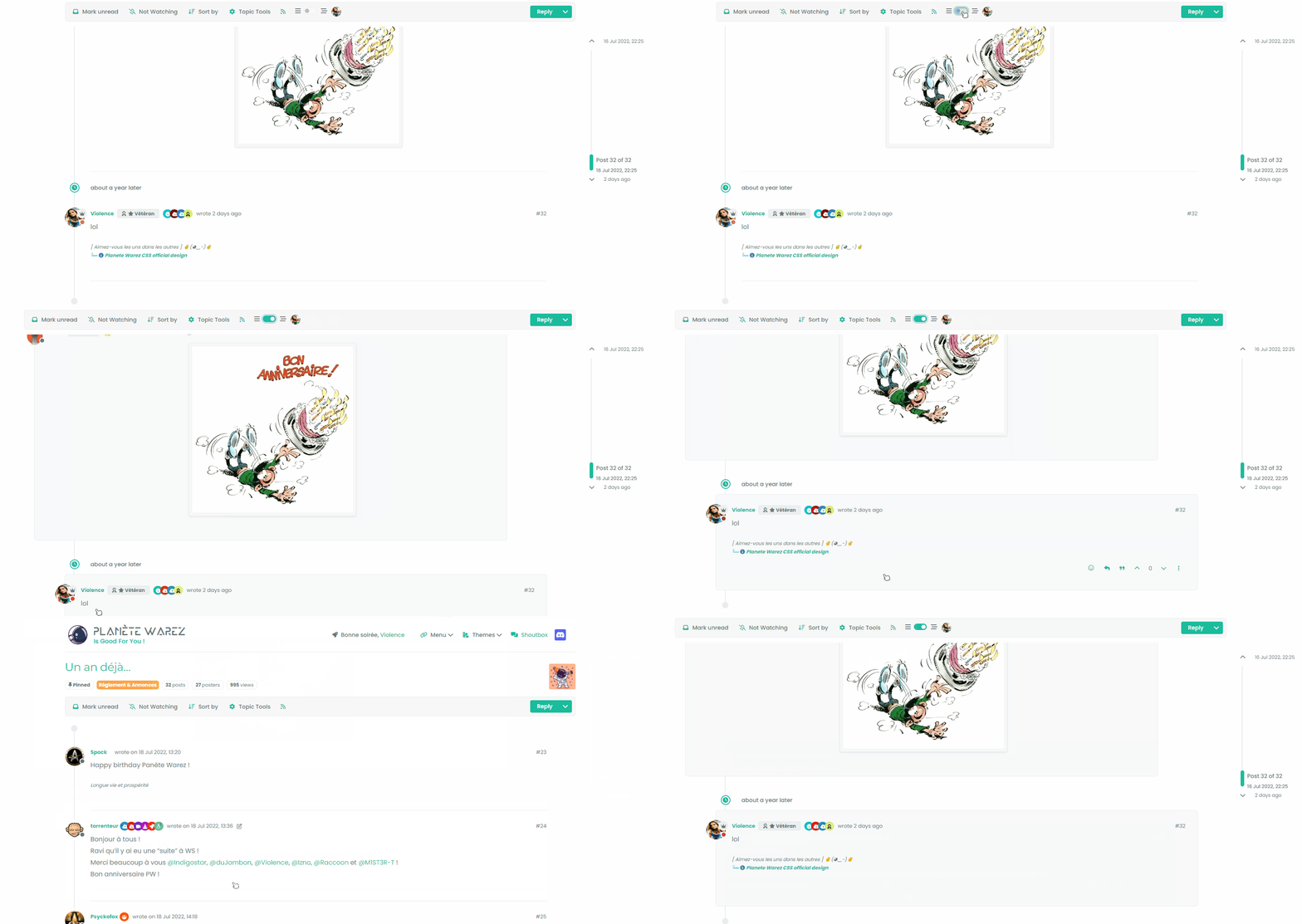
-
Here I am again Mark @phenomlab
I am contributing to this code to add a tooltip to the button.
The position can be changed according to your wishes.
For my part, I prefer to put it at the bottom because if we put it at the top it can be annoying.Tell me what you think about it ?
function threaded() {
    $(document).ready(function () {
        // Check if the screen width is 1200px or more
        if ($(window).width() >= 1200) {
            // Check if the dropdown already exists
            if ($('#enableThreading').length === 0) {
                var threadView = $('<div class="threads-wrapper"><i class="fa fa-fw fa-bars left"></i><form class="form"><div class="form-check form-switch sticky-tools-bar"> \
                    <input class="form-check-input" id="enableThreading" type="checkbox" data-field="enableThreading"> \
                    <label class=" d-none d-md-inline fw-semibold" for="enableThreading"><i class="fa fa-fw fa-bars-staggered right"></i></label> \
                </div></form></div>');
                $('.topic .sticky-tools ul [component="topic/browsing-users"]:last-of-type').append(threadView);
                // Check if there's a stored state for the checkbox and update it
                var storedState = localStorage.getItem('enableThreadingState');
                if (storedState === 'true') {
                    $('#enableThreading').prop('checked', true);
                }
            }

            // Add a tooltip to the button
            $('#enableThreading').tooltip({
                title: 'Thread View On/Off', // Replace with your tooltip text
                placement: 'Bottom', // Adjust the placement as needed
                trigger: 'hover', // Show tooltip on hover
            });

            // Toggle the class 'threaded' on or off when the checkbox changes state
            $('#enableThreading').on('change', function () {
                var isChecked = $(this).is(':checked');
                if (isChecked) {
                    console.log('Thread view is active.');
                    $('ul[component="topic"]').addClass('threaded');
                    $('.posts-container').addClass('threaded');
                    $('ul[component="topic"]').addClass('threaded');
                    $('.post-container').addClass('threaded');
                    $('.timeline-event').addClass('threaded');
                    $('[component="post/footer"]').addClass('threaded');
                    $('[component="post"]').each(function () {
                        // Add the 'threaded' class to matching elements
                        if ($(this).hasClass('pt-4') || $(this).hasClass('self-post')) {
                            $(this).addClass('threaded');
                            $('.topic .sticky-tools').addClass('threaded');
                        }
                    });
                } else {
                    console.log('Thread view is inactive.');
                    $('[component="post"]').removeClass('threaded');
                    $('ul[component="topic"]').removeClass('threaded');
                    $('.posts-container').removeClass('threaded');
                    $('ul[component="topic"]').removeClass('threaded');
                    $('.post-container').removeClass('threaded');
                    $('.timeline-event').removeClass('threaded');
                    $('[component="post/footer"]').removeClass('threaded');
                    $('.topic .sticky-tools').removeClass('threaded');
                }
                // Store the checkbox state in localStorage
                localStorage.setItem('enableThreadingState', isChecked);
            });
            // Check for changes in the checkbox state when the page loads
            $('#enableThreading').trigger('change');
        }
    });
}

$(window).on('action:ajaxify.end', function (data) {
    threaded();
});

$(window).on('action:posts.edited', function (data) {
    threaded();
});

$(window).on('action:posts.loaded', function (data) {
    threaded();
});
CYA my friend
PW and WS Spirit alive
-
Here I am again Mark @phenomlab
I am contributing to this code to add a tooltip to the button.
The position can be changed according to your wishes.
For my part, I prefer to put it at the bottom because if we put it at the top it can be annoying.Tell me what you think about it ?
function threaded() {
    $(document).ready(function () {
        // Check if the screen width is 1200px or more
        if ($(window).width() >= 1200) {
            // Check if the dropdown already exists
            if ($('#enableThreading').length === 0) {
                var threadView = $('<div class="threads-wrapper"><i class="fa fa-fw fa-bars left"></i><form class="form"><div class="form-check form-switch sticky-tools-bar"> \
                    <input class="form-check-input" id="enableThreading" type="checkbox" data-field="enableThreading"> \
                    <label class=" d-none d-md-inline fw-semibold" for="enableThreading"><i class="fa fa-fw fa-bars-staggered right"></i></label> \
                </div></form></div>');
                $('.topic .sticky-tools ul [component="topic/browsing-users"]:last-of-type').append(threadView);
                // Check if there's a stored state for the checkbox and update it
                var storedState = localStorage.getItem('enableThreadingState');
                if (storedState === 'true') {
                    $('#enableThreading').prop('checked', true);
                }
            }

            // Add a tooltip to the button
            $('#enableThreading').tooltip({
                title: 'Thread View On/Off', // Replace with your tooltip text
                placement: 'Bottom', // Adjust the placement as needed
                trigger: 'hover', // Show tooltip on hover
            });

            // Toggle the class 'threaded' on or off when the checkbox changes state
            $('#enableThreading').on('change', function () {
                var isChecked = $(this).is(':checked');
                if (isChecked) {
                    console.log('Thread view is active.');
                    $('ul[component="topic"]').addClass('threaded');
                    $('.posts-container').addClass('threaded');
                    $('ul[component="topic"]').addClass('threaded');
                    $('.post-container').addClass('threaded');
                    $('.timeline-event').addClass('threaded');
                    $('[component="post/footer"]').addClass('threaded');
                    $('[component="post"]').each(function () {
                        // Add the 'threaded' class to matching elements
                        if ($(this).hasClass('pt-4') || $(this).hasClass('self-post')) {
                            $(this).addClass('threaded');
                            $('.topic .sticky-tools').addClass('threaded');
                        }
                    });
                } else {
                    console.log('Thread view is inactive.');
                    $('[component="post"]').removeClass('threaded');
                    $('ul[component="topic"]').removeClass('threaded');
                    $('.posts-container').removeClass('threaded');
                    $('ul[component="topic"]').removeClass('threaded');
                    $('.post-container').removeClass('threaded');
                    $('.timeline-event').removeClass('threaded');
                    $('[component="post/footer"]').removeClass('threaded');
                    $('.topic .sticky-tools').removeClass('threaded');
                }
                // Store the checkbox state in localStorage
                localStorage.setItem('enableThreadingState', isChecked);
            });
            // Check for changes in the checkbox state when the page loads
            $('#enableThreading').trigger('change');
        }
    });
}

$(window).on('action:ajaxify.end', function (data) {
    threaded();
});

$(window).on('action:posts.edited', function (data) {
    threaded();
});

$(window).on('action:posts.loaded', function (data) {
    threaded();
});
CYA my friend
@DownPW looks good to me
 I started to write this a few days ago, but got sidetracked and never finished it.
Good job.
-
I forgot the screen

PW and WS Spirit alive
-
@DownPW looks great.
-
And just modified this for better display (centered)
.threads-wrapper {
    display: flex;
    position: relative;
    /* top: -2px; */
    top: 1px;
}
PW and WS Spirit alive
-
And just modified this for better display (centered)
.threads-wrapper { display: flex; position: relative; /* top: -2px; */ top: 1px; }@DownPW yes, it was styled for this site because it uses heavily modified css.
-
I note, however, that here on Sudonix, our own posts and those of other users are not shifted (to the left). Only those of the author of the topics are.
In the code you provide on Github, the author’s posts and those of others are shifted (to the left), only our own posts are not.
I do not know if it’s normal.
It actually seems logical to me that only our own posts are not shifted to just better identify our own posts
PW and WS Spirit alive



Hello! It looks like you're interested in this conversation, but you don't have an account yet.
Getting fed up of having to scroll through the same posts each visit? When you register for an account, you'll always come back to exactly where you were before, and choose to be notified of new replies (either via email, or push notification). You'll also be able to save bookmarks and upvote posts to show your appreciation to other community members.
With your input, this post could be even better 💗
Register LoginRelated Topics
-
-
-
-
-
-
NodeBB upgrade now cant post
Solved Bugs -
-
Bootstrap Version
Solved Customisation