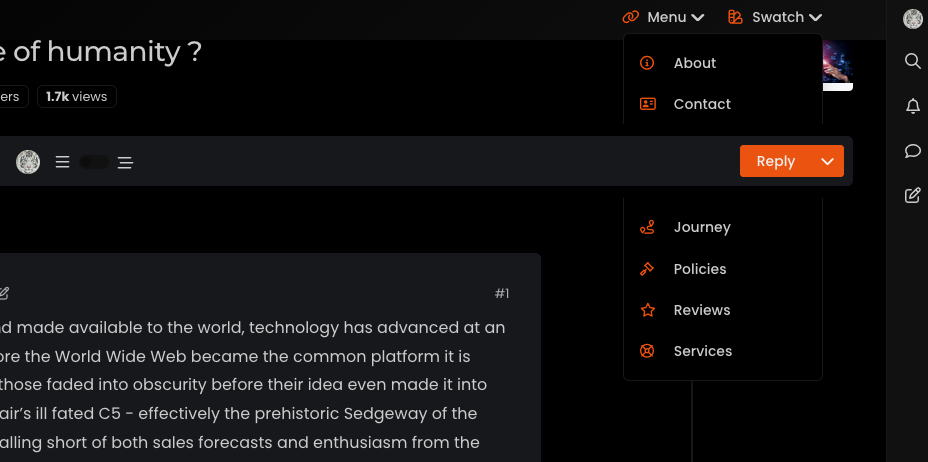
What is this bar called?

-
When I refresh the page or first visit, the Reading bar appear when she shouldn’t appear.
An idea?Same things when I disable all the other custom CSS

@DownPW Let me have a look.
-
It’s weird @phenomlab because I tested by removing all the custom css except the reading bar and it’s the same.
Have you testing without custom css for see that ?
On custom JS maybe ?
PW and WS Spirit alive
-
It’s weird @phenomlab because I tested by removing all the custom css except the reading bar and it’s the same.
Have you testing without custom css for see that ?
On custom JS maybe ?
@DownPW I am able to reproduce this, yes. There are some CSS classes missing
.reading-meter {
    visibility: hidden;
}
.reading-meter.show {
    visibility: visible;
}
I’ve added these on your DEV server and updated the original post. Sorry

Mark – Founder, Phenomlab Ltd
Executive IT & Security Leadership
Phenomlab Ltd -
No problem my friend, I won’t complain

-
I saw another bug.
This bug occurs on the home page. No problem on recent page for example
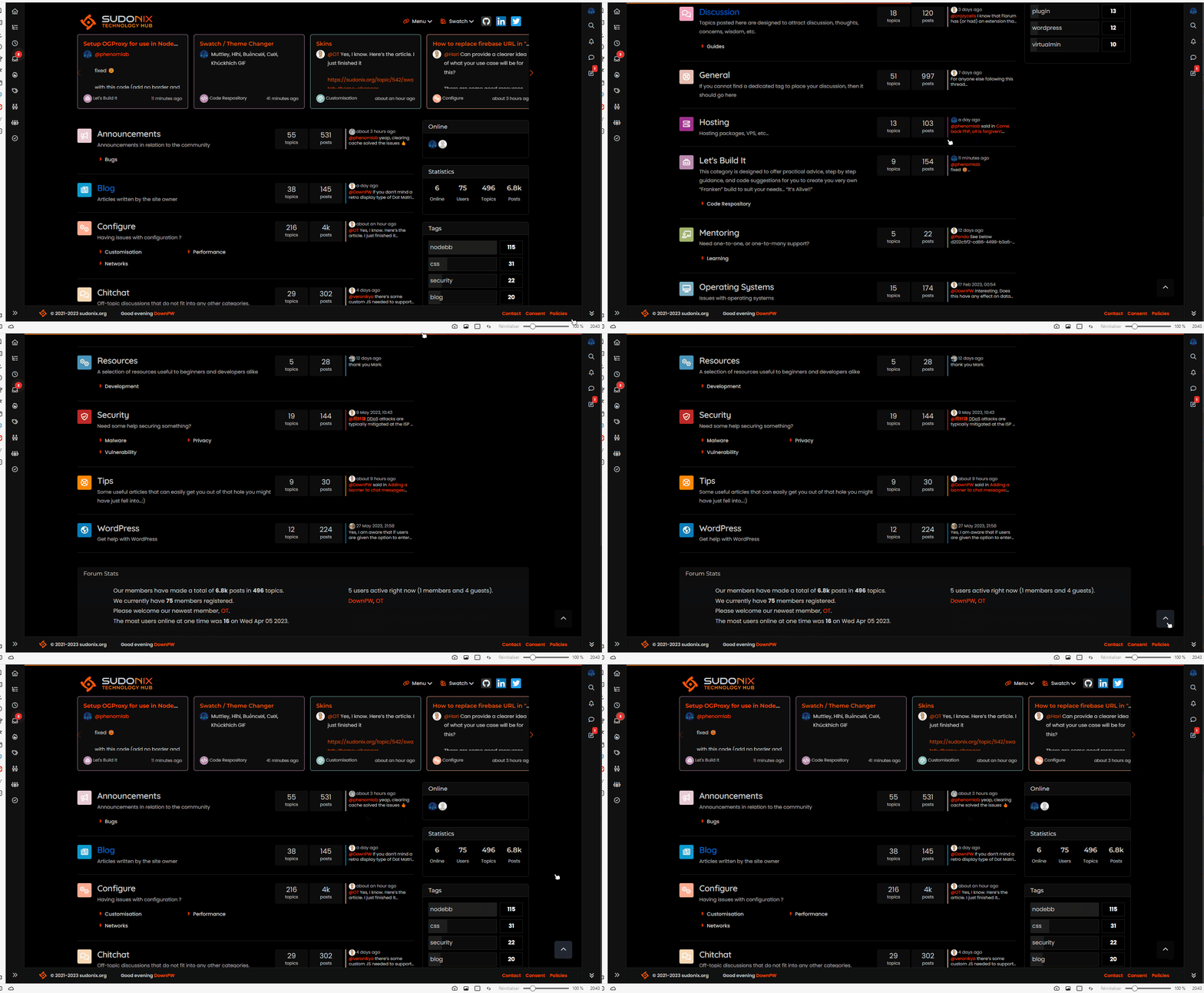
When you scroll down (to go to the bottom of the page) and then click on the button at the bottom right, it goes up automatically but the reading bar in the header does not disappear
here a video :
PW and WS Spirit alive
-
I saw another bug.
This bug occurs on the home page. No problem on recent page for example
When you scroll down (to go to the bottom of the page) and then click on the button at the bottom right, it goes up automatically but the reading bar in the header does not disappear
here a video :
@DownPW thanks. Not sure why that happens - I’ve not noticed it before! Will check.
-
just for info, same bug on tags page and groups page
PW and WS Spirit alive
-
just for info, same bug on tags page and groups page
@DownPW Can you test this revised code for me please
// Scroll to top function
$(window).on('action:ajaxify.end', function(data) {
    var matched = false;
    $(document).ready(function() {
        var pageUp = $('#pageUp');
        var bar = $('.reading-meter');
        var perWidth = $('.reading-meter').width();

        // Main progressbar function
        function pageScroller() {
        var winScroll = document.body.scrollTop || document.documentElement.scrollTop;
        var height = document.documentElement.scrollHeight - document.documentElement.clientHeight;
        var scrolled = (winScroll / height) * 100;

        document.getElementById("progress-bar").style.width = parseFloat(scrolled).toFixed(0) + "%";
        $('#percentage').val(parseFloat(scrolled).toFixed(0) + "%");

        // Prevent the mouse scroll wheel from scrolling down after the pageUp button is clicked
        if ($('#pageUp').is(':focus')) {
        event.preventDefault();
        }
    }

        // Bind the pageScroller function to the window's scroll event
        $(window).scroll(function() {
            pageScroller();
        });

        // Check the URL and composer visibility separately from the scroll event
        $(window).scroll(function() {
            var thisURL = window.location.href;
            var checkURL = ["topic", "notifications", "user"];
            var isFound = false;
            for (var i = 0, len = checkURL.length; i < len; i++) {
                if (thisURL.indexOf(checkURL[i]) > -1) {
                    isFound = true;
                    break;
                }
            }
            if (isFound) {
                bar.removeClass('show');
                pageUp.removeClass('show');
            } else {
                // Exception here is that we don't want the scroll bar to show when the composer is active
                if ($(window).scrollTop() > 0 && (!$('[component="composer"]').is(":visible"))) {
                    bar.addClass('show');
                    pageUp.addClass('show');
                } else {
                    bar.removeClass('show');
                    pageUp.removeClass('show');
                }
            }
        });

        // Scroll to top when #pageUp is clicked
        $(document).on("click", "#pageUp", function(e) {
            const firstTopic = $('[component="category/topic"][data-index="0"]');
            if (firstTopic.length) {
                $("html").animate({
                    scrollTop: 0
                }, '300');
                return false;
            } else {
                ajaxify.refresh();
            }
            $('#progress-bar').width(0);
            pageUp.removeClass('show');
        });
    });
});
Mark – Founder, Phenomlab Ltd
Executive IT & Security Leadership
Phenomlab Ltd -
@DownPW Can you test this revised code for me please
// Scroll to top function $(window).on('action:ajaxify.end', function(data) { var matched = false; $(document).ready(function() { var pageUp = $('#pageUp'); var bar = $('.reading-meter'); var perWidth = $('.reading-meter').width(); // Main progressbar function function pageScroller() { var winScroll = document.body.scrollTop || document.documentElement.scrollTop; var height = document.documentElement.scrollHeight - document.documentElement.clientHeight; var scrolled = (winScroll / height) * 100; document.getElementById("progress-bar").style.width = parseFloat(scrolled).toFixed(0) + "%"; $('#percentage').val(parseFloat(scrolled).toFixed(0) + "%"); // Prevent the mouse scroll wheel from scrolling down after the pageUp button is clicked if ($('#pageUp').is(':focus')) { event.preventDefault(); } } // Bind the pageScroller function to the window's scroll event $(window).scroll(function() { pageScroller(); }); // Check the URL and composer visibility separately from the scroll event $(window).scroll(function() { var thisURL = window.location.href; var checkURL = ["topic", "notifications", "user"]; var isFound = false; for (var i = 0, len = checkURL.length; i < len; i++) { if (thisURL.indexOf(checkURL[i]) > -1) { isFound = true; break; } } if (isFound) { bar.removeClass('show'); pageUp.removeClass('show'); } else { // Exception here is that we don't want the scroll bar to show when the composer is active if ($(window).scrollTop() > 0 && (!$('[component="composer"]').is(":visible"))) { bar.addClass('show'); pageUp.addClass('show'); } else { bar.removeClass('show'); pageUp.removeClass('show'); } } }); // Scroll to top when #pageUp is clicked $(document).on("click", "#pageUp", function(e) { const firstTopic = $('[component="category/topic"][data-index="0"]'); if (firstTopic.length) { $("html").animate({ scrollTop: 0 }, '300'); return false; } else { ajaxify.refresh(); } $('#progress-bar').width(0); pageUp.removeClass('show'); }); }); });@phenomlab said in What is this bar called?:
@DownPW Can you test this revised code for me please
Yep !
DoneSeem to be good for me

PW and WS Spirit alive
-
@phenomlab said in What is this bar called?:
@DownPW Can you test this revised code for me please
Yep !
DoneSeem to be good for me
@DownPW Thanks.
-

-
Hello @phenomlab
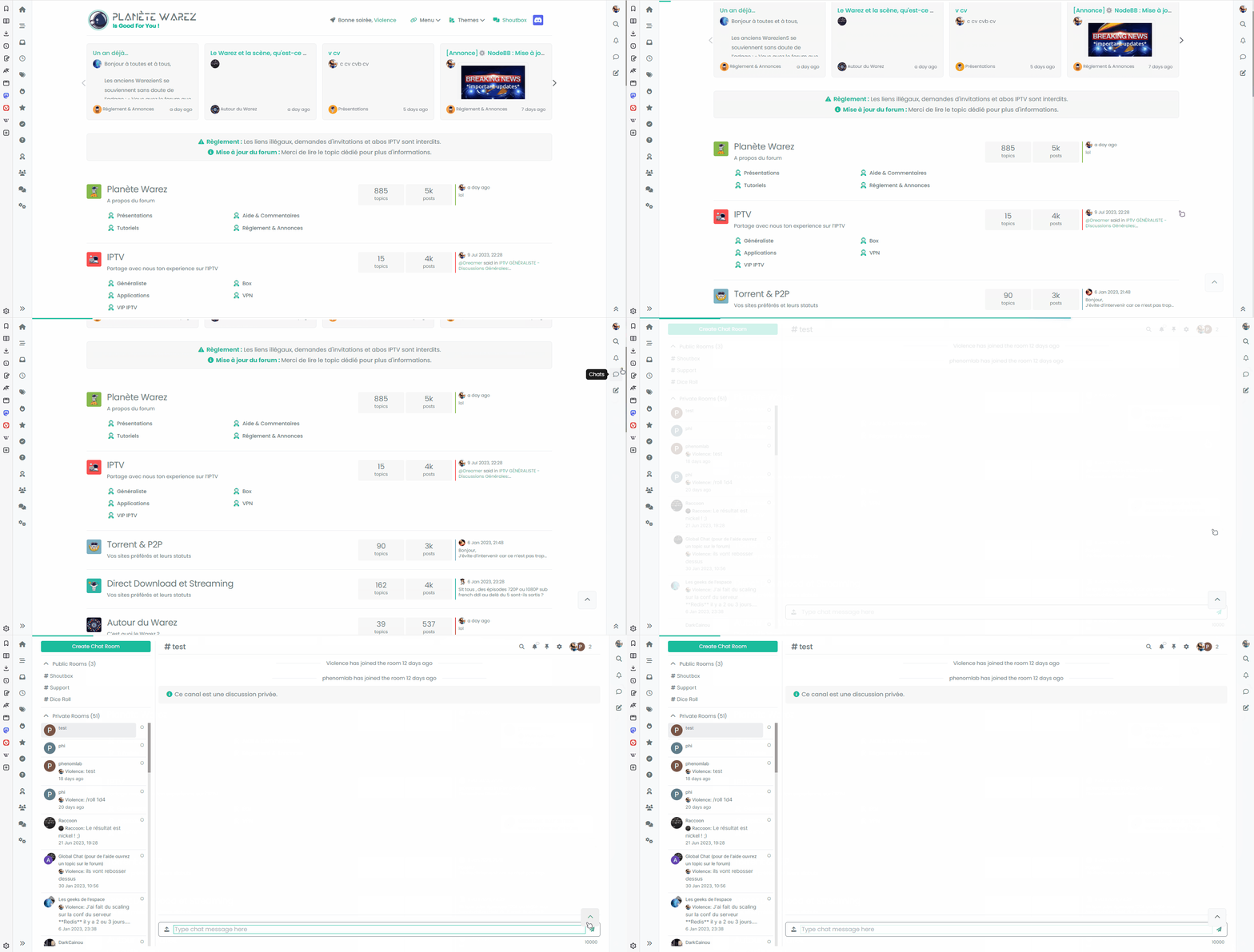
I find a bug
For example, I’m on the home page and I scroll down.
The button at the bottom right appears.
If I then go directly to the chat for example, the button remains and interferes with navigation/chatSame for all notifications page
We need a function to deactivate the button depending on the page/URL (chats, notifications, user) like you did for the reading meter bar
My code :
// Scroll to top function / Reading Meter Bar /
// Scroll to top function
$(window).on('action:ajaxify.end', function(data) {
    var matched = false;
    $(document).ready(function() {
        var pageUp = $('#pageUp');
        var bar = $('.reading-meter');
        var perWidth = $('.reading-meter').width();

        // Main progressbar function
        function pageScroller() {
        var winScroll = document.body.scrollTop || document.documentElement.scrollTop;
        var height = document.documentElement.scrollHeight - document.documentElement.clientHeight;
        var scrolled = (winScroll / height) * 100;

        document.getElementById("progress-bar").style.width = parseFloat(scrolled).toFixed(0) + "%";
        $('#percentage').val(parseFloat(scrolled).toFixed(0) + "%");

        // Prevent the mouse scroll wheel from scrolling down after the pageUp button is clicked
        if ($('#pageUp').is(':focus')) {
        event.preventDefault();
        }
    }

        // Bind the pageScroller function to the window's scroll event
        $(window).scroll(function() {
            pageScroller();
        });

        // Check the URL and composer visibility separately from the scroll event
        $(window).scroll(function() {
            var thisURL = window.location.href;
            var checkURL = ["topic", "notifications", "user"];
            var isFound = false;
            for (var i = 0, len = checkURL.length; i < len; i++) {
                if (thisURL.indexOf(checkURL[i]) > -1) {
                    isFound = true;
                    break;
                }
            }
            if (isFound) {
                bar.removeClass('show');
                pageUp.removeClass('show');
            } else {
                // Exception here is that we don't want the scroll bar to show when the composer is active
                if ($(window).scrollTop() > 0 && (!$('[component="composer"]').is(":visible"))) {
                    bar.addClass('show');
                    pageUp.addClass('show');
                } else {
                    bar.removeClass('show');
                    pageUp.removeClass('show');
                }
            }
        });

        // Scroll to top when #pageUp is clicked
        $(document).on("click", "#pageUp", function(e) {
            const firstTopic = $('[component="category/topic"][data-index="0"]');
            if (firstTopic.length) {
                $("html").animate({
                    scrollTop: 0
                }, '300');
                return false;
            } else {
                ajaxify.refresh();
            }
            $('#progress-bar').width(0);
            pageUp.removeClass('show');
        });
    });
});
PW and WS Spirit alive
-
Hello @phenomlab
I find a bug
For example, I’m on the home page and I scroll down.
The button at the bottom right appears.
If I then go directly to the chat for example, the button remains and interferes with navigation/chatSame for all notifications page
We need a function to deactivate the button depending on the page/URL (chats, notifications, user) like you did for the reading meter bar
My code :
// Scroll to top function / Reading Meter Bar / // Scroll to top function $(window).on('action:ajaxify.end', function(data) { var matched = false; $(document).ready(function() { var pageUp = $('#pageUp'); var bar = $('.reading-meter'); var perWidth = $('.reading-meter').width(); // Main progressbar function function pageScroller() { var winScroll = document.body.scrollTop || document.documentElement.scrollTop; var height = document.documentElement.scrollHeight - document.documentElement.clientHeight; var scrolled = (winScroll / height) * 100; document.getElementById("progress-bar").style.width = parseFloat(scrolled).toFixed(0) + "%"; $('#percentage').val(parseFloat(scrolled).toFixed(0) + "%"); // Prevent the mouse scroll wheel from scrolling down after the pageUp button is clicked if ($('#pageUp').is(':focus')) { event.preventDefault(); } } // Bind the pageScroller function to the window's scroll event $(window).scroll(function() { pageScroller(); }); // Check the URL and composer visibility separately from the scroll event $(window).scroll(function() { var thisURL = window.location.href; var checkURL = ["topic", "notifications", "user"]; var isFound = false; for (var i = 0, len = checkURL.length; i < len; i++) { if (thisURL.indexOf(checkURL[i]) > -1) { isFound = true; break; } } if (isFound) { bar.removeClass('show'); pageUp.removeClass('show'); } else { // Exception here is that we don't want the scroll bar to show when the composer is active if ($(window).scrollTop() > 0 && (!$('[component="composer"]').is(":visible"))) { bar.addClass('show'); pageUp.addClass('show'); } else { bar.removeClass('show'); pageUp.removeClass('show'); } } }); // Scroll to top when #pageUp is clicked $(document).on("click", "#pageUp", function(e) { const firstTopic = $('[component="category/topic"][data-index="0"]'); if (firstTopic.length) { $("html").animate({ scrollTop: 0 }, '300'); return false; } else { ajaxify.refresh(); } $('#progress-bar').width(0); pageUp.removeClass('show'); }); }); });@DownPW thanks for reporting. Let me see if I can reproduce this.
-
Hello @phenomlab
I find a bug
For example, I’m on the home page and I scroll down.
The button at the bottom right appears.
If I then go directly to the chat for example, the button remains and interferes with navigation/chatSame for all notifications page
We need a function to deactivate the button depending on the page/URL (chats, notifications, user) like you did for the reading meter bar
My code :
// Scroll to top function / Reading Meter Bar / // Scroll to top function $(window).on('action:ajaxify.end', function(data) { var matched = false; $(document).ready(function() { var pageUp = $('#pageUp'); var bar = $('.reading-meter'); var perWidth = $('.reading-meter').width(); // Main progressbar function function pageScroller() { var winScroll = document.body.scrollTop || document.documentElement.scrollTop; var height = document.documentElement.scrollHeight - document.documentElement.clientHeight; var scrolled = (winScroll / height) * 100; document.getElementById("progress-bar").style.width = parseFloat(scrolled).toFixed(0) + "%"; $('#percentage').val(parseFloat(scrolled).toFixed(0) + "%"); // Prevent the mouse scroll wheel from scrolling down after the pageUp button is clicked if ($('#pageUp').is(':focus')) { event.preventDefault(); } } // Bind the pageScroller function to the window's scroll event $(window).scroll(function() { pageScroller(); }); // Check the URL and composer visibility separately from the scroll event $(window).scroll(function() { var thisURL = window.location.href; var checkURL = ["topic", "notifications", "user"]; var isFound = false; for (var i = 0, len = checkURL.length; i < len; i++) { if (thisURL.indexOf(checkURL[i]) > -1) { isFound = true; break; } } if (isFound) { bar.removeClass('show'); pageUp.removeClass('show'); } else { // Exception here is that we don't want the scroll bar to show when the composer is active if ($(window).scrollTop() > 0 && (!$('[component="composer"]').is(":visible"))) { bar.addClass('show'); pageUp.addClass('show'); } else { bar.removeClass('show'); pageUp.removeClass('show'); } } }); // Scroll to top when #pageUp is clicked $(document).on("click", "#pageUp", function(e) { const firstTopic = $('[component="category/topic"][data-index="0"]'); if (firstTopic.length) { $("html").animate({ scrollTop: 0 }, '300'); return false; } else { ajaxify.refresh(); } $('#progress-bar').width(0); pageUp.removeClass('show'); }); }); });@DownPW Can you replace your function with this one and let me know?
// Scroll to top function $(window).on('action:ajaxify.end', function(data) { var matched = false; $(document).ready(function() { var pageUp = $('#pageUp'); var bar = $('.reading-meter'); var perWidth = $('.reading-meter').width(); // Main progressbar function function pageScroller() { var winScroll = document.body.scrollTop || document.documentElement.scrollTop; var height = document.documentElement.scrollHeight - document.documentElement.clientHeight; var scrolled = (winScroll / height) * 100; document.getElementById("progress-bar").style.width = parseFloat(scrolled).toFixed(0) + "%"; $('#percentage').val(parseFloat(scrolled).toFixed(0) + "%"); // Prevent the mouse scroll wheel from scrolling down after the pageUp button is clicked if ($('#pageUp').is(':focus')) { event.preventDefault(); } } // Bind the pageScroller function to the window's scroll event $(window).scroll(function() { pageScroller(); }); // Check the URL and composer visibility separately from the scroll event $(window).scroll(function() { var thisURL = window.location.href; var checkURL = ["topic", "notifications", "user"]; var isFound = false; for (var i = 0, len = checkURL.length; i < len; i++) { if (thisURL.indexOf(checkURL[i]) > -1) { isFound = true; break; } } if (isFound) { bar.removeClass('show'); pageUp.removeClass('show'); } else { // Exception here is that we don't want the scroll bar to show when the composer is active if ($(window).scrollTop() > 0 && (!$('[component="composer"]').is(":visible"))) { bar.addClass('show'); pageUp.addClass('show'); } else { bar.removeClass('show'); pageUp.removeClass('show'); } } }); // Scroll to top when #pageUp is clicked $(document).on("click", "#pageUp", function(e) { const firstTopic = $('[component="category/topic"][data-index="0"]'); if (firstTopic.length) { $("html").animate({ scrollTop: 0 }, '300'); return false; } else { ajaxify.refresh(); } $('#progress-bar').width(0); pageUp.removeClass('show'); }); }); }); /* Set pages where the progress bar should not be shown - see examples in below array, and ensure you follow the same syntax for any you need to add */ $(window).on('action:ajaxify.end', function(data) { $(document).ready(function() { var bar = $('.reading-meter'); var thisURL = window.location.href; var checkURL = new Array("user", "notifications"); var isFound = false; for (var i = 0, len = checkURL.length; i < len; i++) { if (thisURL.indexOf(checkURL[i]) > -1) { isFound = true; break; } } if (isFound) { //console.log("Page '" + checkURL[i] + "' is in URL - hide progress bar"); bar.removeClass('show'); } }); });@cagatay reported something similar a while back IIRC and this was the solution.
Thanks
-
nope sorry, same things

PW and WS Spirit alive
-
-
@DownPW Can you try with this code?
// Scroll to top function $(window).on('action:ajaxify.end', function(data) { var matched = false; $(document).ready(function() { var pageUp = $('#pageUp'); var bar = $('.reading-meter'); var perWidth = $('.reading-meter').width(); // Main progressbar function function pageScroller() { var winScroll = document.body.scrollTop || document.documentElement.scrollTop; var height = document.documentElement.scrollHeight - document.documentElement.clientHeight; var scrolled = (winScroll / height) * 100; document.getElementById("progress-bar").style.width = parseFloat(scrolled).toFixed(0) + "%"; $('#percentage').val(parseFloat(scrolled).toFixed(0) + "%"); // Prevent the mouse scroll wheel from scrolling down after the pageUp button is clicked if ($('#pageUp').is(':focus')) { event.preventDefault(); } } // Bind the pageScroller function to the window's scroll event $(window).scroll(function() { pageScroller(); }); // Check the URL and composer visibility separately from the scroll event function checkURL() { var thisURL = window.location.href; var checkArray = ["topic", "notifications", "user"]; var isFound = false; for (var i = 0, len = checkArray.length; i < len; i++) { if (thisURL.indexOf(checkArray[i]) > -1) { isFound = true; break; } } return isFound; } // Function to update visibility based on URL and composer function updateVisibility() { if (checkURL()) { bar.removeClass('show'); pageUp.removeClass('show'); } else { // Exception here is that we don't want the scroll bar to show when the composer is active if ($(window).scrollTop() > 0 && (!$('[component="composer"]').is(":visible"))) { bar.addClass('show'); pageUp.addClass('show'); } else { bar.removeClass('show'); pageUp.removeClass('show'); } } } // Call updateVisibility initially updateVisibility(); // Bind updateVisibility function to the window's scroll event $(window).scroll(function() { updateVisibility(); }); }); }); -
seems to be good my friend
PW and WS Spirit alive
-
@DownPW not sure if you’ve noticed, but (at least for me) the scroll to top function no longer works?
EDIT - there is a bug in the above code. Please use this updated version
// Scroll to top function $(window).on('action:ajaxify.end', function(data) { var matched = false; $(document).ready(function() { var pageUp = $('#pageUp'); var bar = $('.reading-meter'); var perWidth = $('.reading-meter').width(); // Main progressbar function function pageScroller() { var winScroll = document.body.scrollTop || document.documentElement.scrollTop; var height = document.documentElement.scrollHeight - document.documentElement.clientHeight; var scrolled = (winScroll / height) * 100; document.getElementById("progress-bar").style.width = parseFloat(scrolled).toFixed(0) + "%"; $('#percentage').val(parseFloat(scrolled).toFixed(0) + "%"); // Prevent the mouse scroll wheel from scrolling down after the pageUp button is clicked if ($('#pageUp').is(':focus')) { event.preventDefault(); } } // Bind the pageScroller function to the window's scroll event $(window).scroll(function() { pageScroller(); }); // Check the URL and composer visibility separately from the scroll event function checkURL() { var thisURL = window.location.href; var checkArray = ["topic", "notifications", "user"]; var isFound = false; for (var i = 0, len = checkArray.length; i < len; i++) { if (thisURL.indexOf(checkArray[i]) > -1) { isFound = true; break; } } return isFound; } // Function to update visibility based on URL and composer function updateVisibility() { if (checkURL()) { bar.removeClass('show'); pageUp.removeClass('show'); } else { // Exception here is that we don't want the scroll bar to show when the composer is active if ($(window).scrollTop() > 0 && (!$('[component="composer"]').is(":visible"))) { bar.addClass('show'); pageUp.addClass('show'); } else { bar.removeClass('show'); pageUp.removeClass('show'); } } } // Call updateVisibility initially updateVisibility(); // Bind updateVisibility function to the window's scroll event $(window).scroll(function() { updateVisibility(); }); // Scroll to top when #pageUp is clicked $(document).on("click", "#pageUp", function(e) { const firstTopic = $('[component="category/topic"][data-index="0"]'); if (firstTopic.length) { $("html").animate({ scrollTop: 0 }, '300'); return false; } else { ajaxify.refresh(); } $('#progress-bar').width(0); pageUp.removeClass('show'); }); }); }); -
It’s funny I just realized it and I was going to share it here and I see your message!!
Thanks you Mark @phenomlabOn the other hand, I have never been careful but I have the impression that the page is reloaded when you click on the button.
I don’t know if it’s me but before, (on v2 perhaps?) we saw the page scroll from bottom to top after pressing the buttonI find this strange. I’ve never seen this on other sites using the same type of scroll to top
PW and WS Spirit alive



Hello! It looks like you're interested in this conversation, but you don't have an account yet.
Getting fed up of having to scroll through the same posts each visit? When you register for an account, you'll always come back to exactly where you were before, and choose to be notified of new replies (either via email, or push notification). You'll also be able to save bookmarks and upvote posts to show your appreciation to other community members.
With your input, this post could be even better 💗
Registrarse Conectarse