[NODEBB] Help for my custom CSS
-
hello @phenomlab
I have a very odd bug that I didn’t have before
I have images and background color defined for each category
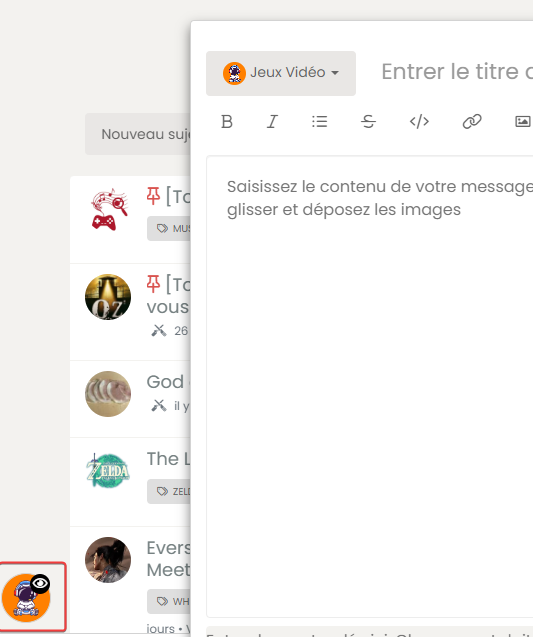
when I open a new topic, the fa icon on the bottom left taskbar does not appear like when I reply to a topic
Here a gif too see the problem :

And here is the result I want:

I have tried to play with the color or z-index variable in css but nothing works
I tried disabling the custom CSS on ACP but it’s the same. clear the cache = same
Have you an idea ?
You can test on production forum
@DownPW I can’t see the images or videos, but I’ll have a look on your production site.
-
hello @phenomlab
I have a very odd bug that I didn’t have before
I have images and background color defined for each category
when I open a new topic, the fa icon on the bottom left taskbar does not appear like when I reply to a topic
Here a gif too see the problem :
And here is the result I want:
I have tried to play with the color or z-index variable in css but nothing works
I tried disabling the custom CSS on ACP but it’s the same. clear the cache = same
Have you an idea ?
You can test on production forum
@DownPW Seems to come from this code

It should look like this

Do you have any custom JS that is altering this, or perhaps a plugin ?
-
I will test without css, js, header and it’s the same

PW and WS Spirit alive
-
@DownPW What plugins do you have installed ?
-
Active plugins:
    * @nodebb/nodebb-plugin-reactions@1.0.2 (installed, enabled)
    * @nodebb/nodebb-plugin-user-level@1.0.4 (installed, enabled)
    * nodebb-plugin-beep@0.4.7 (installed, enabled)
    * nodebb-plugin-browsing-users@2.0.4 (installed, enabled)
    * nodebb-plugin-cards@0.3.1 (installed, enabled)
    * nodebb-plugin-composer-default@9.1.0 (installed, enabled)
    * nodebb-plugin-dbsearch@5.1.5 (installed, enabled)
    * nodebb-plugin-emoji@4.0.4 (installed, enabled)
    * nodebb-plugin-emoji-apple@3.0.0 (installed, enabled)
    * nodebb-plugin-extended-markdown@1.6.0 (installed, enabled)
    * nodebb-plugin-global-chat@2.0.0 (installed, enabled)
    * nodebb-plugin-iframely@0.7.16 (installed, enabled)
    * nodebb-plugin-imgur@2.0.5 (installed, enabled)
    * nodebb-plugin-markdown@10.1.0 (installed, enabled)
    * nodebb-plugin-mentions@3.0.11 (installed, enabled)
    * nodebb-plugin-ns-embed@6.0.0 (installed, enabled)
    * nodebb-plugin-poll@2.0.6 (installed, enabled)
    * nodebb-plugin-question-and-answer@0.12.25 (installed, enabled)
    * nodebb-plugin-recent-cards@2.0.22 (installed, enabled)
    * nodebb-plugin-spam-be-gone@1.0.0 (installed, enabled)
    * nodebb-plugin-tenor-gif@2.2.0 (installed, enabled)
    * nodebb-plugin-twitter@0.1.0 (installed, enabled)
    * nodebb-plugin-ws-dice@2.4.2 (installed, enabled)
    * nodebb-rewards-essentials@0.2.1 (installed, enabled)
    * nodebb-theme-persona@12.1.1 (installed, enabled)
    * nodebb-widget-essentials@6.0.0 (installed, enabled)
PW and WS Spirit alive
-
Active plugins:
* @nodebb/nodebb-plugin-reactions@1.0.2 (installed, enabled) * @nodebb/nodebb-plugin-user-level@1.0.4 (installed, enabled) * nodebb-plugin-beep@0.4.7 (installed, enabled) * nodebb-plugin-browsing-users@2.0.4 (installed, enabled) * nodebb-plugin-cards@0.3.1 (installed, enabled) * nodebb-plugin-composer-default@9.1.0 (installed, enabled) * nodebb-plugin-dbsearch@5.1.5 (installed, enabled) * nodebb-plugin-emoji@4.0.4 (installed, enabled) * nodebb-plugin-emoji-apple@3.0.0 (installed, enabled) * nodebb-plugin-extended-markdown@1.6.0 (installed, enabled) * nodebb-plugin-global-chat@2.0.0 (installed, enabled) * nodebb-plugin-iframely@0.7.16 (installed, enabled) * nodebb-plugin-imgur@2.0.5 (installed, enabled) * nodebb-plugin-markdown@10.1.0 (installed, enabled) * nodebb-plugin-mentions@3.0.11 (installed, enabled) * nodebb-plugin-ns-embed@6.0.0 (installed, enabled) * nodebb-plugin-poll@2.0.6 (installed, enabled) * nodebb-plugin-question-and-answer@0.12.25 (installed, enabled) * nodebb-plugin-recent-cards@2.0.22 (installed, enabled) * nodebb-plugin-spam-be-gone@1.0.0 (installed, enabled) * nodebb-plugin-tenor-gif@2.2.0 (installed, enabled) * nodebb-plugin-twitter@0.1.0 (installed, enabled) * nodebb-plugin-ws-dice@2.4.2 (installed, enabled) * nodebb-rewards-essentials@0.2.1 (installed, enabled) * nodebb-theme-persona@12.1.1 (installed, enabled) * nodebb-widget-essentials@6.0.0 (installed, enabled)@DownPW This is going to be painful, but it’s possible that one of these plugins is the cause. Have you tried disabling each one to see if the issue subsides ?
-
The last plugins we installed is the dice plugin, Iframely, and twitter, to be tested…
Because the others are quite well known and I never noticed this bug with them, but I could be wrong.
PW and WS Spirit alive
-
The last plugins we installed is the dice plugin, Iframely, and twitter, to be tested…
Because the others are quite well known and I never noticed this bug with them, but I could be wrong.
@DownPW Hmm. You could use a simple jQuery function to replace that icon with the right one. Just seems a bit “overkill” but might be necessary
-
@phenomlab said in [NODEBB] Help for my custom CSS:
Hmm. You could use a simple jQuery function to replace that icon with the right one. Just seems a bit “overkill” but might be necessary
why not, if you can write this query I’m not saying no, just to test
PW and WS Spirit alive
-
@phenomlab said in [NODEBB] Help for my custom CSS:
Hmm. You could use a simple jQuery function to replace that icon with the right one. Just seems a bit “overkill” but might be necessary
why not, if you can write this query I’m not saying no, just to test
@DownPW might be a bit greedy, but try this
$(document).ready(function() { $(window).on('action:ajaxify.end', function(data) { $(this).find($(".fa")).removeClass('fa-nbb-none').addClass('fa-commenting-o'); }); }); -
JS code seems not working but…
I see on ACP, the image of category is uploaded to imgur :
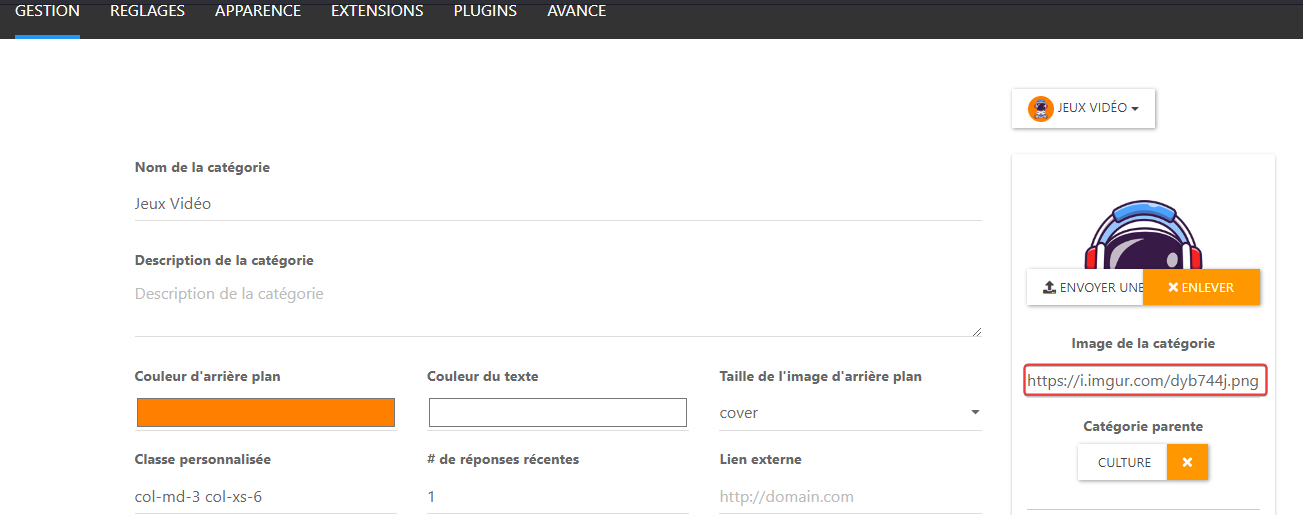
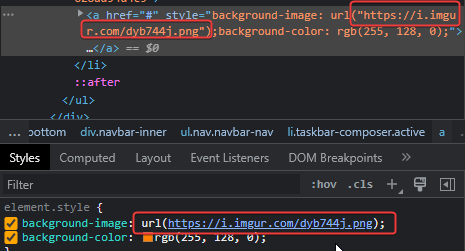
and I see this on dev console :
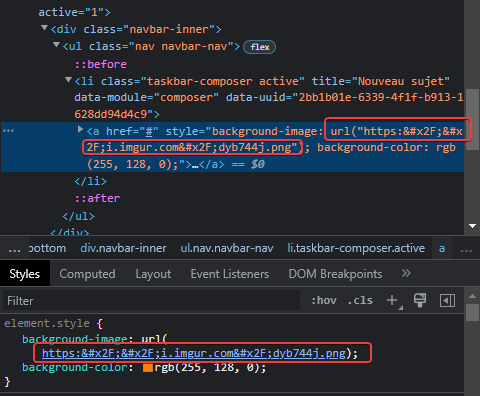
The url seems to not be encoded correctly, I don’t know why ???
If I change manually the URL in the dev console, it’s OK:
PW and WS Spirit alive
-
JS code seems not working but…
I see on ACP, the image of category is uploaded to imgur :
and I see this on dev console :
The url seems to not be encoded correctly, I don’t know why ???
If I change manually the URL in the dev console, it’s OK:
@DownPW said in [NODEBB] Help for my custom CSS:
The url seems to not be encoded correctly, I don’t know why ???
Yes, that certainly seems the case. I think you need to take this issue up with the plugin developer.
-
the trick is to know which plugin is in question!!
PW and WS Spirit alive
-
the trick is to know which plugin is in question!!
@DownPW sorry. I meant the
imgurplugin authorMark Cutting also advises organisations as a Fractional CIO, Fractional CISO and Executive Advisor, helping boards improve technology governance, cyber resilience and executive decision making. Learn more at Gratmore Ltd
-
hmmm I don’t thinks so because I have the same problem on NO PRODUCTION VM and I have this bug too without nodebb-imgur-plugin.
I have test with a local url in public nodebb folder and it’s the same too
I test to desactivate all plugin one by one for see at the moment
PW and WS Spirit alive
-
hmmm I don’t thinks so because I have the same problem on NO PRODUCTION VM and I have this bug too without nodebb-imgur-plugin.
I have test with a local url in public nodebb folder and it’s the same too
I test to desactivate all plugin one by one for see at the moment
@DownPW let me know when your development server is available tomorrow and I’ll take a look at that code I provided previously
-
no problem I’m at home tomorrow all the day
I’ll let you know if I find
-
I think it’s a nodebb issue, because with only one plugin and one theme activate :
- nodebb-plugin-composer-default@9.1.0 (installed, enabled)
- nodebb-theme-persona@12.1.1 (installed, enabled)
Custom CSS, custom JS, custom Header and all custom widgets are disable…
Result it’s the same, I have this bug.
On your dev system, can you test to add a logo for a catégorie, delete the icon and test a new topic in this category ?
I think you will have the same result.
Let me know if you test too !
PW and WS Spirit alive
-
I think it’s a nodebb issue, because with only one plugin and one theme activate :
- nodebb-plugin-composer-default@9.1.0 (installed, enabled)
- nodebb-theme-persona@12.1.1 (installed, enabled)
Custom CSS, custom JS, custom Header and all custom widgets are disable…
Result it’s the same, I have this bug.
On your dev system, can you test to add a logo for a catégorie, delete the icon and test a new topic in this category ?
I think you will have the same result.
Let me know if you test too !
@DownPW did you delete the icon ? I’m wondering if this creates an orphaned reference to an icon which of course can’t be read.
-
yes off course I delete it
because if Idon’t delete the icon, she appears on bubble
Open issue here:
https://github.com/NodeBB/NodeBB/issues/10896
If I not delete icon, she’s appear but not the image :



Hello! It looks like you're interested in this conversation, but you don't have an account yet.
Getting fed up of having to scroll through the same posts each visit? When you register for an account, you'll always come back to exactly where you were before, and choose to be notified of new replies (either via email, or push notification). You'll also be able to save bookmarks and upvote posts to show your appreciation to other community members.
With your input, this post could be even better 💗
Register LoginDid this solution help you?
Related Topics
-
-
-
-
-
-
-
NodeBB Footer
Solved Customisation -