NodeBB customisation
-
@phenomlab I notice that in mobile view the above change only changes the forum heading to white, but leaves the icons in grey (is there any fix for this?).
Meanwhile on desktop it changes everything to white (as I wanted), but hovering over the icons it turns them to grey, is there any way to change this so they change to #FFC557?
Many thanks as always
 .
.@phenomlab I do have a few changes I have in mind to be made, but am aware of posting them all at once ;).
-
@phenomlab I notice that in mobile view the above change only changes the forum heading to white, but leaves the icons in grey (is there any fix for this?).
Meanwhile on desktop it changes everything to white (as I wanted), but hovering over the icons it turns them to grey, is there any way to change this so they change to #FFC557?
Many thanks as always
.@jac said in NodeBB customisation:
I notice that in mobile view the above change only changes the forum heading to white, but leaves the icons in grey (is there any fix for this?).
Yes, it’s probably being overridden with another class that is a closer match. Try this
@media screen (min-width: 767px) {
 .navbar-default .navbar-brand, .navbar-default .navbar-nav>li>a {
color: #ffffff; }
 }
Mark Cutting also advises organisations as a Fractional CIO, Fractional CISO and Executive Advisor, helping boards improve technology governance, cyber resilience and executive decision making. Learn more at Gratmore Ltd
-
@phenomlab I do have a few changes I have in mind to be made, but am aware of posting them all at once ;).
@jac said in NodeBB customisation:
I do have a few changes I have in mind to be made, but am aware of posting them all at once ;).
You can post them all at once, no issues. You might want to create screenshots and identify the areas that you’d like changed. I have your site URL so it won’t be too tough to accomplish
Mark Cutting also advises organisations as a Fractional CIO, Fractional CISO and Executive Advisor, helping boards improve technology governance, cyber resilience and executive decision making. Learn more at Gratmore Ltd
-
@jac said in NodeBB customisation:
I do have a few changes I have in mind to be made, but am aware of posting them all at once ;).
You can post them all at once, no issues. You might want to create screenshots and identify the areas that you’d like changed. I have your site URL so it won’t be too tough to accomplish
@phenomlab said in NodeBB customisation:
@jac said in NodeBB customisation:
I do have a few changes I have in mind to be made, but am aware of posting them all at once ;).
You can post them all at once, no issues. You might want to create screenshots and identify the areas that you’d like changed. I have your site URL so it won’t be too tough to accomplish
Thanks
-
@jac said in NodeBB customisation:
I notice that in mobile view the above change only changes the forum heading to white, but leaves the icons in grey (is there any fix for this?).
Yes, it’s probably being overridden with another class that is a closer match. Try this
@media screen (min-width: 767px) { .navbar-default .navbar-brand, .navbar-default .navbar-nav>li>a { color: #ffffff; } }@phenomlab said in NodeBB customisation:
@media screen (min-width: 767px) {
.navbar-default .navbar-brand, .navbar-default .navbar-nav>li>a {
color: #ffffff; }
}Thanks Mark, will try this as soon as possible
-
Is there any way to remove the footer code?

-
change Nav hover colour to #FFC557

-
@jac said in NodeBB customisation:
change Nav hover colour to #FFC557
I hope it’s ok just firing things into the thread once I find something I may want to change?
-
@jac Yep. Go into the ACP->Widgets, and you’ll see it under the footer in “Global”
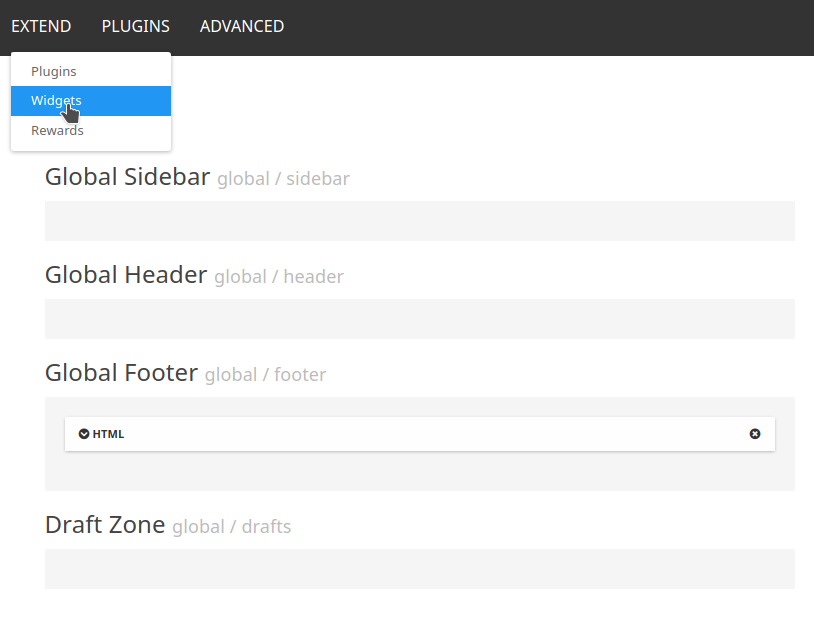
See the “x” on the global footer HTML widget ? Delete that, and confirm, then it’ll disappear.
-
@jac said in NodeBB customisation:
change Nav hover colour to #FFC557
.navbar-default .navbar-brand, .navbar-default .navbar-nav>li>a:hover {
    color: #FFC557;
}
Mark Cutting also advises organisations as a Fractional CIO, Fractional CISO and Executive Advisor, helping boards improve technology governance, cyber resilience and executive decision making. Learn more at Gratmore Ltd
-
@phenomlab said in NodeBB customisation:
@jac said in NodeBB customisation:
I do have a few changes I have in mind to be made, but am aware of posting them all at once ;).
You can post them all at once, no issues. You might want to create screenshots and identify the areas that you’d like changed. I have your site URL so it won’t be too tough to accomplish
Thanks
@jac said in NodeBB customisation:
@phenomlab said in NodeBB customisation:
@jac said in NodeBB customisation:
I do have a few changes I have in mind to be made, but am aware of posting them all at once ;).
You can post them all at once, no issues. You might want to create screenshots and identify the areas that you’d like changed. I have your site URL so it won’t be too tough to accomplish
Thanks
I can confirm this has indeed work
thank you very much1 -
@jac said in NodeBB customisation:
change Nav hover colour to #FFC557
.navbar-default .navbar-brand, .navbar-default .navbar-nav>li>a:hover { color: #FFC557; }@phenomlab said in NodeBB customisation:
@jac said in NodeBB customisation:
change Nav hover colour to #FFC557
.navbar-default .navbar-brand, .navbar-default .navbar-nav>li>a:hover {
    color: #FFC557;
}
Is there any way to change the tag colours in the post?

with white writing and a blue background (#255A9F)
something I’m looking to do with the quotes block, admittedly like you have done yourself (it looks very smart indeed
 )
) -
@jac said in NodeBB customisation:
@phenomlab said in NodeBB customisation:
@jac said in NodeBB customisation:
I do have a few changes I have in mind to be made, but am aware of posting them all at once ;).
You can post them all at once, no issues. You might want to create screenshots and identify the areas that you’d like changed. I have your site URL so it won’t be too tough to accomplish
Thanks
I can confirm this has indeed work
thank you very much1 @jac said in NodeBB customisation:
@jac said in NodeBB customisation:
@phenomlab said in NodeBB customisation:
@jac said in NodeBB customisation:
I do have a few changes I have in mind to be made, but am aware of posting them all at once ;).
You can post them all at once, no issues. You might want to create screenshots and identify the areas that you’d like changed. I have your site URL so it won’t be too tough to accomplish
Thanks
I can confirm this has indeed work
thank you very much1 Has the mobile view nav font changed to white? Would you mind checking, using two browsers one is definitely grey and one looks a little lighter but it’s hard to tell.
-
@jac said in NodeBB customisation:
@jac said in NodeBB customisation:
@phenomlab said in NodeBB customisation:
@jac said in NodeBB customisation:
I do have a few changes I have in mind to be made, but am aware of posting them all at once ;).
You can post them all at once, no issues. You might want to create screenshots and identify the areas that you’d like changed. I have your site URL so it won’t be too tough to accomplish
Thanks
I can confirm this has indeed work
thank you very much1 Has the mobile view nav font changed to white? Would you mind checking, using two browsers one is definitely grey and one looks a little lighter but it’s hard to tell.
@jac No, it hasn’t. You’ll need this
.navbar-default .navbar-toggle {
    color: #ffffff;
}
Mark Cutting also advises organisations as a Fractional CIO, Fractional CISO and Executive Advisor, helping boards improve technology governance, cyber resilience and executive decision making. Learn more at Gratmore Ltd
-
@phenomlab said in NodeBB customisation:
@jac said in NodeBB customisation:
change Nav hover colour to #FFC557
.navbar-default .navbar-brand, .navbar-default .navbar-nav>li>a:hover {
    color: #FFC557;
}
Is there any way to change the tag colours in the post?
with white writing and a blue background (#255A9F)
something I’m looking to do with the quotes block, admittedly like you have done yourself (it looks very smart indeed
)@jac said in NodeBB customisation:
with white writing and a blue background (#255A9F)
You’ll need this
.tag-list .tag {
    background: #255A9F;
    color: #ffffff;
}
Mark Cutting also advises organisations as a Fractional CIO, Fractional CISO and Executive Advisor, helping boards improve technology governance, cyber resilience and executive decision making. Learn more at Gratmore Ltd
-
@jac No, it hasn’t. You’ll need this
.navbar-default .navbar-toggle { color: #ffffff; }@phenomlab said in NodeBB customisation:
@jac No, it hasn’t. You’ll need this
.navbar-default .navbar-toggle {
    color: #ffffff;
}
Many thanks mate that has worked

-
@jac said in NodeBB customisation:
with white writing and a blue background (#255A9F)
You’ll need this
.tag-list .tag { background: #255A9F; color: #ffffff; }@phenomlab said in NodeBB customisation:
@jac said in NodeBB customisation:
with white writing and a blue background (#255A9F)
You’ll need this
.tag-list .tag {
    background: #255A9F;
    color: #ffffff;
}
Have applied this too but unsure if it’s working as I can’t see it on mobile view.
-
@phenomlab said in NodeBB customisation:
@jac said in NodeBB customisation:
with white writing and a blue background (#255A9F)
You’ll need this
.tag-list .tag {
    background: #255A9F;
    color: #ffffff;
}
Have applied this too but unsure if it’s working as I can’t see it on mobile view.
@jac Here’s the desktop view

Mark Cutting also advises organisations as a Fractional CIO, Fractional CISO and Executive Advisor, helping boards improve technology governance, cyber resilience and executive decision making. Learn more at Gratmore Ltd
-
@phenomlab said in NodeBB customisation:
@jac Here’s the desktop view
Looks great thanks!
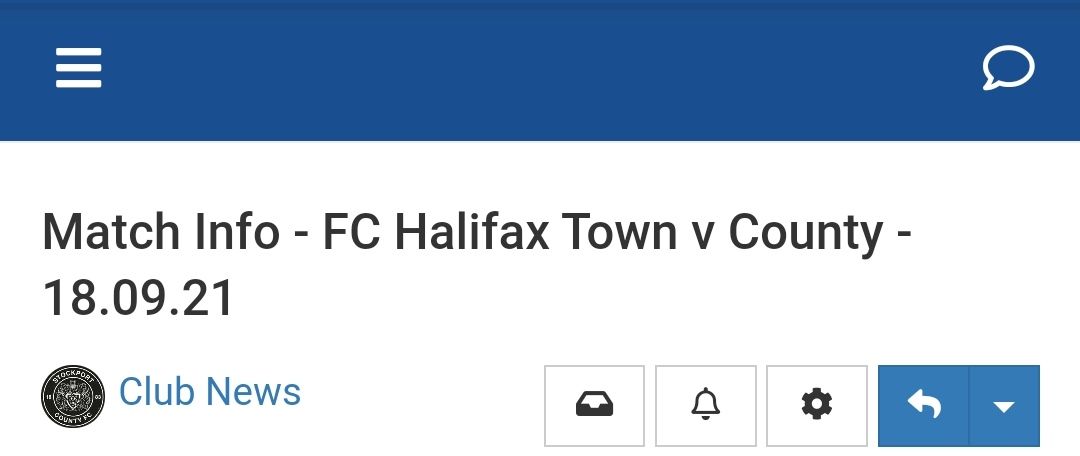
Is there any way to show tags on mobile post instead of this…
-
@phenomlab said in NodeBB customisation:
@jac Here’s the desktop view
Looks great thanks!
Is there any way to show tags on mobile post instead of this…
@jac Not sure what you mean ?
Mark Cutting also advises organisations as a Fractional CIO, Fractional CISO and Executive Advisor, helping boards improve technology governance, cyber resilience and executive decision making. Learn more at Gratmore Ltd


Hello! It looks like you're interested in this conversation, but you don't have an account yet.
Getting fed up of having to scroll through the same posts each visit? When you register for an account, you'll always come back to exactly where you were before, and choose to be notified of new replies (either via email, or push notification). You'll also be able to save bookmarks and upvote posts to show your appreciation to other community members.
With your input, this post could be even better 💗
Register LoginRelated Topics
-
-
-
-
-
NodeBB Footer
Solved Customisation -
NodeBB Discord Plugins
Unsolved Customisation -
-
Customising NodeBB
Locked Customisation