is my DMARC configured correctly?

-
Recently i have followed elastic email DMARC generator https://elasticemail.com/dmarc and configured at my DNS

emails are going to inbox, spf and all everything is working fine.
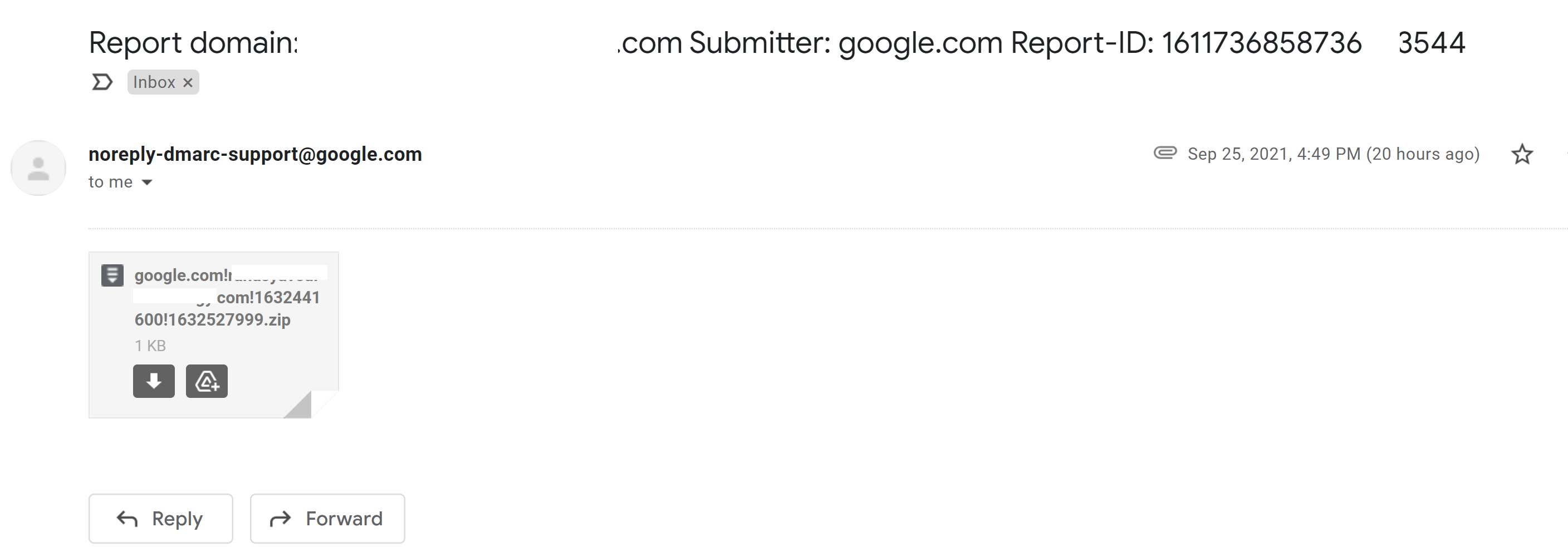
But Google has sent me this email and I could not understand it. what does it mean?
it has some xml file saying everything is pass does this mean it just a monthly or weekly email update?

<feedback> <report_metadata> <org_name>google.com</org_name> <email>noreply-dmarc-support@google.com</email> <extra_contact_info>https://support.google.com/a/answer/2466580</extra_contact_info> <report_id>1611736858736883544</report_id> <date_range> <begin>1632441600</begin> <end>1632527999</end> </date_range> </report_metadata> <policy_published> <domain>mydomain.com</domain> <adkim>s</adkim> <aspf>s</aspf> <p>none</p> <sp>none</sp> <pct>100</pct> </policy_published> <record> <row> <source_ip>200.100.45.55</source_ip> <count>1</count> <policy_evaluated> <disposition>none</disposition> <dkim>pass</dkim> <spf>pass</spf> </policy_evaluated> </row> <identifiers> <header_from>mydomain.com</header_from> </identifiers> <auth_results> <dkim> <domain>mydomain.com</domain> <result>pass</result> <selector>default</selector> </dkim> <spf> <domain>mydomain.com</domain> <result>pass</result> </spf> </auth_results> </record> <record> <row> <source_ip>200.100.45.55</source_ip> <count>2</count> <policy_evaluated> <disposition>none</disposition> <dkim>pass</dkim> <spf>pass</spf> </policy_evaluated> </row> <identifiers> <header_from>mydomain.com</header_from> </identifiers> <auth_results> <dkim> <domain>mydomain.com</domain> <result>pass</result> <selector>default</selector> </dkim> <spf> <domain>mydomain.com</domain> <result>pass</result> </spf> </auth_results> </record> <record> <row> <source_ip>200.100.45.55</source_ip> <count>1</count> <policy_evaluated> <disposition>none</disposition> <dkim>pass</dkim> <spf>pass</spf> </policy_evaluated> </row> <identifiers> <header_from>mydomain.com</header_from> </identifiers> <auth_results> <dkim> <domain>mydomain.com</domain> <result>pass</result> <selector>api</selector> </dkim> <dkim> <domain>elasticemail.com</domain> <result>pass</result> <selector>api</selector> </dkim> <spf> <domain>mydomain.com</domain> <result>pass</result> </spf> </auth_results> </record> <record> <row> <source_ip>900.40.50.60</source_ip> <count>1</count> <policy_evaluated> <disposition>none</disposition> <dkim>pass</dkim> <spf>pass</spf> </policy_evaluated> </row> <identifiers> <header_from>mydomain.com</header_from> </identifiers> <auth_results> <dkim> <domain>mydomain.com</domain> <result>pass</result> <selector>api</selector> </dkim> <dkim> <domain>elasticemail.com</domain> <result>pass</result> <selector>api</selector> </dkim> <spf> <domain>mydomain.com</domain> <result>pass</result> </spf> </auth_results> </record> <record> <row> <source_ip>100.000.00.90</source_ip> <count>1</count> <policy_evaluated> <disposition>none</disposition> <dkim>pass</dkim> <spf>pass</spf> </policy_evaluated> </row> <identifiers> <header_from>mydomain.com</header_from> </identifiers> <auth_results> <dkim> <domain>mydomain.com</domain> <result>pass</result> <selector>default</selector> </dkim> <spf> <domain>mydomain.com</domain> <result>pass</result> </spf> </auth_results> </record> <record> <row> <source_ip>77.777.77.78</source_ip> <count>4</count> <policy_evaluated> <disposition>none</disposition> <dkim>pass</dkim> <spf>pass</spf> </policy_evaluated> </row> <identifiers> <header_from>mydomain.com</header_from> </identifiers> <auth_results> <dkim> <domain>mydomain.com</domain> <result>pass</result> <selector>api</selector> </dkim> <dkim> <domain>elasticemail.com</domain> <result>pass</result> <selector>api</selector> </dkim> <spf> <domain>mydomain.com</domain> <result>pass</result> </spf> </auth_results> </record> </feedback> -
Recently i have followed elastic email DMARC generator https://elasticemail.com/dmarc and configured at my DNS
emails are going to inbox, spf and all everything is working fine.
But Google has sent me this email and I could not understand it. what does it mean?
it has some xml file saying everything is pass does this mean it just a monthly or weekly email update?
<feedback> <report_metadata> <org_name>google.com</org_name> <email>noreply-dmarc-support@google.com</email> <extra_contact_info>https://support.google.com/a/answer/2466580</extra_contact_info> <report_id>1611736858736883544</report_id> <date_range> <begin>1632441600</begin> <end>1632527999</end> </date_range> </report_metadata> <policy_published> <domain>mydomain.com</domain> <adkim>s</adkim> <aspf>s</aspf> <p>none</p> <sp>none</sp> <pct>100</pct> </policy_published> <record> <row> <source_ip>200.100.45.55</source_ip> <count>1</count> <policy_evaluated> <disposition>none</disposition> <dkim>pass</dkim> <spf>pass</spf> </policy_evaluated> </row> <identifiers> <header_from>mydomain.com</header_from> </identifiers> <auth_results> <dkim> <domain>mydomain.com</domain> <result>pass</result> <selector>default</selector> </dkim> <spf> <domain>mydomain.com</domain> <result>pass</result> </spf> </auth_results> </record> <record> <row> <source_ip>200.100.45.55</source_ip> <count>2</count> <policy_evaluated> <disposition>none</disposition> <dkim>pass</dkim> <spf>pass</spf> </policy_evaluated> </row> <identifiers> <header_from>mydomain.com</header_from> </identifiers> <auth_results> <dkim> <domain>mydomain.com</domain> <result>pass</result> <selector>default</selector> </dkim> <spf> <domain>mydomain.com</domain> <result>pass</result> </spf> </auth_results> </record> <record> <row> <source_ip>200.100.45.55</source_ip> <count>1</count> <policy_evaluated> <disposition>none</disposition> <dkim>pass</dkim> <spf>pass</spf> </policy_evaluated> </row> <identifiers> <header_from>mydomain.com</header_from> </identifiers> <auth_results> <dkim> <domain>mydomain.com</domain> <result>pass</result> <selector>api</selector> </dkim> <dkim> <domain>elasticemail.com</domain> <result>pass</result> <selector>api</selector> </dkim> <spf> <domain>mydomain.com</domain> <result>pass</result> </spf> </auth_results> </record> <record> <row> <source_ip>900.40.50.60</source_ip> <count>1</count> <policy_evaluated> <disposition>none</disposition> <dkim>pass</dkim> <spf>pass</spf> </policy_evaluated> </row> <identifiers> <header_from>mydomain.com</header_from> </identifiers> <auth_results> <dkim> <domain>mydomain.com</domain> <result>pass</result> <selector>api</selector> </dkim> <dkim> <domain>elasticemail.com</domain> <result>pass</result> <selector>api</selector> </dkim> <spf> <domain>mydomain.com</domain> <result>pass</result> </spf> </auth_results> </record> <record> <row> <source_ip>100.000.00.90</source_ip> <count>1</count> <policy_evaluated> <disposition>none</disposition> <dkim>pass</dkim> <spf>pass</spf> </policy_evaluated> </row> <identifiers> <header_from>mydomain.com</header_from> </identifiers> <auth_results> <dkim> <domain>mydomain.com</domain> <result>pass</result> <selector>default</selector> </dkim> <spf> <domain>mydomain.com</domain> <result>pass</result> </spf> </auth_results> </record> <record> <row> <source_ip>77.777.77.78</source_ip> <count>4</count> <policy_evaluated> <disposition>none</disposition> <dkim>pass</dkim> <spf>pass</spf> </policy_evaluated> </row> <identifiers> <header_from>mydomain.com</header_from> </identifiers> <auth_results> <dkim> <domain>mydomain.com</domain> <result>pass</result> <selector>api</selector> </dkim> <dkim> <domain>elasticemail.com</domain> <result>pass</result> <selector>api</selector> </dkim> <spf> <domain>mydomain.com</domain> <result>pass</result> </spf> </auth_results> </record> </feedback>@hari nothing to worry about there. When you setup DMARC, it will also ask for an email address to send daily reports to. Google won’t be the only one sending these - you’ll get one from every domain that receives email from yours. Typically, it makes sense to redirect these to an unattended mailbox so they don’t clog up your main mailbox.
Mark Cutting also advises organisations as a Fractional CIO, Fractional CISO and Executive Advisor, helping boards improve technology governance, cyber resilience and executive decision making. Learn more at Gratmore Ltd
-
undefined Hari has marked this topic as solved on
-
 undefined phenomlab unlocked this topic on
-
@hari nothing to worry about there. When you setup DMARC, it will also ask for an email address to send daily reports to. Google won’t be the only one sending these - you’ll get one from every domain that receives email from yours. Typically, it makes sense to redirect these to an unattended mailbox so they don’t clog up your main mailbox.
@phenomlab said in is my DMARC configured correctly?:
you’ll get one from every domain that receives email from yours.
Today I have received another mail from outlook DMARC, i was referring to your reply again and found it very helpful/informative. thanks again.
I wish sudonix 100 more great years ahead!
Hello! It looks like you're interested in this conversation, but you don't have an account yet.
Getting fed up of having to scroll through the same posts each visit? When you register for an account, you'll always come back to exactly where you were before, and choose to be notified of new replies (either via email, or push notification). You'll also be able to save bookmarks and upvote posts to show your appreciation to other community members.
With your input, this post could be even better 💗
Register LoginDid this solution help you?
Related Topics
-
Spam spam spam
Solved Configure -
Nodebb and emails
Solved Configure -
Test of youtube embeds
Solved Configure -
-
-
Email Server Settings
Solved Configure -
-