Recent Cards - fix for slider on mobile not working
-
If you’ve downloaded the plugin
nodebb-plugin-recent-cardsand are struggling with getting the slider to work on a mobile device in the way that it’s supposed to (swipe), there is a (relatively) simple fix.First, add the below to ACP -> Appearance -> Custom Header
<script src="https://cdnjs.cloudflare.com/ajax/libs/jquery/3.6.0/jquery.min.js" integrity="sha512-894YE6QWD5I59HgZOGReFYm4dnWc1Qt5NtvYSaNcOP+u1T9qYdvdihz0PPSiiqn/+/3e7Jo4EaG7TubfWGUrMQ==" crossorigin="anonymous" referrerpolicy="no-referrer"></script>
<script src="https://cdn.jsdelivr.net/bxslider/4.2.12/jquery.bxslider.min.js"></script>
Then, add the below JS snippet to your ACP -> Appearance -> Custom JS
$(window).on('action:ajaxify.end', function(data) {
    $('.carousel-mode').bxSlider();
});
This provides the real slider functionality you are looking for
 Admittedly, it’s pulling in another library, but it’s tiny and unlikely to have any real impact (unless the source is offline of course).
And, with a bit of imagination, plus assistance from the documentation available from
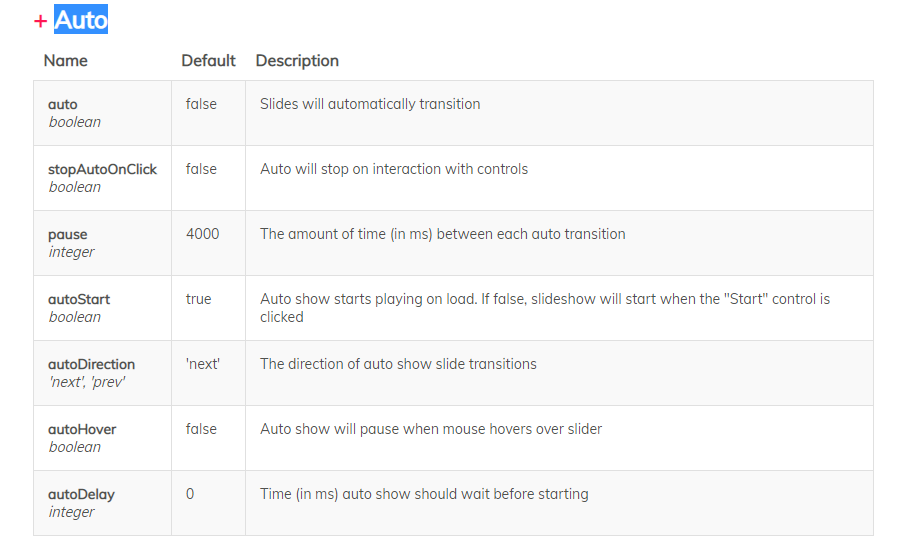
https://bxslider.com/options/It’s possible to create (in conjunction with https://sudonix.com/topic/256/recent-cards-plugin-customization/2) this effect (automatic scrolling through categories) using the below code
$(window).on('action:ajaxify.end', function(data) {
    $('.carousel-mode').bxSlider({
        auto: true,
        autoControls: true,
        stopAutoOnClick: true,
        pager: false
    });
});
Enjoy
-
 undefined phenomlab marked this topic as a regular topic on
-
Small caveat here in the sense that links in the slider no longer work. The bug is reported here
https://github.com/stevenwanderski/bxslider-4/issues/1246#issuecommentThe suggested “fix” is to use
touchEnabled: falsein the config, but that kind of defeats the purpose of the slider in my view on a mobile device. -
And so, it appears that the bug only impacts Google Chrome, so we’ll have to test the browser first to ensure that if it is indeed Chrome, we will need to disable the
touchEnabledsetting. This code below will do exactly that. If anything other than Chrome is detected, we settouchEnabled: true(which is actually the default anyway)window.addEventListener("load", () => { // CHROME if (navigator.userAgent.indexOf("Chrome") != -1) { console.log("Google Chrome"); $(window).on('action:ajaxify.end', function(data) { $('.carousel-mode').bxSlider({ auto: true, autoControls: true, stopAutoOnClick: true, pager: false, keyboardEnabled: true, touchEnabled: false }); }); } else { console.log("Others"); $(window).on('action:ajaxify.end', function(data) { $('.carousel-mode').bxSlider({ auto: true, autoControls: true, stopAutoOnClick: true, pager: false, keyboardEnabled: true, touchEnabled: true }); }); } });Mark Cutting also advises organisations as a Fractional CIO, Fractional CISO and Executive Advisor, helping boards improve technology governance, cyber resilience and executive decision making. Learn more at Gratmore Ltd
-
And so, it appears that the bug only impacts Google Chrome, so we’ll have to test the browser first to ensure that if it is indeed Chrome, we will need to disable the
touchEnabledsetting. This code below will do exactly that. If anything other than Chrome is detected, we settouchEnabled: true(which is actually the default anyway)window.addEventListener("load", () => { // CHROME if (navigator.userAgent.indexOf("Chrome") != -1) { console.log("Google Chrome"); $(window).on('action:ajaxify.end', function(data) { $('.carousel-mode').bxSlider({ auto: true, autoControls: true, stopAutoOnClick: true, pager: false, keyboardEnabled: true, touchEnabled: false }); }); } else { console.log("Others"); $(window).on('action:ajaxify.end', function(data) { $('.carousel-mode').bxSlider({ auto: true, autoControls: true, stopAutoOnClick: true, pager: false, keyboardEnabled: true, touchEnabled: true }); }); } });@phenomlab when I use the codes in the top two black boxes, in firefox it gives this:

one card is taking the whole space of 4 cards…
-
@phenomlab when I use the codes in the top two black boxes, in firefox it gives this:
one card is taking the whole space of 4 cards…
@crazycells Yes, because you have hard coded relative widths set - did you modify anything ?

The default width from the plugin is around
290pxMark Cutting also advises organisations as a Fractional CIO, Fractional CISO and Executive Advisor, helping boards improve technology governance, cyber resilience and executive decision making. Learn more at Gratmore Ltd
-
@crazycells Yes, because you have hard coded relative widths set - did you modify anything ?
The default width from the plugin is around
290px -
@phenomlab let me check the settings…
@crazycells If you can’t find it, this will resolve it
li.col-md-3.col-sm-6.col-xs-12.recent-card-container { width: 290px !important; }Mark Cutting also advises organisations as a Fractional CIO, Fractional CISO and Executive Advisor, helping boards improve technology governance, cyber resilience and executive decision making. Learn more at Gratmore Ltd
-
@crazycells If you can’t find it, this will resolve it
li.col-md-3.col-sm-6.col-xs-12.recent-card-container { width: 290px !important; }@phenomlab said in Recent Cards - fix for slider on mobile not working:
@crazycells If you can’t find it, this will resolve it
li.col-md-3.col-sm-6.col-xs-12.recent-card-container { width: 290px !important; }I could not find any CSS codes related to the width of these cards, but this code solved the problem. Thanks.
Additionally, why the pages are shown as points under these cards? We do not normally have that setting on, I checked the settings and restarted the forum, but they did not go away.
-
@phenomlab said in Recent Cards - fix for slider on mobile not working:
@crazycells If you can’t find it, this will resolve it
li.col-md-3.col-sm-6.col-xs-12.recent-card-container { width: 290px !important; }I could not find any CSS codes related to the width of these cards, but this code solved the problem. Thanks.
Additionally, why the pages are shown as points under these cards? We do not normally have that setting on, I checked the settings and restarted the forum, but they did not go away.
@crazycells Because you are overriding the plugin
bxsliderlibrary with one from an external source - see below$(window).on('action:ajaxify.end', function(data) { $('.carousel-mode').bxSlider({ auto: true, autoControls: true, stopAutoOnClick: true, pager: false }); });Essentially, you’ll need to use
pager: falseas shown above to disable itMark Cutting also advises organisations as a Fractional CIO, Fractional CISO and Executive Advisor, helping boards improve technology governance, cyber resilience and executive decision making. Learn more at Gratmore Ltd
-
@crazycells Because you are overriding the plugin
bxsliderlibrary with one from an external source - see below$(window).on('action:ajaxify.end', function(data) { $('.carousel-mode').bxSlider({ auto: true, autoControls: true, stopAutoOnClick: true, pager: false }); });Essentially, you’ll need to use
pager: falseas shown above to disable it -
@crazycells Yes, or just remove it
Mark Cutting also advises organisations as a Fractional CIO, Fractional CISO and Executive Advisor, helping boards improve technology governance, cyber resilience and executive decision making. Learn more at Gratmore Ltd
-
@crazycells Yes, or just remove it
@phenomlab yeap, I see it now. Thank you very much.

In Firefox (desktop), and in safari (mobile) I do not have any problem and it works beautifully.
-
@phenomlab yeap, I see it now. Thank you very much.
In Firefox (desktop), and in safari (mobile) I do not have any problem and it works beautifully.
@crazycells Great !!
-
Previously, baris said: “For me ajaxifying between pages was breaking when I activated touchEnabled.”
Is this change causing the same problem?
PS. I do not know what ajaxifying is, I checked the definition but I did not really understand it.

-
Previously, baris said: “For me ajaxifying between pages was breaking when I activated touchEnabled.”
Is this change causing the same problem?
PS. I do not know what ajaxifying is, I checked the definition but I did not really understand it.
@crazycells No, because we call the function again using
$(window).on('action:ajaxify.end', function(data) {Mark Cutting also advises organisations as a Fractional CIO, Fractional CISO and Executive Advisor, helping boards improve technology governance, cyber resilience and executive decision making. Learn more at Gratmore Ltd
-
@crazycells No, because we call the function again using
$(window).on('action:ajaxify.end', function(data) {@phenomlab great! Good to hear that (although I do not understand fully)…
Thanks a lot

-
@phenomlab yeap, I see it now. Thank you very much.
In Firefox (desktop), and in safari (mobile) I do not have any problem and it works beautifully.
@crazycells said in Recent Cards - fix for slider on mobile not working:
In Firefox (desktop), and in safari (mobile) I do not have any problem and it works beautifully.
Are you using the code block from here ?
https://sudonix.com/topic/257/recent-cards-fix-for-slider-on-mobile-not-working/3Mark Cutting also advises organisations as a Fractional CIO, Fractional CISO and Executive Advisor, helping boards improve technology governance, cyber resilience and executive decision making. Learn more at Gratmore Ltd
-
undefined phenomlab referenced this topic on
-
Previously, baris said: “For me ajaxifying between pages was breaking when I activated touchEnabled.”
Is this change causing the same problem?
PS. I do not know what ajaxifying is, I checked the definition but I did not really understand it.
@crazycells said in Recent Cards - fix for slider on mobile not working:
PS. I do not know what ajaxifying is, I checked the definition but I did not really understand it.
AJAX is “Asynchronous Javascript And XML (Extensible Markup Language)” and means that requests for data can be sent and received without having to reload the entire page. This strategy is commonplace in today’s internet world - particularly for Single Page Applications (known as SPA’s)
Mark Cutting also advises organisations as a Fractional CIO, Fractional CISO and Executive Advisor, helping boards improve technology governance, cyber resilience and executive decision making. Learn more at Gratmore Ltd
-
@crazycells said in Recent Cards - fix for slider on mobile not working:
In Firefox (desktop), and in safari (mobile) I do not have any problem and it works beautifully.
Are you using the code block from here ?
https://sudonix.com/topic/257/recent-cards-fix-for-slider-on-mobile-not-working/3@phenomlab no, I made these changes:
Custom Header:
<script src="https://cdnjs.cloudflare.com/ajax/libs/jquery/3.6.0/jquery.min.js" integrity="sha512-894YE6QWD5I59HgZOGReFYm4dnWc1Qt5NtvYSaNcOP+u1T9qYdvdihz0PPSiiqn/+/3e7Jo4EaG7TubfWGUrMQ==" crossorigin="anonymous" referrerpolicy="no-referrer"></script> <script src="https://cdn.jsdelivr.net/bxslider/4.2.12/jquery.bxslider.min.js"></script>Custom JS
$(window).on('action:ajaxify.end', function(data) { $('.carousel-mode').bxSlider({ stopAutoOnClick: true, pager: false }); }); -
@crazycells said in Recent Cards - fix for slider on mobile not working:
PS. I do not know what ajaxifying is, I checked the definition but I did not really understand it.
AJAX is “Asynchronous Javascript And XML (Extensible Markup Language)” and means that requests for data can be sent and received without having to reload the entire page. This strategy is commonplace in today’s internet world - particularly for Single Page Applications (known as SPA’s)
@phenomlab I changed the code to this:
window.addEventListener("load", () => { // CHROME if (navigator.userAgent.indexOf("Chrome") != -1) { console.log("Google Chrome"); $(window).on('action:ajaxify.end', function(data) { $('.carousel-mode').bxSlider({ auto: true, autoControls: true, stopAutoOnClick: true, pager: false, keyboardEnabled: true, touchEnabled: false }); }); } else { console.log("Others"); $(window).on('action:ajaxify.end', function(data) { $('.carousel-mode').bxSlider({ auto: true, autoControls: true, stopAutoOnClick: true, pager: false, keyboardEnabled: true, touchEnabled: true }); }); } });with “auto: false” edit…
and it is still working with firefox and safari; but not with google chrome.

Hello! It looks like you're interested in this conversation, but you don't have an account yet.
Getting fed up of having to scroll through the same posts each visit? When you register for an account, you'll always come back to exactly where you were before, and choose to be notified of new replies (either via email, or push notification). You'll also be able to save bookmarks and upvote posts to show your appreciation to other community members.
With your input, this post could be even better 💗
Register Login