installing flarum with plesk
-
@Hari Flarum will 100% work on Plesk, but as I alluded to in a previous thread, it’s not a simple exercise. Installing Flarum using Pocket Hold isn’t necessary as you should be able to complete the entire installation process using SSH without issue.
Plesk will use Apache and also leverage NGINX as a reverse proxy. For some time, I ran a Flarum installation using Plesk, but it’s very limiting in the sense that you have very little control over NGINX itself.
@phenomlab I completely agree, as i can see how complicated it is. i just want to test, explore and learn
it’s not detecting flarum i need to include flarum path, i did not understand earlier suggestions at the same time bit confused too, could you rephrase and tell me where can i go and do changes?
-
now i understood, the great plesk
index.htmlfile not letting to load the flarum after deleting it flarum got loaded without doing any Nginx or apache settings -
undefined Hari has marked this topic as solved on
-
-
finally got it running but i am getting these errors how to fix them?
root@amazing-hellman:/var/www/vhosts/test.tk/httpdocs# php flarum info PHP Fatal error: Uncaught PDOException: could not find driver in /var/www/vhosts/test.tk/httpdocs/vendor/doctrine/dbal/lib/Doctrine/DBAL/Driver/PDOConnection.php:40 Stack trace: #0 /var/www/vhosts/test.tk/httpdocs/vendor/doctrine/dbal/lib/Doctrine/DBAL/Driver/PDOConnection.php(40): PDO->__construct() #1 /var/www/vhosts/test.tk/httpdocs/vendor/illuminate/database/Connectors/Connector.php(67): Doctrine\DBAL\Driver\PDOConnection->__construct() #2 /var/www/vhosts/test.tk/httpdocs/vendor/illuminate/database/Connectors/Connector.php(46): Illuminate\Database\Connectors\Connector->createPdoConnection() #3 /var/www/vhosts/test.tk/httpdocs/vendor/illuminate/database/Connectors/MySqlConnector.php(24): Illuminate\Database\Connectors\Connector->createConnection() #4 /var/www/vhosts/test.tk/httpdocs/vendor/illuminate/database/Connectors/ConnectionFactory.php(184): Illuminate\Database\Connectors\MySqlConnector->connect() #5 [internal function]: Illuminate\Database\Connectors\ConnectionFactory->Illuminate\Database\Connector in /var/www/vhosts/test.tk/httpdocs/vendor/doctrine/dbal/lib/Doctrine/DBAL/Driver/PDO/Exception.php on line 18 root@amazing-hellman:/var/www/vhosts/test.tk/httpdocs# -
finally got it running but i am getting these errors how to fix them?
root@amazing-hellman:/var/www/vhosts/test.tk/httpdocs# php flarum info PHP Fatal error: Uncaught PDOException: could not find driver in /var/www/vhosts/test.tk/httpdocs/vendor/doctrine/dbal/lib/Doctrine/DBAL/Driver/PDOConnection.php:40 Stack trace: #0 /var/www/vhosts/test.tk/httpdocs/vendor/doctrine/dbal/lib/Doctrine/DBAL/Driver/PDOConnection.php(40): PDO->__construct() #1 /var/www/vhosts/test.tk/httpdocs/vendor/illuminate/database/Connectors/Connector.php(67): Doctrine\DBAL\Driver\PDOConnection->__construct() #2 /var/www/vhosts/test.tk/httpdocs/vendor/illuminate/database/Connectors/Connector.php(46): Illuminate\Database\Connectors\Connector->createPdoConnection() #3 /var/www/vhosts/test.tk/httpdocs/vendor/illuminate/database/Connectors/MySqlConnector.php(24): Illuminate\Database\Connectors\Connector->createConnection() #4 /var/www/vhosts/test.tk/httpdocs/vendor/illuminate/database/Connectors/ConnectionFactory.php(184): Illuminate\Database\Connectors\MySqlConnector->connect() #5 [internal function]: Illuminate\Database\Connectors\ConnectionFactory->Illuminate\Database\Connector in /var/www/vhosts/test.tk/httpdocs/vendor/doctrine/dbal/lib/Doctrine/DBAL/Driver/PDO/Exception.php on line 18 root@amazing-hellman:/var/www/vhosts/test.tk/httpdocs#@Hari That looks like the
php-mysqlextension is not installed, or not loaded for the PHP version you are using. -
i want to learn these things
-
change PHP version to 8 at the server level and also for my domain in Plesk using SSH
-
instead of maria DB i want to use MySQL as default, how can i do that? is it really possible? without a docker or any other things (since i am getting those SQL errors as shown in the earlier reply want to switch to MySQL from MariaDB)
-
update composer to v2 for my domain via SSH.
@phenomlab said in installing flarum with plesk:
@Hari Flarum will 100% work on Plesk, but as I alluded to in a previous thread, it’s not a simple exercise. Installing Flarum using Pocket Hold isn’t necessary as you should be able to complete the entire installation process using SSH without issue.
i don’t know the reason but i am unable to install any extensions or flarum using SSH that is the reason i had to use pocket hold
-
-
-
i want to learn these things
-
change PHP version to 8 at the server level and also for my domain in Plesk using SSH
-
instead of maria DB i want to use MySQL as default, how can i do that? is it really possible? without a docker or any other things (since i am getting those SQL errors as shown in the earlier reply want to switch to MySQL from MariaDB)
-
update composer to v2 for my domain via SSH.
@phenomlab said in installing flarum with plesk:
@Hari Flarum will 100% work on Plesk, but as I alluded to in a previous thread, it’s not a simple exercise. Installing Flarum using Pocket Hold isn’t necessary as you should be able to complete the entire installation process using SSH without issue.
i don’t know the reason but i am unable to install any extensions or flarum using SSH that is the reason i had to use pocket hold
@Hari My responses below
change PHP version to 8 at the server level and also for my domain in Plesk using SSH
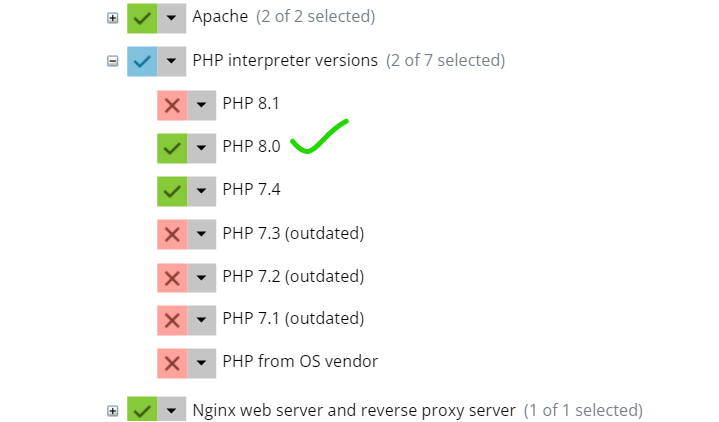
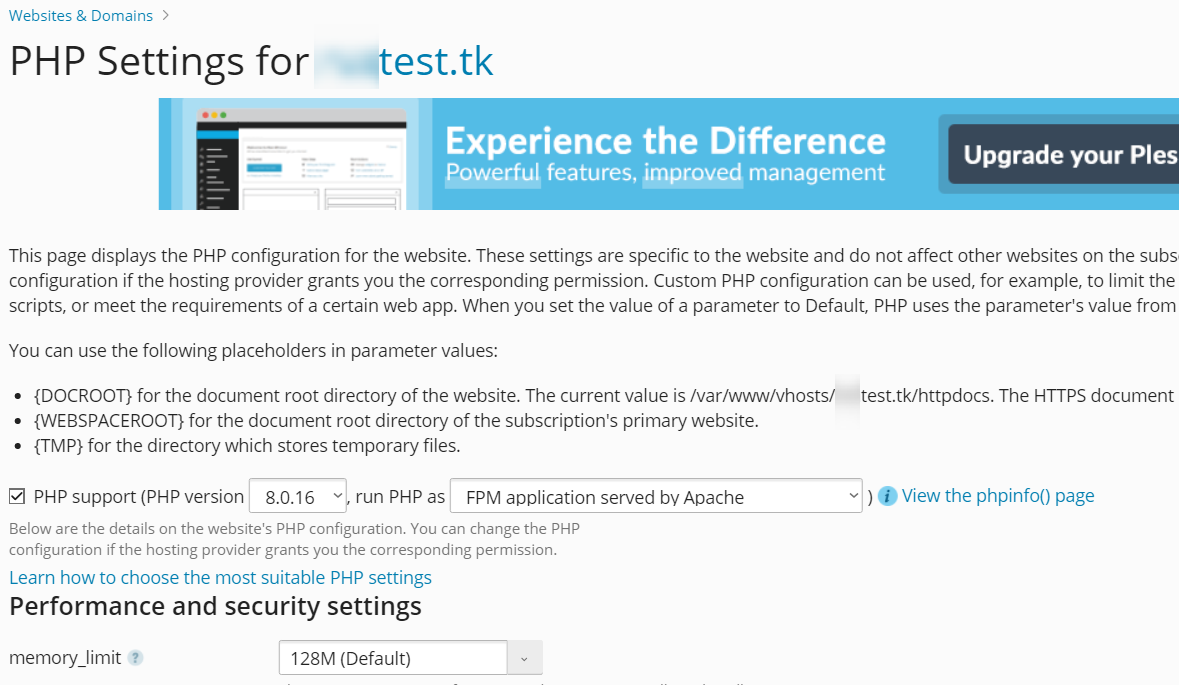
PHP 8.x has been available in Plesk since October 2021. There’s no need to change this using SSH, and it’s actually not recommended. The entire point of Plesk is to manage this using the portal - see below
https://support.plesk.com/hc/en-us/articles/115000769793
instead of maria DB i want to use MySQL as default, how can i do that? is it really possible? without a docker or any other things (since i am getting those SQL errors as shown in the earlier reply want to switch to MySQL from MariaDB)
Possible, yes - although it’s usually the other way round in the sense that people want to replace MySQL with MariaDB
https://www.plesk.com/blog/product-technology/mysql-vs-mariadb/
update composer to v2 for my domain via SSH.
You should take the same route as is advertised here
Mark Cutting also advises organisations as a Fractional CIO, Fractional CISO and Executive Advisor, helping boards improve technology governance, cyber resilience and executive decision making. Learn more at Gratmore Ltd
-
-
@Hari My responses below
change PHP version to 8 at the server level and also for my domain in Plesk using SSH
PHP 8.x has been available in Plesk since October 2021. There’s no need to change this using SSH, and it’s actually not recommended. The entire point of Plesk is to manage this using the portal - see below
https://support.plesk.com/hc/en-us/articles/115000769793
instead of maria DB i want to use MySQL as default, how can i do that? is it really possible? without a docker or any other things (since i am getting those SQL errors as shown in the earlier reply want to switch to MySQL from MariaDB)
Possible, yes - although it’s usually the other way round in the sense that people want to replace MySQL with MariaDB
https://www.plesk.com/blog/product-technology/mysql-vs-mariadb/
update composer to v2 for my domain via SSH.
You should take the same route as is advertised here
@phenomlab oh i see in that case i think my old backup is causing the issues regarding MySQL and PHP versions. i will try fresh installation now.
-
@phenomlab oh i see in that case i think my old backup is causing the issues regarding MySQL and PHP versions. i will try fresh installation now.
@Hari Ok. Let me know.
Mark Cutting also advises organisations as a Fractional CIO, Fractional CISO and Executive Advisor, helping boards improve technology governance, cyber resilience and executive decision making. Learn more at Gratmore Ltd
-
i have installed and set my project settings to PHP 8 but CLI is not updating to 8.0
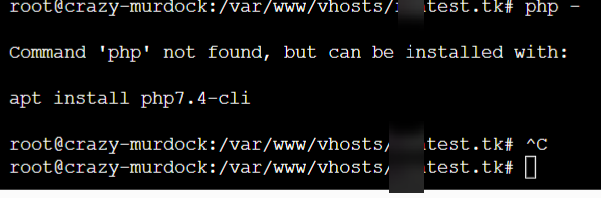
should i try this?
https://talk.plesk.com/threads/set-default-php-version-for-command-line.345940/

-
i have installed and set my project settings to PHP 8 but CLI is not updating to 8.0
should i try this?
https://talk.plesk.com/threads/set-default-php-version-for-command-line.345940/
@Hari What version of Plesk do you have ? You should be able to install this using the links I posted earlier ?
Mark Cutting also advises organisations as a Fractional CIO, Fractional CISO and Executive Advisor, helping boards improve technology governance, cyber resilience and executive decision making. Learn more at Gratmore Ltd
-
@Hari What version of Plesk do you have ? You should be able to install this using the links I posted earlier ?
-
@Hari What’s the output of
php -vfrom CLI ?Mark Cutting also advises organisations as a Fractional CIO, Fractional CISO and Executive Advisor, helping boards improve technology governance, cyber resilience and executive decision making. Learn more at Gratmore Ltd
-
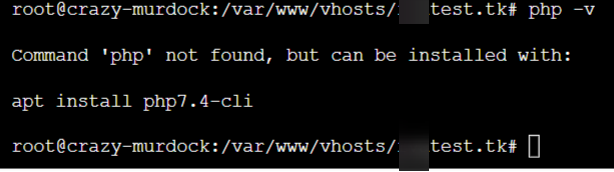
i just sent logins, please teach me what changes i need to make i really want to learn this setup process … i want to do a youtube video on this too

-
i just sent logins, please teach me what changes i need to make i really want to learn this setup process … i want to do a youtube video on this too
@Hari Looks like the environment variable is not set.
What is the output of
locate phpandwhereis php?Mark Cutting also advises organisations as a Fractional CIO, Fractional CISO and Executive Advisor, helping boards improve technology governance, cyber resilience and executive decision making. Learn more at Gratmore Ltd
-
@Hari Looks like the environment variable is not set.
What is the output of
locate phpandwhereis php? -
@Hari No. Plesk typically installs PHP in
/opt/plesk/php/7.4/binso what is the output of/opt/plesk/php/7.4/bin/php -v?Should be
PHP 7.4.28 (cli) (built: Feb 18 2022 07:57:20) ( NTS )
Copyright (c) The PHP Group
Zend Engine v3.4.0, Copyright (c) Zend Technologies
    with the ionCube PHP Loader + ionCube24 v11.0.1, Copyright (c) 2002-2022, by ionCube Ltd.
    with Zend OPcache v7.4.28, Copyright (c), by Zend Technologies
Therefore, PHP 8 should be in
/opt/plesk/php/8.0/bin, so you should also get output from/opt/plesk/php/8.0/bin/php -vas belowPHP 8.0.16 (cli) (built: Feb 18 2022 07:57:20) ( NTS ) Copyright (c) The PHP Group Zend Engine v4.0.16, Copyright (c) Zend Technologies with Zend OPcache v8.0.16, Copyright (c), by Zend TechnologiesThis means that because your environment variable is missing, you have to specify the full path to PHP 8, so instead of just
php, you need/opt/plesk/php/8.0/bin/phpWelcome to Plesk

Mark Cutting also advises organisations as a Fractional CIO, Fractional CISO and Executive Advisor, helping boards improve technology governance, cyber resilience and executive decision making. Learn more at Gratmore Ltd
-
@Hari No. Plesk typically installs PHP in
/opt/plesk/php/7.4/binso what is the output of/opt/plesk/php/7.4/bin/php -v?Should be
PHP 7.4.28 (cli) (built: Feb 18 2022 07:57:20) ( NTS )
Copyright (c) The PHP Group
Zend Engine v3.4.0, Copyright (c) Zend Technologies
    with the ionCube PHP Loader + ionCube24 v11.0.1, Copyright (c) 2002-2022, by ionCube Ltd.
    with Zend OPcache v7.4.28, Copyright (c), by Zend Technologies
Therefore, PHP 8 should be in
/opt/plesk/php/8.0/bin, so you should also get output from/opt/plesk/php/8.0/bin/php -vas belowPHP 8.0.16 (cli) (built: Feb 18 2022 07:57:20) ( NTS ) Copyright (c) The PHP Group Zend Engine v4.0.16, Copyright (c) Zend Technologies with Zend OPcache v8.0.16, Copyright (c), by Zend TechnologiesThis means that because your environment variable is missing, you have to specify the full path to PHP 8, so instead of just
php, you need/opt/plesk/php/8.0/bin/phpWelcome to Plesk
-
@Hari sorry - that should be
/opt/plesk/php/8.0/bin/php. Previous post corrected.Mark Cutting also advises organisations as a Fractional CIO, Fractional CISO and Executive Advisor, helping boards improve technology governance, cyber resilience and executive decision making. Learn more at Gratmore Ltd
-
@Hari sorry - that should be
/opt/plesk/php/8.0/bin/php. Previous post corrected.@phenomlab i installed Plesk directly from DO app area… it’s free up to 2-3 domains.
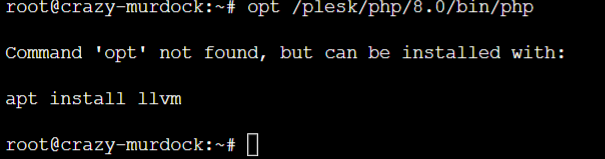
after running opt command the screen got stuck
-
@phenomlab i installed Plesk directly from DO app area… it’s free up to 2-3 domains.
after running opt command the screen got stuck
@Hari That’s expected because you are now running PHP as a daemon
 Kill it by pressing CTRL + C (sometimes CTRL + Z or CTRL + X), then issue the correct command of
 /opt/plesk/php/8.0/bin/php -vwhich should spit out the version used in CLI.Mark Cutting also advises organisations as a Fractional CIO, Fractional CISO and Executive Advisor, helping boards improve technology governance, cyber resilience and executive decision making. Learn more at Gratmore Ltd



Hello! It looks like you're interested in this conversation, but you don't have an account yet.
Getting fed up of having to scroll through the same posts each visit? When you register for an account, you'll always come back to exactly where you were before, and choose to be notified of new replies (either via email, or push notification). You'll also be able to save bookmarks and upvote posts to show your appreciation to other community members.
With your input, this post could be even better 💗
Register Login