Adding a banner to chat messages
-
hmm I think because you have not create the room like me but like I said, it’s not very serious
@DownPW Nope. I get the same if I create the room

-
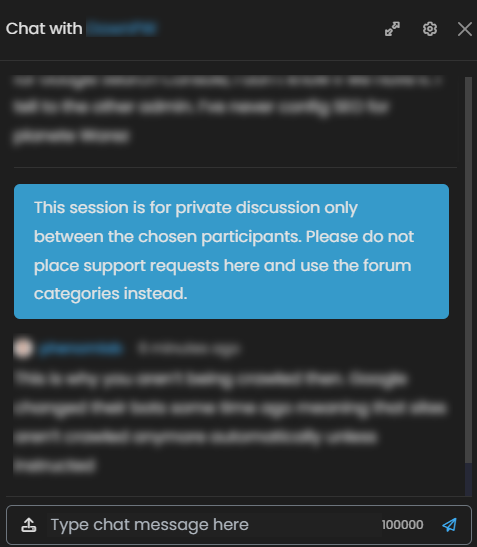
Here’s a small modification to the
chatBannerfunction that will place the message just above thecomposer/replycomponent meaning it is pinned at the bottom and always in view as a reminder. I’ve made this change to support thethreadedChatI’m currently developing// Chat message banner function chatBanner() { var roomName = $("h5[component='chat/header/title']").text().trim(); var bannerContent; if (roomName === "Testing 3") { bannerContent = '<div id="chatbanner">This message will fire for chat rooms with the title of "Testing 3"</div>'; } else { bannerContent = '<div id="chatbanner">This session is for <strong>private discussion only</strong> between the chosen participants. Please do <strong>not</strong> place support requests here and create a <a href="#" onclick="app.newTopic();">new topic</a> instead.</div>'; } var chatMessagesContainer = $('[component="chat/system-message"]:last-of-type'); //var existingMessages = $('[component="chat/message"]'); var existingMessages = $('[component="chat/composer"]'); if (existingMessages.length === 0) { // If there are no messages, append the banner to the messages container chatMessagesContainer.first().after(bannerContent); } else { // If there are messages, add the banner after the last message // existingMessages.last().after(bannerContent); existingMessages.before(bannerContent); } }There are only two changes here:
var existingMessages = $('[component="chat/message"]');becomes
var existingMessages = $('[component="chat/composer"]');and
existingMessages.last().after(bannerContent);becomes
existingMessages.before(bannerContent); -
 undefined phenomlab referenced this topic on
-
undefined phenomlab referenced this topic on
-
hi @phenomlab
since v3.9, widget chat room is officialy available with nodebb-widget essential.
I use this code for now for different banenr message for different room
// ------------------------------------------
// Chat messages banner
// ------------------------------------------

// Several banner for several chat

function chatBanner() {
    var roomName = $("h5[component='chat/header/title']").text().trim();
    var bannerContent;
    if (roomName === "General") {
        bannerContent = '<div id="chatbanner"><i class="fa fa-fw fa-circle-info link-primary" aria-hidden="true"></i> Message 1. </div>';
    } else if (roomName === "Support") {
        bannerContent = '<div id="chatbanner"><i class="fa fa-fw fa-circle-info link-primary" aria-hidden="true"></i>  Message 2.</div>';
    } else if (roomName === "Info") {
        bannerContent = '<div id="chatbanner"><i class="fa fa-fw fa-circle-info link-primary" aria-hidden="true"></i>  Message 3</div>';
    } else if (roomName === "xxxxxxx") {
        bannerContent = '<div id="chatbanner"><i class="fa fa-fw fa-circle-info link-primary" aria-hidden="true"></i>  Message 4.</div>';
    } else if (roomName === "xxxxxxxx") {
        bannerContent = '<div id="chatbanner"><i class="fa fa-fw fa-circle-info link-primary" aria-hidden="true"></i>  Message 5.</div>';
    } else if (roomName === "xxxxxxxxx") {
        bannerContent = '<div id="chatbanner"><i class="fa fa-fw fa-circle-info link-primary" aria-hidden="true"></i>  Message 6.</div>';
    } else {
        bannerContent = '<div id="chatbanner"><i class="fa fa-fw fa-circle-info link-primary" aria-hidden="true"></i> Ce canal est une discussion privée. </div>';
    }
    var chatMessagesContainer = $('[component="chat/system-message"]:last-of-type');
    //var existingMessages = $('[component="chat/message"]');
    var existingMessages = $('[component="chat/composer"]');

    if (existingMessages.length === 0) {
        // If there are no messages, append the banner to the messages container
        chatMessagesContainer.first().after(bannerContent);
    } else {
        // If there are messages, add the banner after the last message
        //existingMessages.last().after(bannerContent);
        existingMessages.before(bannerContent);
    }
}

$(window).on('action:chat.loaded', function(data) {
    $(document).ready(function() {
        chatBanner()
    });
});
On the new widget, only the last message appears :
} else {
      bannerContent = '<div id="chatbanner"><i class="fa fa-fw fa-circle-info link-primary" aria-hidden="true"></i> Ce canal est une discussion privée. </div>';
  }
When I Change room on the chat room widget, no change.
It’s possible to adapt the code for chatroom widget without bug if we don’t use the chatroom widget ?
many thanks
PW and WS Spirit alive
-
hi @phenomlab
since v3.9, widget chat room is officialy available with nodebb-widget essential.
I use this code for now for different banenr message for different room
// ------------------------------------------
// Chat messages banner
// ------------------------------------------

// Several banner for several chat

function chatBanner() {
    var roomName = $("h5[component='chat/header/title']").text().trim();
    var bannerContent;
    if (roomName === "General") {
        bannerContent = '<div id="chatbanner"><i class="fa fa-fw fa-circle-info link-primary" aria-hidden="true"></i> Message 1. </div>';
    } else if (roomName === "Support") {
        bannerContent = '<div id="chatbanner"><i class="fa fa-fw fa-circle-info link-primary" aria-hidden="true"></i>  Message 2.</div>';
    } else if (roomName === "Info") {
        bannerContent = '<div id="chatbanner"><i class="fa fa-fw fa-circle-info link-primary" aria-hidden="true"></i>  Message 3</div>';
    } else if (roomName === "xxxxxxx") {
        bannerContent = '<div id="chatbanner"><i class="fa fa-fw fa-circle-info link-primary" aria-hidden="true"></i>  Message 4.</div>';
    } else if (roomName === "xxxxxxxx") {
        bannerContent = '<div id="chatbanner"><i class="fa fa-fw fa-circle-info link-primary" aria-hidden="true"></i>  Message 5.</div>';
    } else if (roomName === "xxxxxxxxx") {
        bannerContent = '<div id="chatbanner"><i class="fa fa-fw fa-circle-info link-primary" aria-hidden="true"></i>  Message 6.</div>';
    } else {
        bannerContent = '<div id="chatbanner"><i class="fa fa-fw fa-circle-info link-primary" aria-hidden="true"></i> Ce canal est une discussion privée. </div>';
    }
    var chatMessagesContainer = $('[component="chat/system-message"]:last-of-type');
    //var existingMessages = $('[component="chat/message"]');
    var existingMessages = $('[component="chat/composer"]');

    if (existingMessages.length === 0) {
        // If there are no messages, append the banner to the messages container
        chatMessagesContainer.first().after(bannerContent);
    } else {
        // If there are messages, add the banner after the last message
        //existingMessages.last().after(bannerContent);
        existingMessages.before(bannerContent);
    }
}

$(window).on('action:chat.loaded', function(data) {
    $(document).ready(function() {
        chatBanner()
    });
});
On the new widget, only the last message appears :
} else {
      bannerContent = '<div id="chatbanner"><i class="fa fa-fw fa-circle-info link-primary" aria-hidden="true"></i> Ce canal est une discussion privée. </div>';
  }
When I Change room on the chat room widget, no change.
It’s possible to adapt the code for chatroom widget without bug if we don’t use the chatroom widget ?
many thanks
@DownPW Possible, yes, but not using the existing code. It would need to be changed to test for multiple entries based on two distinct widget areas. This should work (it’s already applied on your DEV server)
function chatBanner() {
    var roomName = $("h5[component='chat/header/title']").text().trim();
    var roomNameWidget = $('[id*="chat-modal"] .btn-ghost.btn-sm.dropdown-toggle').text().trim();
    var bannerContent;
    if (roomName === "General" || roomNameWidget === "General") {
        bannerContent = '<div id="chatbanner"><i class="fa fa-fw fa-circle-info link-primary" aria-hidden="true"></i> Message 1. </div>';
    } else if (roomName === "Support" || roomNameWidget === "Support")  {
        bannerContent = '<div id="chatbanner"><i class="fa fa-fw fa-circle-info link-primary" aria-hidden="true"></i> Message 2.</div>';
    } else if (roomName === "Info" || roomNameWidget === "Info")  {
        bannerContent = '<div id="chatbanner"><i class="fa fa-fw fa-circle-info link-primary" aria-hidden="true"></i> Message 3</div>';
    } else if (roomName === "xxxxxx" || roomNameWidget === "xxxxxx")  {
        bannerContent = '<div id="chatbanner"><i class="fa fa-fw fa-circle-info link-primary" aria-hidden="true"></i> Message 4</div>';
    } else if (roomName === "xxxxxx" || roomNameWidget === "xxxxxx")  {
        bannerContent = '<div id="chatbanner"><i class="fa fa-fw fa-circle-info link-primary" aria-hidden="true"></i> Message 5</div>';
    } else if (roomName === "xxxxxx" || roomNameWidget === "xxxxxx") {
        bannerContent = '<div id="chatbanner"><i class="fa fa-fw fa-circle-info link-primary" aria-hidden="true"></i> Message 6</div>';
    } else {
        bannerContent = '<div id="chatbanner"><i class="fa fa-fw fa-circle-info link-primary" aria-hidden="true"></i> Ce canal est une discussion privée. </div>';
    }
    var chatMessagesContainer = $('[component="chat/system-message"]:last-of-type');
    //var existingMessages = $('[component="chat/message"]');
    var existingMessages = $('[component="chat/composer"]');

    if (existingMessages.length === 0) {
        // If there are no messages, append the banner to the messages container
        chatMessagesContainer.first().after(bannerContent);
    } else {
        // If there are messages, add the banner after the last message
        //existingMessages.last().after(bannerContent);
        existingMessages.before(bannerContent);
    }
}
Here, we are using
||which is essentially anORoperator. Because we cannot know the chat room ID in advance, it is necessary to use a wildcard to track it[id*="chat-modal"] .btn-ghost.btn-sm.dropdown-toggleMark Cutting also advises organisations as a Fractional CIO, Fractional CISO and Executive Advisor, helping boards improve technology governance, cyber resilience and executive decision making. Learn more at Gratmore Ltd
-
PW and WS Spirit alive
-
@DownPW One other “bug” (well, not in the traditional sense) that I spotted was that if you are on the root page with the chat modal widget showing, and then click the chat icon, you’ll notice some undesirable effect here in the sense that the room banner does not change.
This is expected in fact, because the chat modal window is already exposed, and therefore, the value already exists. It is possible to alter this behaviour, but it is expensive in terms of performance as you’d need to hide the chat modal first and then re-run the function so that it only collects data from resultant chat window you opened from the side bar (hope this makes sense).
-
hmm it all depends on whether you think that makes sense.
I always trust your opinion
PW and WS Spirit alive
-
hmm it all depends on whether you think that makes sense.
I always trust your opinion
@DownPW Sorry, I meant how I explained it. Pictures speak a thousand words, so I can easily put together a video and you’ll see what I mean. It’s almost the perfect storm - you are asking the code to choose either selector, and yet they both exist, so the latest value will always win.
-
Looks very interesting Mark, I’m going to attempt to add this to my forum tomorrow
 .
. -
@DownPW Possible, yes, but not using the existing code. It would need to be changed to test for multiple entries based on two distinct widget areas. This should work (it’s already applied on your DEV server)
function chatBanner() {
    var roomName = $("h5[component='chat/header/title']").text().trim();
    var roomNameWidget = $('[id*="chat-modal"] .btn-ghost.btn-sm.dropdown-toggle').text().trim();
    var bannerContent;
    if (roomName === "General" || roomNameWidget === "General") {
        bannerContent = '<div id="chatbanner"><i class="fa fa-fw fa-circle-info link-primary" aria-hidden="true"></i> Message 1. </div>';
    } else if (roomName === "Support" || roomNameWidget === "Support")  {
        bannerContent = '<div id="chatbanner"><i class="fa fa-fw fa-circle-info link-primary" aria-hidden="true"></i> Message 2.</div>';
    } else if (roomName === "Info" || roomNameWidget === "Info")  {
        bannerContent = '<div id="chatbanner"><i class="fa fa-fw fa-circle-info link-primary" aria-hidden="true"></i> Message 3</div>';
    } else if (roomName === "xxxxxx" || roomNameWidget === "xxxxxx")  {
        bannerContent = '<div id="chatbanner"><i class="fa fa-fw fa-circle-info link-primary" aria-hidden="true"></i> Message 4</div>';
    } else if (roomName === "xxxxxx" || roomNameWidget === "xxxxxx")  {
        bannerContent = '<div id="chatbanner"><i class="fa fa-fw fa-circle-info link-primary" aria-hidden="true"></i> Message 5</div>';
    } else if (roomName === "xxxxxx" || roomNameWidget === "xxxxxx") {
        bannerContent = '<div id="chatbanner"><i class="fa fa-fw fa-circle-info link-primary" aria-hidden="true"></i> Message 6</div>';
    } else {
        bannerContent = '<div id="chatbanner"><i class="fa fa-fw fa-circle-info link-primary" aria-hidden="true"></i> Ce canal est une discussion privée. </div>';
    }
    var chatMessagesContainer = $('[component="chat/system-message"]:last-of-type');
    //var existingMessages = $('[component="chat/message"]');
    var existingMessages = $('[component="chat/composer"]');

    if (existingMessages.length === 0) {
        // If there are no messages, append the banner to the messages container
        chatMessagesContainer.first().after(bannerContent);
    } else {
        // If there are messages, add the banner after the last message
        //existingMessages.last().after(bannerContent);
        existingMessages.before(bannerContent);
    }
}
Here, we are using
||which is essentially anORoperator. Because we cannot know the chat room ID in advance, it is necessary to use a wildcard to track it[id*="chat-modal"] .btn-ghost.btn-sm.dropdown-toggle@DownPW Possible, yes, but not using the existing code. It would need to be changed to test for multiple entries based on two distinct widget areas. This should work (it’s already applied on your DEV server)
function chatBanner() {
    var roomName = $("h5[component='chat/header/title']").text().trim();
    var roomNameWidget = $('[id*="chat-modal"] .btn-ghost.btn-sm.dropdown-toggle').text().trim();
    var bannerContent;
    if (roomName === "General" || roomNameWidget === "General") {
        bannerContent = '<div id="chatbanner"><i class="fa fa-fw fa-circle-info link-primary" aria-hidden="true"></i> Message 1. </div>';
    } else if (roomName === "Support" || roomNameWidget === "Support")  {
        bannerContent = '<div id="chatbanner"><i class="fa fa-fw fa-circle-info link-primary" aria-hidden="true"></i> Message 2.</div>';
    } else if (roomName === "Info" || roomNameWidget === "Info")  {
        bannerContent = '<div id="chatbanner"><i class="fa fa-fw fa-circle-info link-primary" aria-hidden="true"></i> Message 3</div>';
    } else if (roomName === "xxxxxx" || roomNameWidget === "xxxxxx")  {
        bannerContent = '<div id="chatbanner"><i class="fa fa-fw fa-circle-info link-primary" aria-hidden="true"></i> Message 4</div>';
    } else if (roomName === "xxxxxx" || roomNameWidget === "xxxxxx")  {
        bannerContent = '<div id="chatbanner"><i class="fa fa-fw fa-circle-info link-primary" aria-hidden="true"></i> Message 5</div>';
    } else if (roomName === "xxxxxx" || roomNameWidget === "xxxxxx") {
        bannerContent = '<div id="chatbanner"><i class="fa fa-fw fa-circle-info link-primary" aria-hidden="true"></i> Message 6</div>';
    } else {
        bannerContent = '<div id="chatbanner"><i class="fa fa-fw fa-circle-info link-primary" aria-hidden="true"></i> Ce canal est une discussion privée. </div>';
    }
    var chatMessagesContainer = $('[component="chat/system-message"]:last-of-type');
    //var existingMessages = $('[component="chat/message"]');
    var existingMessages = $('[component="chat/composer"]');

    if (existingMessages.length === 0) {
        // If there are no messages, append the banner to the messages container
        chatMessagesContainer.first().after(bannerContent);
    } else {
        // If there are messages, add the banner after the last message
        //existingMessages.last().after(bannerContent);
        existingMessages.before(bannerContent);
    }
}
Here, we are using
||which is essentially anORoperator. Because we cannot know the chat room ID in advance, it is necessary to use a wildcard to track it[id*="chat-modal"] .btn-ghost.btn-sm.dropdown-toggleI see bugs with this code and chat box widget I use on my categories page
What was happening
NodeBB allows multiple chat windows to be open simultaneously , the widget and the full/modal-page DM view. Both exist in the DOM at the same time.
The original code used global jQuery selectors like $(‘[component=“chat/composer”]’) which scanned the entire page and found elements from both chat windows at once. When you opened “XY” caht while “XXY” was still open in the widget, the selectors would pick up the wrong room name or inject the banner into the wrong window.
The key discovery was that the action:chat.loaded event passes the modal DOM element directly as data. By wrapping it in $(data) and using $modal.find(…) for every selector, all queries are scoped exclusively to the correct modal, making it impossible for two open chat windows to interfere with each other.
FIX code (to adapt to your rooms) :
function chatBanner(modalElement) {
    var $modal = $(modalElement);

    $modal.find('#chatbanner').remove();

    var roomName = $modal.find('[component="chat/room/name"]').text().trim();

    if (!roomName) {
        var placeholder = $modal.find('[component="chat/input"]').attr('placeholder') || '';
        roomName = placeholder.replace(/^Message #?/, '').trim();
    }

    var bannerContent;
    if (roomName === "General") {
        bannerContent = '<div id="chatbanner"><i class="fa fa-fw fa-circle-info link-primary" aria-hidden="true"></i> Chat message banner</div>';
    } else if (roomName === "xxxxxxxxxx") {
        bannerContent = '<div id="chatbanner"><i class="fa fa-fw fa-circle-info link-primary" aria-hidden="true"></i> Chat message banner</div>';
    } else if (roomName === "xxxxxxxxxx") {
        bannerContent = '<div id="chatbanner"><i class="fa fa-fw fa-circle-info link-primary" aria-hidden="true"></i> Chat message banner</div>';
    } else if (roomName === "xxxxxxxxxx") {
        bannerContent = '<div id="chatbanner"><i class="fa fa-fw fa-circle-info link-primary" aria-hidden="true"></i> Chat message banner</div>';
    } else if (roomName === "xxxxxxxxxx") {
        bannerContent = '<div id="chatbanner"><i class="fa fa-fw fa-circle-info link-primary" aria-hidden="true"></i> Chat message banner</div>';
    } else if (roomName === "Les geeks de l'espace") {
        bannerContent = '<div id="chatbanner"><i class="fa fa-fw fa-circle-info link-primary" aria-hidden="true"></i> Chat message banner</div>';
    } else {
        bannerContent = '<div id="chatbanner"><i class="fa fa-fw fa-circle-info link-primary" aria-hidden="true"></i> Chat message banner</div>';
    }

    $modal.find('[component="chat/composer"]').first().before(bannerContent);
}

$(window).on('action:chat.loaded', function(ev, data) {
    chatBanner(data);
});



Hello! It looks like you're interested in this conversation, but you don't have an account yet.
Getting fed up of having to scroll through the same posts each visit? When you register for an account, you'll always come back to exactly where you were before, and choose to be notified of new replies (either via email, or push notification). You'll also be able to save bookmarks and upvote posts to show your appreciation to other community members.
With your input, this post could be even better 💗
Register LoginRelated Topics
-
-
-
-
-
-
-
-
Invalid CSRF on dev install
Moved Solved Tips