Skip to content

navbar

Solved Customisation
2 2 511 1

Did this solution help you?
Did you find the suggested solution useful? Support 💗 Sudonix with a coffee
If your organisation needs deeper expertise around infrastructure, security, or technology leadership, learn more about Phenomlab Ltd. Many of the deeper technical guides behind Sudonix are published there.

Related Topics
  • Custom Page - nodebb

    Solved Customisation custom-pages nodebb
    13
    2
    5 Votes
    13 Posts
    484 Views
    I’m happy to see this
  • Please help me, I can't install nodebb

    Locked Solved Customisation nodebb
    7
    5 Votes
    7 Posts
    962 Views
    Installation completed, verified, and tested. Correct installation methodology is below https://docs.nodebb.org/installing/os/ubuntu/
  • Modify the tagging behavior in NodeBB

    Locked General tagging harmony
    11
    3 Votes
    11 Posts
    2k Views
    For anyone else following this thread https://community.nodebb.org/topic/17402/change-in-reply-to-xxxx-text And https://github.com/NodeBB/NodeBB/commit/f2152953cddd3247746ef393516b0a53ba7750a4
  • 36 Votes
    55 Posts
    13k Views
    @DownPW I see why. The code relies on the existence of [component="topic/quickreply/container"] However, this by definition means that the below has to be enabled [image: 1679077966615-aeef638f-4188-489d-a9f2-f3a26dbca9d8-image.png] It will then work [image: 1679077992245-7fb38631-e0f3-46ef-b652-00929d927b13-image.png] For some unknown reason, this is hidden in Harmony, and only shows if you select it. In v2, it seems that the <section> is deleted altogether in Persona if “Quick Reply” is disabled, meaning it won’t fire as it can’t locate that specific component. The downside is that you might not want the quick reply function, but I think it’s a PITA to scroll up to the top of the post just to reply, so I have it on
  • 9 Votes
    32 Posts
    8k Views
    @DownPW said in Bottom footer navbar button extend: Oh my god, it’s beautiful mark I liked this design so much, I’ve implemented it here. I intend to do a lot more with the footer in due course, so hiding it makes a lot of sense. Thanks @DownPW for the idea and initial concept
  • [NODEBB] Help for my custom CSS

    Solved Customisation nodebb css bugfix
    237
    49 Votes
    237 Posts
    85k Views
    @baris said: You should change your selectors so it doesn’t look at the entire document. You probably only want to apply fancybox to stuff inside the #content element which is what changes when the user navigates around the page. So use $('#content a').... for your selectors then the forum logo in the header won’t be selected. I modified the JS Fancybox code now and this code and it seem better // --------------------------------------------- // Fancybox Media Reader (Without Website Logo) // --------------------------------------------- if (top.location.pathname !== '/login') { $(window).on('action:posts.loaded', function(data) { console.log("Polling DOM for lazyLoaded images to apply Fancybox"); $(document).ready(function() { $('#content a').not('.forum-logo').not(".avatar").not(".emoji").not(".bmac-noanimate").each(function() { $('#content a[href*=".jpg"], #content a[href*=".jpeg"], #content a[href*=".png"], #content a[href*=".gif"], #content a[href*=".webp"]').addClass("noanimate"); }); }); }); } if (top.location.pathname !== '/login') { $(document).ready(function() { $(window).on('action:ajaxify.end', function(data) { $('#content a').not('.logo').not(".avatar").not(".emoji").not(".bmac-noanimate").each(function() { $('#content a[href*=".jpg"], #content a[href*=".jpeg"], #content a[href*=".png"], #content a[href*=".gif"], #content a[href*=".webp"]').addClass("noanimate"); data.preventDefault() // Strip out the images contained inside blockquotes as this looks nasty :) $('#content blockquote img').remove(); }); Fancybox.bind( '#content a[href*=".jpg"], #content a[href*=".jpeg"], #content a[href*=".png"], #content a[href*=".gif"], #content a[href*=".webp"]', { groupAll: true, } ); }); }); } // Chat fancybox - fires when chat module loaded and AJAX calls new chat $(document).ready(function() { $(window).on('action:chat.loaded', function(data) { // >>> Se limiter au contenu principal uniquement <<< $('#content img').not('.forum-logo').not(".avatar").not(".emoji").not(".bmac-noanimate").each(function() { var newHref = $(this).attr("src"); $(this).wrap("<a class='fancybox' href='" + newHref + "'/>"); $('#content a[href*=".jpg"], #content a[href*=".jpeg"], #content a[href*=".png"], #content a[href*=".gif"], #content a[href*=".webp"]').addClass("noanimate"); data.preventDefault(); // Strip out the images contained inside blockquotes as this looks nasty :) $('#content blockquote img').remove(); }); Fancybox.bind( '#content a[href*=".jpg"], #content a[href*=".jpeg"], #content a[href*=".png"], #content a[href*=".gif"], #content a[href*=".webp"]', { groupAll: true, } ); }); }); For the logo, I must use overflow: visible !important; on [component="brand/logo"] /* --- Logo --- */ [component="brand/logo"] { max-height: 50px; width: auto; height: auto; max-width: 100%; display: block; object-fit: contain; object-position: left center; overflow: visible !important; } Better result !!
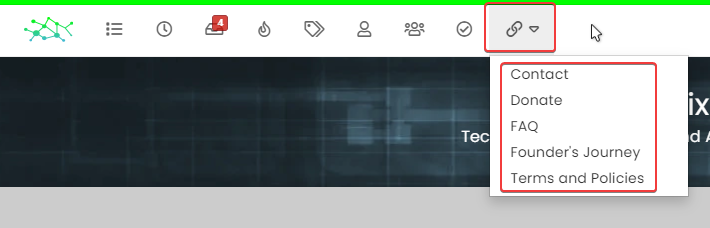
  • Multiple link on one ico non Navbar

    Solved Customisation links css navbar
    7
    1
    2 Votes
    7 Posts
    1k Views
    yeah you’re right @phenomlab. Problem of NodeBB Version
  • Bug Navbar CSS

    Solved Customisation navbar css
    3
    1 Votes
    3 Posts
    996 Views
    Not better way. Thanks.