CTA banner for visitors
-
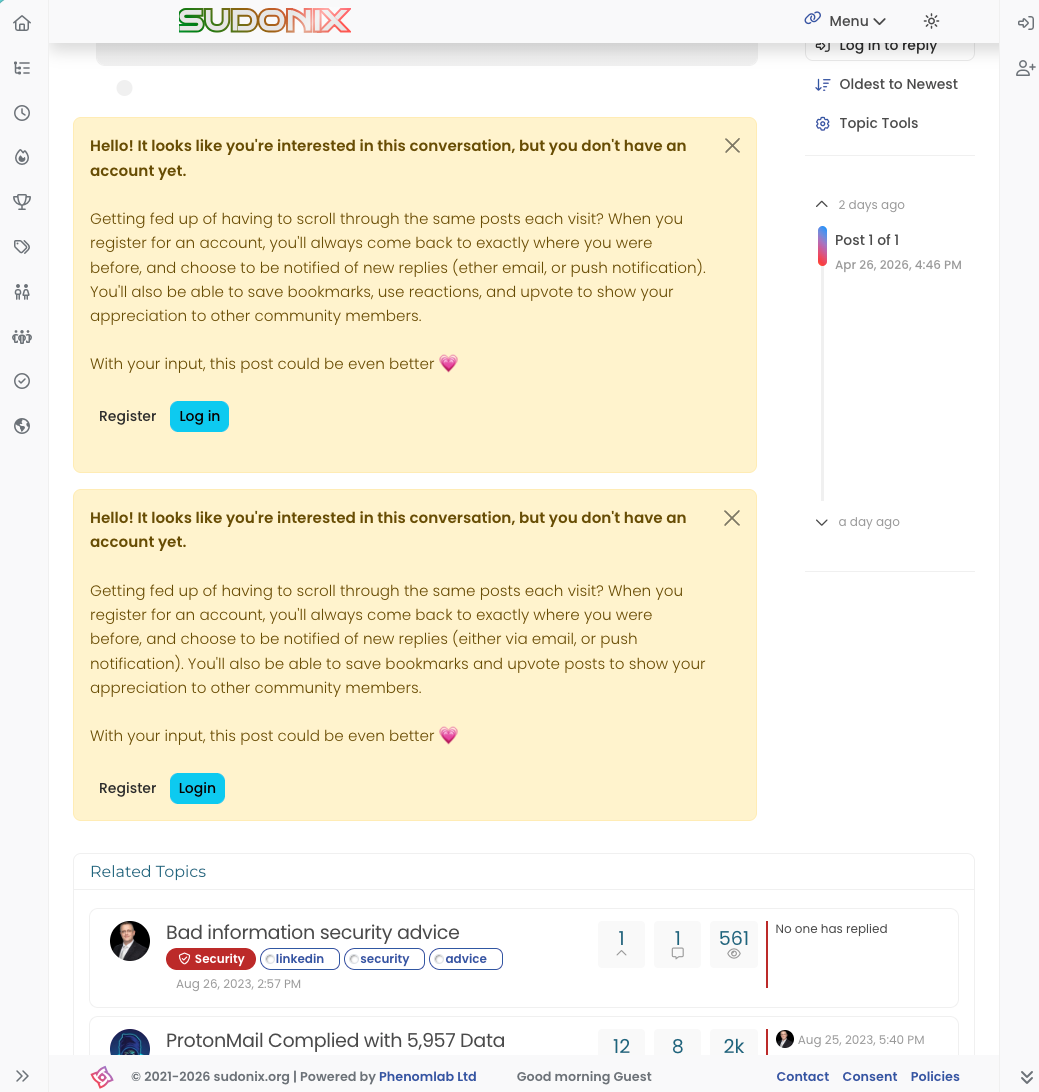
banner is duplicated, please see the pic attached.
-
banner is duplicated, please see the pic attached.
@crazycells Yes, because of this code
$(document).ready(function () {
    $(window).on('action:ajaxify.end', function (data) {
        if (config && config.uid > 0) {
            // User is logged in, so don't fire any message
        } else {
            // Insert content into the selected element
            var addAfterLastPost = $(
                "<div class='alert alert-warning alert-dismissible fade show' role='alert'>" +
                "<p><strong>Hello! It looks like you're interested in this conversation, but you don't have an account yet.</strong></p>" +
                "<p>Getting fed up of having to scroll through the same posts each visit? When you register for an account, you'll always come back to exactly where you were before, " +
                "and choose to be notified of new replies (ether email, or push notification). You'll also be able to save bookmarks, use reactions, and upvote to show your appreciation to other community members.</p>" +
                "<p>With your input, this post could be even better 💗"+
                "<br><br>"+
                "<a style='margin-right:5px;' component='topic/reply/guest' href='/register' class='fw-semibold btn btn-sm btn-warning'>Register</a>" +
                "<a component='topic/reply/guest' href='/login' class='fw-semibold btn btn-sm btn-info'>Log in</a>" +
                "<button type='button' class='btn-close' data-bs-dismiss='alert' aria-label='Close'></button>" +
                "</div>"
            );
            $('ul[component="topic"]').after(addAfterLastPost);
        }
    });
});
This was adopted into core as far as I know, so I’ve removed my manual code.
-
Very strange…
Nothing in console ? -
banner is duplicated, please see the pic attached.
@crazycells Yes, because of this code
$(document).ready(function () {
    $(window).on('action:ajaxify.end', function (data) {
        if (config && config.uid > 0) {
            // User is logged in, so don't fire any message
        } else {
            // Insert content into the selected element
            var addAfterLastPost = $(
                "<div class='alert alert-warning alert-dismissible fade show' role='alert'>" +
                "<p><strong>Hello! It looks like you're interested in this conversation, but you don't have an account yet.</strong></p>" +
                "<p>Getting fed up of having to scroll through the same posts each visit? When you register for an account, you'll always come back to exactly where you were before, " +
                "and choose to be notified of new replies (ether email, or push notification). You'll also be able to save bookmarks, use reactions, and upvote to show your appreciation to other community members.</p>" +
                "<p>With your input, this post could be even better 💗"+
                "<br><br>"+
                "<a style='margin-right:5px;' component='topic/reply/guest' href='/register' class='fw-semibold btn btn-sm btn-warning'>Register</a>" +
                "<a component='topic/reply/guest' href='/login' class='fw-semibold btn btn-sm btn-info'>Log in</a>" +
                "<button type='button' class='btn-close' data-bs-dismiss='alert' aria-label='Close'></button>" +
                "</div>"
            );
            $('ul[component="topic"]').after(addAfterLastPost);
        }
    });
});
This was adopted into core as far as I know, so I’ve removed my manual code.
-
 undefined phenomlab marked this topic as a question on
-
undefined phenomlab has marked this topic as solved on


Hello! It looks like you're interested in this conversation, but you don't have an account yet.
Getting fed up of having to scroll through the same posts each visit? When you register for an account, you'll always come back to exactly where you were before, and choose to be notified of new replies (either via email, or push notification). You'll also be able to save bookmarks and upvote posts to show your appreciation to other community members.
With your input, this post could be even better 💗
Register Login