Threaded post support for NodeBB


-
Small specific request.
I try to adapt the code to my environment.
I modified the background of the following classes:
.page-topic .topic .posts.timeline .timeline-event,
.page-topic .topic .posts.timeline > [component="post/placeholder"],
.page-topic .topic .posts.timeline > [component="post"] {
  border-left: none;
  transition: transform 0.3s ease !important;
  background: var(--bs-body-bg);
  background: var(--bs-body-navbar);
}
.post-container.threaded { background: var(--bs-body-bg) !important; background: var(--bs-body-navbar)!important; }li.pt-4.self-post:not(.self-post .topic-owner-post).threaded { transform: translateX(0px) !important; transition: transform 0.3s ease !important; background: var(--bs-body-bg); background: var(--bs-body-navbar)!important; padding-right: 30px; }and other code, for example :
.page-topic .topic .posts.timeline [component="topic/event"].timeline-event, .page-topic .topic .posts.timeline [component="topic/necro-post"].timeline-event {
    background: transparent;
}
.page-topic .topic .posts.timeline .timeline-event:last-child, .page-topic .topic .posts.timeline>[component="post/placeholder"]:last-child, .page-topic .topic .posts.timeline>[component=post]:last-child { margin-left: 0.5rem; }When I activate mode it works without problem but it does not disappear when I deactivate the mode. (Return to vanilla)
I think I understand by reading the code that it is necessary to specify the classes chnaged in the function.js (with add .threaded) but I don’t really see how to add more
PW and WS Spirit alive
-
Small specific request.
I try to adapt the code to my environment.
I modified the background of the following classes:
.page-topic .topic .posts.timeline .timeline-event,
.page-topic .topic .posts.timeline > [component="post/placeholder"],
.page-topic .topic .posts.timeline > [component="post"] {
  border-left: none;
  transition: transform 0.3s ease !important;
  background: var(--bs-body-bg);
  background: var(--bs-body-navbar);
}
.post-container.threaded { background: var(--bs-body-bg) !important; background: var(--bs-body-navbar)!important; }li.pt-4.self-post:not(.self-post .topic-owner-post).threaded { transform: translateX(0px) !important; transition: transform 0.3s ease !important; background: var(--bs-body-bg); background: var(--bs-body-navbar)!important; padding-right: 30px; }and other code, for example :
.page-topic .topic .posts.timeline [component="topic/event"].timeline-event, .page-topic .topic .posts.timeline [component="topic/necro-post"].timeline-event {
    background: transparent;
}
.page-topic .topic .posts.timeline .timeline-event:last-child, .page-topic .topic .posts.timeline>[component="post/placeholder"]:last-child, .page-topic .topic .posts.timeline>[component=post]:last-child { margin-left: 0.5rem; }When I activate mode it works without problem but it does not disappear when I deactivate the mode. (Return to vanilla)
I think I understand by reading the code that it is necessary to specify the classes chnaged in the function.js (with add .threaded) but I don’t really see how to add more
@DownPW any reason as to why you’ve defined
backgroundtwice ?See
background: var(--bs-body-bg); background: var(--bs-body navbar)!important; -
I have just forget to delete the first but this nothing change.
PW and WS Spirit alive
-
@DownPW just curious 🤭
The second would override the first anyway.
I’m in transit currently and not in front of a pc but will review this as soon as I can.
-
-
Mark Cutting also advises organisations as a Fractional CIO, Fractional CISO and Executive Advisor, helping boards improve technology governance, cyber resilience and executive decision making. Learn more at Gratmore Ltd
-
 undefined phenomlab referenced this topic on
-
@phenomlab thank you Mark i did not read this one.
-
@phenomlab thank you Mark i did not read this one.
@cagatay no problems. Easily missed!!
-
Small specific request.
I try to adapt the code to my environment.
I modified the background of the following classes:
.page-topic .topic .posts.timeline .timeline-event,
.page-topic .topic .posts.timeline > [component="post/placeholder"],
.page-topic .topic .posts.timeline > [component="post"] {
  border-left: none;
  transition: transform 0.3s ease !important;
  background: var(--bs-body-bg);
  background: var(--bs-body-navbar);
}
.post-container.threaded { background: var(--bs-body-bg) !important; background: var(--bs-body-navbar)!important; }li.pt-4.self-post:not(.self-post .topic-owner-post).threaded { transform: translateX(0px) !important; transition: transform 0.3s ease !important; background: var(--bs-body-bg); background: var(--bs-body-navbar)!important; padding-right: 30px; }and other code, for example :
.page-topic .topic .posts.timeline [component="topic/event"].timeline-event, .page-topic .topic .posts.timeline [component="topic/necro-post"].timeline-event {
    background: transparent;
}
.page-topic .topic .posts.timeline .timeline-event:last-child, .page-topic .topic .posts.timeline>[component="post/placeholder"]:last-child, .page-topic .topic .posts.timeline>[component=post]:last-child { margin-left: 0.5rem; }When I activate mode it works without problem but it does not disappear when I deactivate the mode. (Return to vanilla)
I think I understand by reading the code that it is necessary to specify the classes chnaged in the function.js (with add .threaded) but I don’t really see how to add more
@DownPW said in Threading support for NodeBB:
I think I understand by reading the code that it is necessary to specify the classes chnaged in the function.js (with add .threaded) but I don’t really see how to add more
Can you post the current function code you have?
-
sure :
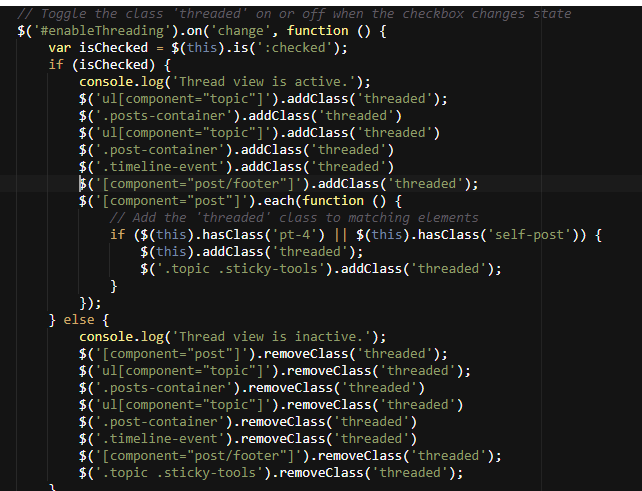
function threaded() {
    $(document).ready(function () {
        // Check if the screen width is 1200px or more
        if ($(window).width() >= 1200) {
            // Check if the dropdown already exists
            if ($('#enableThreading').length === 0) {
                var threadView = $('<div class="threads-wrapper"><i class="fa fa-fw fa-bars left"></i><form class="form"><div class="form-check form-switch sticky-tools-bar"> \
                    <input class="form-check-input" id="enableThreading" type="checkbox" data-field="enableThreading"> \
                    <label class=" d-none d-md-inline fw-semibold" for="enableThreading"><i class="fa fa-fw fa-bars-staggered right"></i></label> \
                </div></form></div>');
                $('.topic .sticky-tools ul [component="topic/browsing-users"]:last-of-type').append(threadView);
                // Check if there's a stored state for the checkbox and update it
                var storedState = localStorage.getItem('enableThreadingState');
                if (storedState === 'true') {
                    $('#enableThreading').prop('checked', true);
                }
            }
            // Toggle the class 'threaded' on or off when the checkbox changes state
            $('#enableThreading').on('change', function () {
                var isChecked = $(this).is(':checked');
                if (isChecked) {
                    console.log('Thread view is active.');
                    $('ul[component="topic"]').addClass('threaded');
                    $('.posts-container').addClass('threaded')
                    $('ul[component="topic"]').addClass('threaded')
                    $('.post-container').addClass('threaded')
                    $('.timeline-event').addClass('threaded')
                    $('[component="post/footer"]').addClass('threaded');
                    $('[component="post"]').each(function () {
                        // Add the 'threaded' class to matching elements
                        if ($(this).hasClass('pt-4') || $(this).hasClass('self-post')) {
                            $(this).addClass('threaded');
                            $('.topic .sticky-tools').addClass('threaded');
                        }
                    });
                } else {
                    console.log('Thread view is inactive.');
                    $('[component="post"]').removeClass('threaded');
                    $('ul[component="topic"]').removeClass('threaded');
                    $('.posts-container').removeClass('threaded')
                    $('ul[component="topic"]').removeClass('threaded')
                    $('.post-container').removeClass('threaded')
                    $('.timeline-event').removeClass('threaded')
                    $('[component="post/footer"]').removeClass('threaded');
                    $('.topic .sticky-tools').removeClass('threaded');
                }
                // Store the checkbox state in localStorage
                localStorage.setItem('enableThreadingState', isChecked);
            });
            // Check for changes in the checkbox state when the page loads
            $('#enableThreading').trigger('change');
        }
    });
}

function threadedChat() {
    $(document).ready(function () {
        // Check if the screen width is 1200px or more
        if ($(window).width() >= 1200) {
            // Check if the dropdown already exists
            if ($('#enableThreadingChat').length === 0) {
                var chatView = $('<div class="threads-wrapper"><i class="fa fa-fw fa-bars left"></i><form class="form"><div class="form-check form-switch sticky-tools-bar"> \
                    <input class="form-check-input" id="enableThreadingChat" type="checkbox" data-field="enableThreading"> \
                    <label class=" d-none d-md-inline fw-semibold" for="enableThreadingChat"><span class="title-tooltip top" tooltip-text="Éditer Profil"><i class="fa fa-fw fa-bars-staggered right"></i></label> \
                </div></form></div>');
                $('[component="chat/header"]').prepend(chatView);

                // Check if there's a stored state for the checkbox and update it
                var storedState = localStorage.getItem('enableThreadingStateChat');
                if (storedState === 'true') {
                    $('#enableThreadingChat').prop('checked', true);
                }
            }

            // Toggle the class 'threaded' on or off when the checkbox changes state
            $('#enableThreadingChat').on('change', function () {
                var isChecked = $(this).is(':checked');
                if (isChecked) {
                    console.log('Thread view is active.');
                    $('[component="chat/message"]').each(function () {
                        // Add the 'threaded' class to matching elements
                        if ($(this).hasClass('chat-message')) {
                            $(this).addClass('threaded');
                        }
                    });
                } else {
                    console.log('Thread view is inactive.');
                    $('[component="chat/message"]').removeClass('threaded');
                }

                // Store the checkbox state in localStorage
                localStorage.setItem('enableThreadingStateChat', isChecked);
            });

            // Check for changes in the checkbox state when the page loads
            $('#enableThreadingChat').trigger('change');
        }
    });
}


$(window).on('action:chat.loaded', function(data) {
        threadedChat();
});
$(window).on('action:chat.received', function(data) {
        threadedChat();
});
$(window).on('action:ajaxify.end', function (data) {
    threaded();
});

$(window).on('action:posts.edited', function (data) {
    threaded();
});

$(window).on('action:posts.loaded', function (data) {
    threaded();
});
PW and WS Spirit alive
-
sure :
function threaded() { $(document).ready(function () { // Check if the screen width is 1200px or more if ($(window).width() >= 1200) { // Check if the dropdown already exists if ($('#enableThreading').length === 0) { var threadView = $('<div class="threads-wrapper"><i class="fa fa-fw fa-bars left"></i><form class="form"><div class="form-check form-switch sticky-tools-bar"> \ <input class="form-check-input" id="enableThreading" type="checkbox" data-field="enableThreading"> \ <label class=" d-none d-md-inline fw-semibold" for="enableThreading"><i class="fa fa-fw fa-bars-staggered right"></i></label> \ </div></form></div>'); $('.topic .sticky-tools ul [component="topic/browsing-users"]:last-of-type').append(threadView); // Check if there's a stored state for the checkbox and update it var storedState = localStorage.getItem('enableThreadingState'); if (storedState === 'true') { $('#enableThreading').prop('checked', true); } } // Toggle the class 'threaded' on or off when the checkbox changes state $('#enableThreading').on('change', function () { var isChecked = $(this).is(':checked'); if (isChecked) { console.log('Thread view is active.'); $('ul[component="topic"]').addClass('threaded'); $('.posts-container').addClass('threaded') $('ul[component="topic"]').addClass('threaded') $('.post-container').addClass('threaded') $('.timeline-event').addClass('threaded') $('[component="post/footer"]').addClass('threaded'); $('[component="post"]').each(function () { // Add the 'threaded' class to matching elements if ($(this).hasClass('pt-4') || $(this).hasClass('self-post')) { $(this).addClass('threaded'); $('.topic .sticky-tools').addClass('threaded'); } }); } else { console.log('Thread view is inactive.'); $('[component="post"]').removeClass('threaded'); $('ul[component="topic"]').removeClass('threaded'); $('.posts-container').removeClass('threaded') $('ul[component="topic"]').removeClass('threaded') $('.post-container').removeClass('threaded') $('.timeline-event').removeClass('threaded') $('[component="post/footer"]').removeClass('threaded'); $('.topic .sticky-tools').removeClass('threaded'); } // Store the checkbox state in localStorage localStorage.setItem('enableThreadingState', isChecked); }); // Check for changes in the checkbox state when the page loads $('#enableThreading').trigger('change'); } }); } function threadedChat() { $(document).ready(function () { // Check if the screen width is 1200px or more if ($(window).width() >= 1200) { // Check if the dropdown already exists if ($('#enableThreadingChat').length === 0) { var chatView = $('<div class="threads-wrapper"><i class="fa fa-fw fa-bars left"></i><form class="form"><div class="form-check form-switch sticky-tools-bar"> \ <input class="form-check-input" id="enableThreadingChat" type="checkbox" data-field="enableThreading"> \ <label class=" d-none d-md-inline fw-semibold" for="enableThreadingChat"><span class="title-tooltip top" tooltip-text="Éditer Profil"><i class="fa fa-fw fa-bars-staggered right"></i></label> \ </div></form></div>'); $('[component="chat/header"]').prepend(chatView); // Check if there's a stored state for the checkbox and update it var storedState = localStorage.getItem('enableThreadingStateChat'); if (storedState === 'true') { $('#enableThreadingChat').prop('checked', true); } } // Toggle the class 'threaded' on or off when the checkbox changes state $('#enableThreadingChat').on('change', function () { var isChecked = $(this).is(':checked'); if (isChecked) { console.log('Thread view is active.'); $('[component="chat/message"]').each(function () { // Add the 'threaded' class to matching elements if ($(this).hasClass('chat-message')) { $(this).addClass('threaded'); } }); } else { console.log('Thread view is inactive.'); $('[component="chat/message"]').removeClass('threaded'); } // Store the checkbox state in localStorage localStorage.setItem('enableThreadingStateChat', isChecked); }); // Check for changes in the checkbox state when the page loads $('#enableThreadingChat').trigger('change'); } }); } $(window).on('action:chat.loaded', function(data) { threadedChat(); }); $(window).on('action:chat.received', function(data) { threadedChat(); }); $(window).on('action:ajaxify.end', function (data) { threaded(); }); $(window).on('action:posts.edited', function (data) { threaded(); }); $(window).on('action:posts.loaded', function (data) { threaded(); });@DownPW Thanks. You should remove the
threadedChatfunction and these lines$(window).on('action:chat.loaded', function(data) { threadedChat(); }); $(window).on('action:chat.received', function(data) { threadedChat(); });That code is not functional yet and is very experimental

I’ll have a look at your DEV environment to make the code recommendations.
-
sure :
function threaded() { $(document).ready(function () { // Check if the screen width is 1200px or more if ($(window).width() >= 1200) { // Check if the dropdown already exists if ($('#enableThreading').length === 0) { var threadView = $('<div class="threads-wrapper"><i class="fa fa-fw fa-bars left"></i><form class="form"><div class="form-check form-switch sticky-tools-bar"> \ <input class="form-check-input" id="enableThreading" type="checkbox" data-field="enableThreading"> \ <label class=" d-none d-md-inline fw-semibold" for="enableThreading"><i class="fa fa-fw fa-bars-staggered right"></i></label> \ </div></form></div>'); $('.topic .sticky-tools ul [component="topic/browsing-users"]:last-of-type').append(threadView); // Check if there's a stored state for the checkbox and update it var storedState = localStorage.getItem('enableThreadingState'); if (storedState === 'true') { $('#enableThreading').prop('checked', true); } } // Toggle the class 'threaded' on or off when the checkbox changes state $('#enableThreading').on('change', function () { var isChecked = $(this).is(':checked'); if (isChecked) { console.log('Thread view is active.'); $('ul[component="topic"]').addClass('threaded'); $('.posts-container').addClass('threaded') $('ul[component="topic"]').addClass('threaded') $('.post-container').addClass('threaded') $('.timeline-event').addClass('threaded') $('[component="post/footer"]').addClass('threaded'); $('[component="post"]').each(function () { // Add the 'threaded' class to matching elements if ($(this).hasClass('pt-4') || $(this).hasClass('self-post')) { $(this).addClass('threaded'); $('.topic .sticky-tools').addClass('threaded'); } }); } else { console.log('Thread view is inactive.'); $('[component="post"]').removeClass('threaded'); $('ul[component="topic"]').removeClass('threaded'); $('.posts-container').removeClass('threaded') $('ul[component="topic"]').removeClass('threaded') $('.post-container').removeClass('threaded') $('.timeline-event').removeClass('threaded') $('[component="post/footer"]').removeClass('threaded'); $('.topic .sticky-tools').removeClass('threaded'); } // Store the checkbox state in localStorage localStorage.setItem('enableThreadingState', isChecked); }); // Check for changes in the checkbox state when the page loads $('#enableThreading').trigger('change'); } }); } function threadedChat() { $(document).ready(function () { // Check if the screen width is 1200px or more if ($(window).width() >= 1200) { // Check if the dropdown already exists if ($('#enableThreadingChat').length === 0) { var chatView = $('<div class="threads-wrapper"><i class="fa fa-fw fa-bars left"></i><form class="form"><div class="form-check form-switch sticky-tools-bar"> \ <input class="form-check-input" id="enableThreadingChat" type="checkbox" data-field="enableThreading"> \ <label class=" d-none d-md-inline fw-semibold" for="enableThreadingChat"><span class="title-tooltip top" tooltip-text="Éditer Profil"><i class="fa fa-fw fa-bars-staggered right"></i></label> \ </div></form></div>'); $('[component="chat/header"]').prepend(chatView); // Check if there's a stored state for the checkbox and update it var storedState = localStorage.getItem('enableThreadingStateChat'); if (storedState === 'true') { $('#enableThreadingChat').prop('checked', true); } } // Toggle the class 'threaded' on or off when the checkbox changes state $('#enableThreadingChat').on('change', function () { var isChecked = $(this).is(':checked'); if (isChecked) { console.log('Thread view is active.'); $('[component="chat/message"]').each(function () { // Add the 'threaded' class to matching elements if ($(this).hasClass('chat-message')) { $(this).addClass('threaded'); } }); } else { console.log('Thread view is inactive.'); $('[component="chat/message"]').removeClass('threaded'); } // Store the checkbox state in localStorage localStorage.setItem('enableThreadingStateChat', isChecked); }); // Check for changes in the checkbox state when the page loads $('#enableThreadingChat').trigger('change'); } }); } $(window).on('action:chat.loaded', function(data) { threadedChat(); }); $(window).on('action:chat.received', function(data) { threadedChat(); }); $(window).on('action:ajaxify.end', function (data) { threaded(); }); $(window).on('action:posts.edited', function (data) { threaded(); }); $(window).on('action:posts.loaded', function (data) { threaded(); });@DownPW I changed your CSS as it was lacking the actual
.threadedclass which is the target we add and remove.page-topic .topic .posts.timeline [component="topic/event"].timeline-event, .page-topic .topic .posts.timeline [component="topic/necro-post"].timeline-event.threaded { background: transparent !important; margin-bottom: 10px !important; } .page-topic .topic .posts.timeline .threaded:last-child .timeline-event:last-child, .page-topic .topic .posts.timeline .threaded:last-child>[component="post/placeholder"]:last-child, .page-topic .topic .posts.timeline .threaded:last-child>[component=post]:last-child { margin-left: 0.5rem !important; }Seems to work, but can you confirm?
-
nope
Sorry I was on my way back from work @phenomlab
So in fact I’m already going to try adding .threaded to the CSS code.
When I activate Thread mode, everything is OK however when I deactivate Thread mode, certain classes remain and are not deleted
For example here, without Thread mode, the background is not returned to vanilla and the same thing for the border-radius :
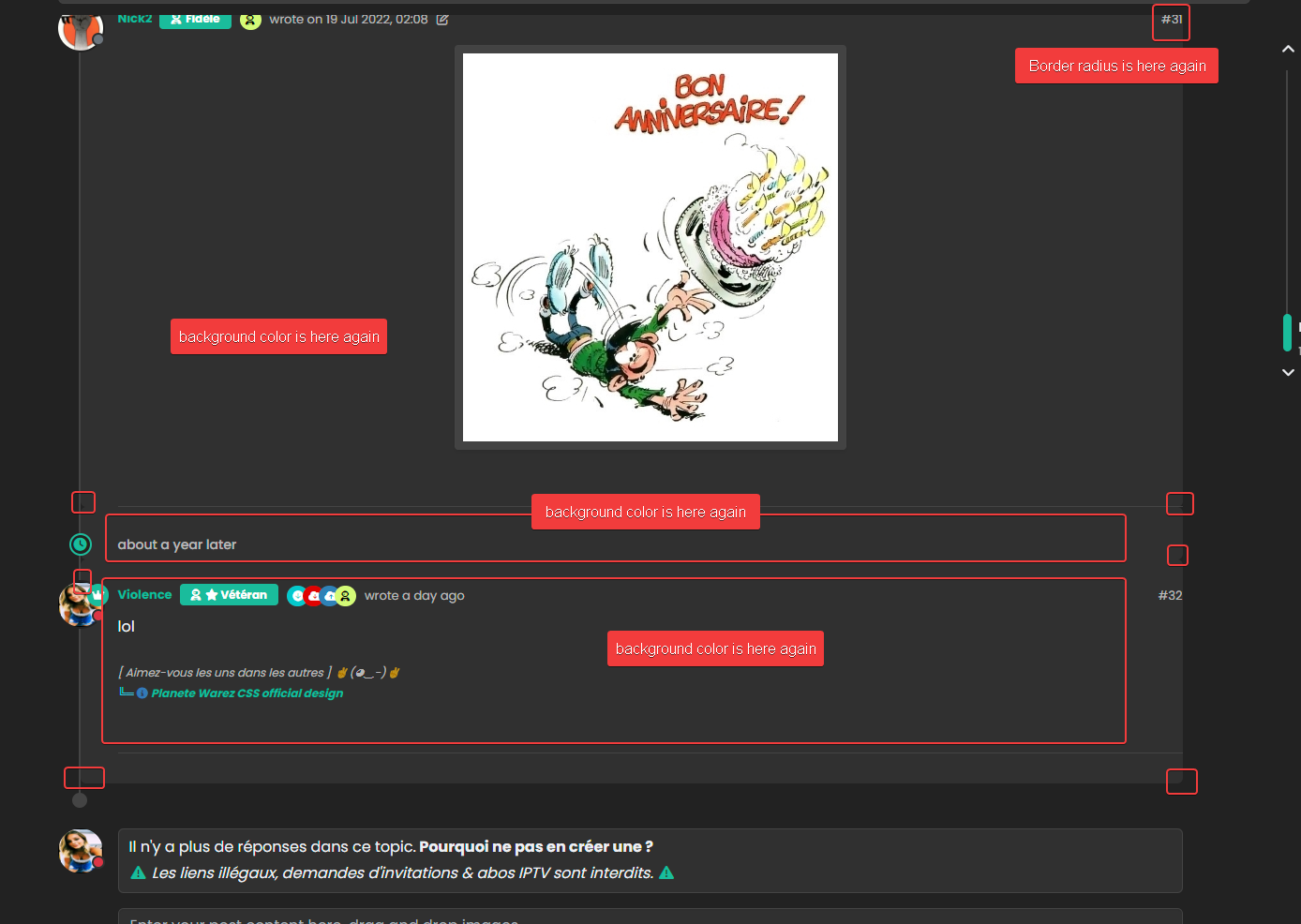
PW and WS Spirit alive
-
nope
Sorry I was on my way back from work @phenomlab
So in fact I’m already going to try adding .threaded to the CSS code.
When I activate Thread mode, everything is OK however when I deactivate Thread mode, certain classes remain and are not deleted
For example here, without Thread mode, the background is not returned to vanilla and the same thing for the border-radius :
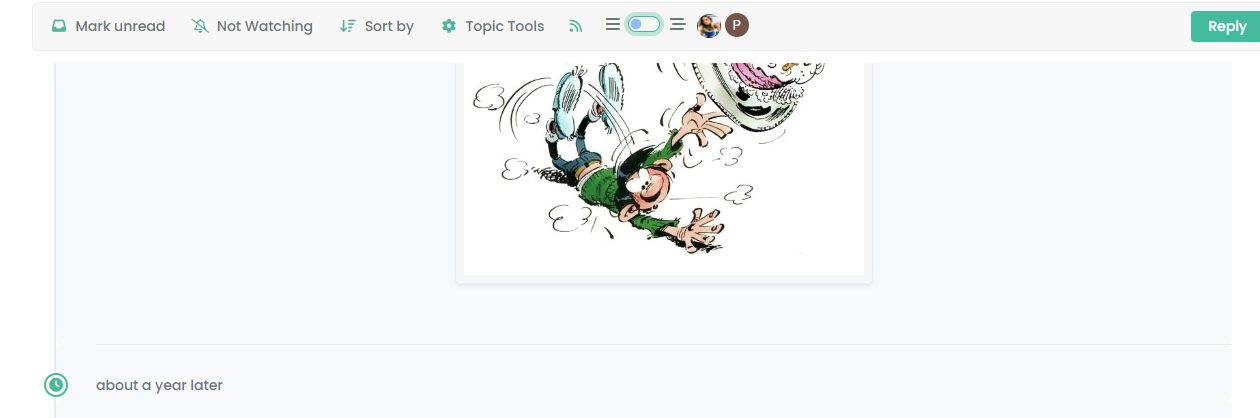
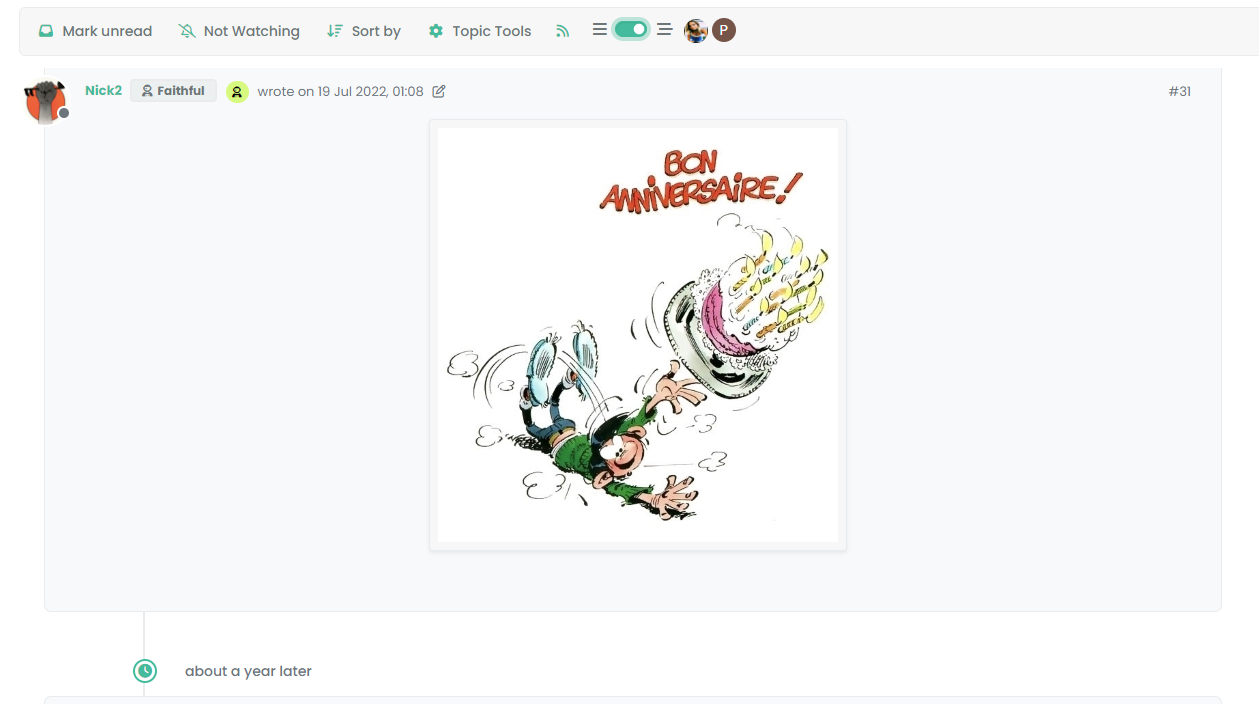
@DownPW For clarity, I didn’t change all of the classes - only the two you posted last
Threading off
Threading on
-
yep but these 2 class have problem, on your screens, with Threading Off, background color use –bs-body-navbar and not –bs-body-bg.
And if you seen topi event is not transparent like vanillaPW and WS Spirit alive
-
yep but these 2 class have problem, on your screens, with Threading Off, background color use –bs-body-navbar and not –bs-body-bg.
And if you seen topi event is not transparent like vanilla@DownPW That should make no difference?
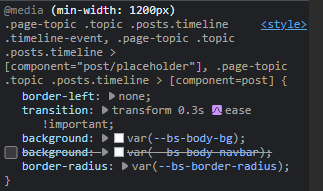
Just remove it from the class
.page-topic .topic .posts.timeline .timeline-event, .page-topic .topic .posts.timeline > [component="post/placeholder"], .page-topic .topic .posts.timeline > [component=post] {
    border-left: none;
    transition: transform 0.3s ease !important;
    background: var(--bs-body-bg);
    /* background: var(--bs-body-navbar); */
    border-radius: var(--bs-border-radius);
}
-
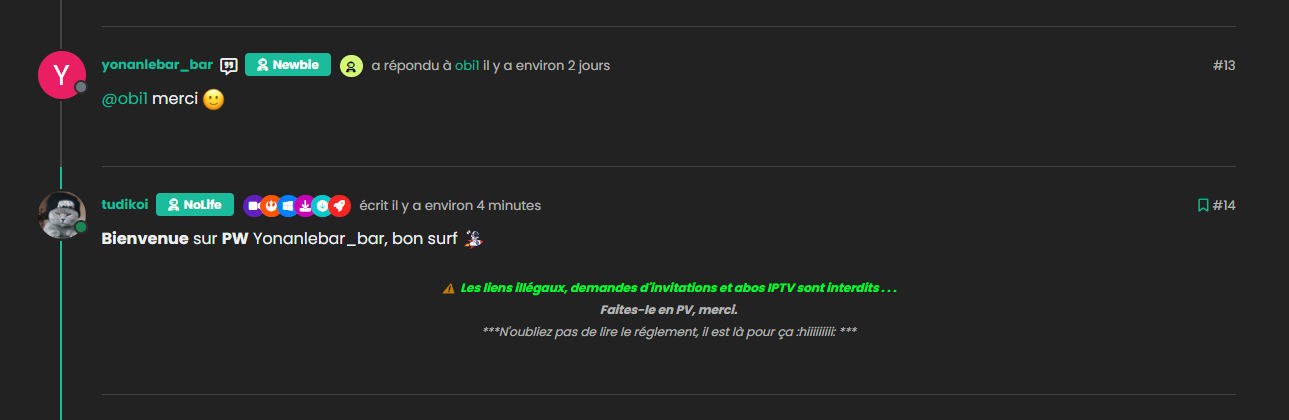
that makes all the difference
Vanilla is like this:
-
yep but these 2 class have problem, on your screens, with Threading Off, background color use –bs-body-navbar and not –bs-body-bg.
And if you seen topi event is not transparent like vanilla@DownPW said in Threading support for NodeBB:
And if you seen topi event is not transparent like vanilla
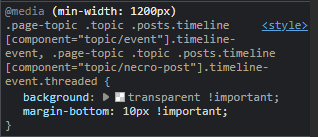
It is for me
-
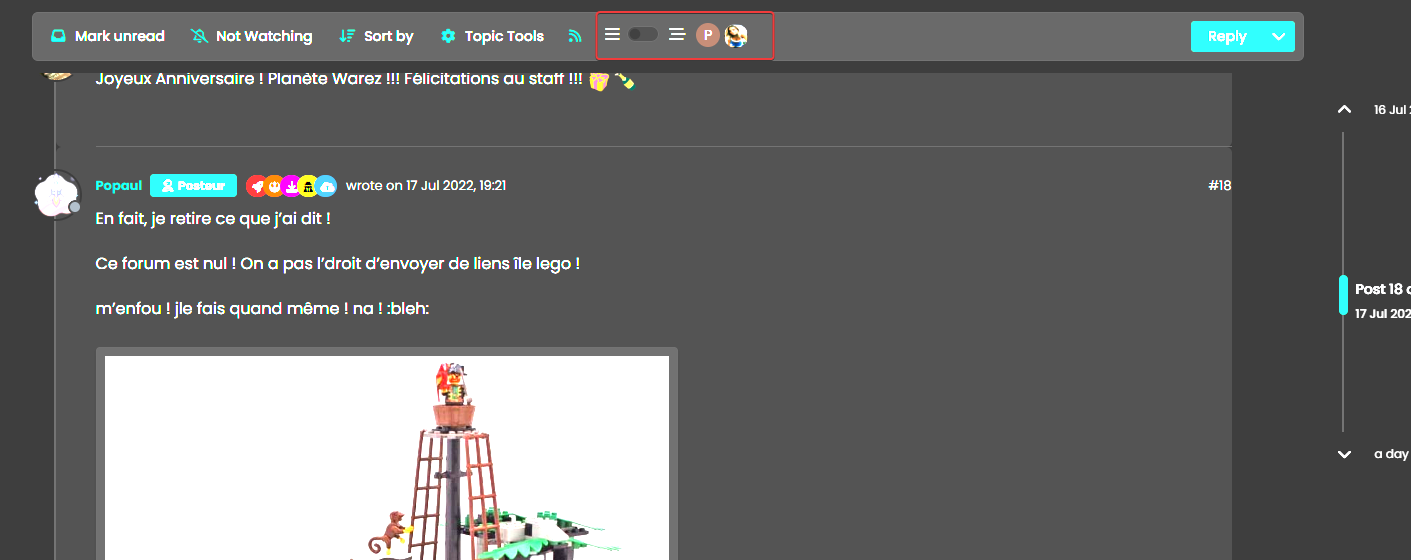
nope for me
-
no return to vanilla background
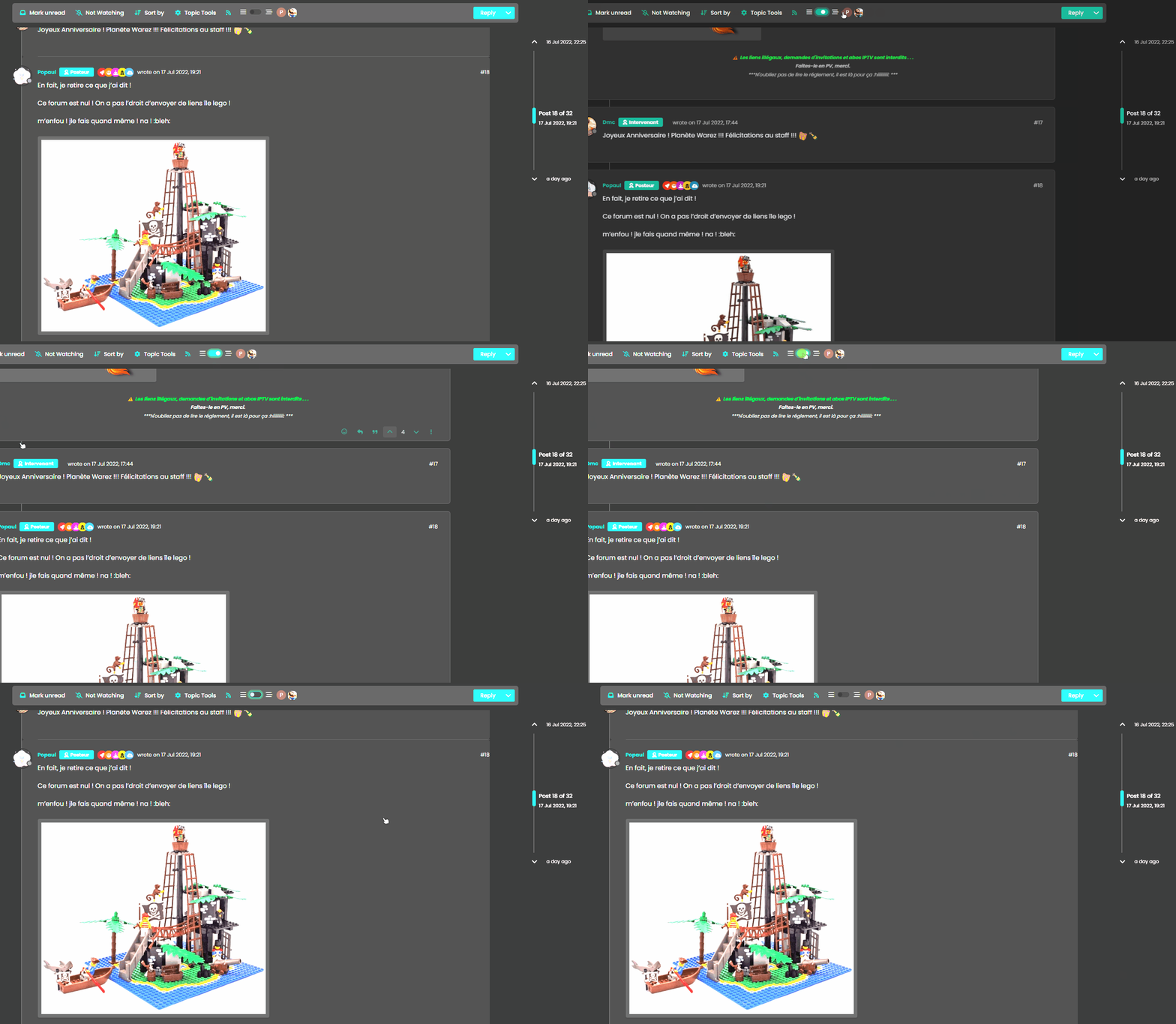
vanilla: bs-body-bg
thread ON: bs-body-navbarPW and WS Spirit alive



Hello! It looks like you're interested in this conversation, but you don't have an account yet.
Getting fed up of having to scroll through the same posts each visit? When you register for an account, you'll always come back to exactly where you were before, and choose to be notified of new replies (either via email, or push notification). You'll also be able to save bookmarks and upvote posts to show your appreciation to other community members.
With your input, this post could be even better 💗
Register Login