Virgin router replacement
-
@phenomlab I understand, I don’t have a plug socket nearby unfortunately
 .

@JAC Can you try it in another room that does have spare sockets? It would then rule out the powerline adapters - you obviously need to do the same downstairs where the hub is.
Mark Cutting also advises organisations as a Fractional CIO, Fractional CISO and Executive Advisor, helping boards improve technology governance, cyber resilience and executive decision making. Learn more at Gratmore Ltd
-
@JAC Can you try it in another room that does have spare sockets? It would then rule out the powerline adapters - you obviously need to do the same downstairs where the hub is.

-
@JAC Can you try it in another room that does have spare sockets? It would then rule out the powerline adapters - you obviously need to do the same downstairs where the hub is.
@phenomlab yes sure, will do.
-
@JAC Yes, you could turn off ACL (Access Control Lists) because you’ll probably not need them - try it
-
-
-
All in all seeing speeds pretty similar to what I get off WiFi. Is it best to just stick with the WiFi and put up with that?
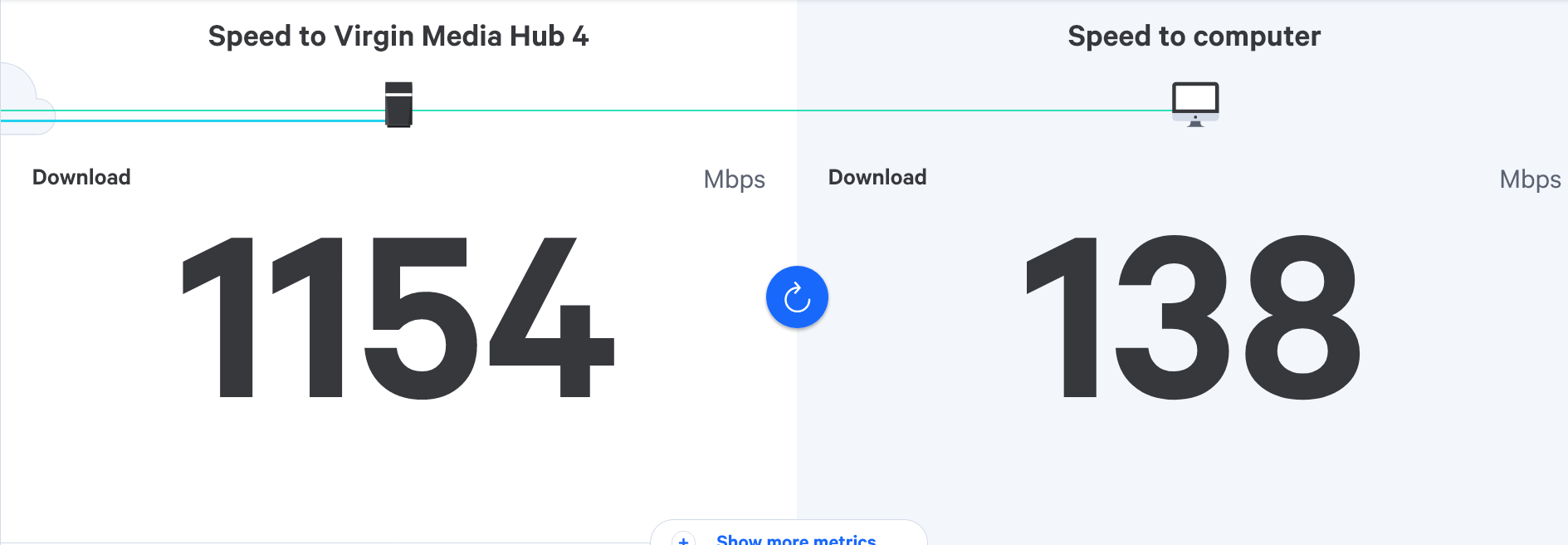
@JAC I think so, yes. It’s pretty clear that the speed drops significantly with the powerline adapters even if the VPN is off, but with it connected directly to the hub downstairs, you get in excess of 800Mbps. Would be worth testing directly into the hub from the lounge one more time I think to ensure the speed experience is consistent.
Mark Cutting also advises organisations as a Fractional CIO, Fractional CISO and Executive Advisor, helping boards improve technology governance, cyber resilience and executive decision making. Learn more at Gratmore Ltd
-
@JAC I think so, yes. It’s pretty clear that the speed drops significantly with the powerline adapters even if the VPN is off, but with it connected directly to the hub downstairs, you get in excess of 800Mbps. Would be worth testing directly into the hub from the lounge one more time I think to ensure the speed experience is consistent.
@phenomlab thanks for the continued advice Mark.
So testing again over WiFi…
With VPN off

With VPN on
 - seems a high result. 🧐
-
@phenomlab thanks for the continued advice Mark.
So testing again over WiFi…
With VPN off
With VPN on
- seems a high result. 🧐
@JAC But nothing like this
https://sudonix.org/topic/286/virgin-router-replacement/91?_=1695833317393
Is that in the same room as the hub ?
Mark Cutting also advises organisations as a Fractional CIO, Fractional CISO and Executive Advisor, helping boards improve technology governance, cyber resilience and executive decision making. Learn more at Gratmore Ltd
-
phenomlab referenced this topic on
-
@JAC But nothing like this
https://sudonix.org/topic/286/virgin-router-replacement/91?_=1695833317393
Is that in the same room as the hub ?
@phenomlab Absolutely pal, I wonder if moving the hub would improve the speed? It seems to me like it probably would? but I’m no expert, that’s why I’m here asking you the questions

 .
I’d love them speeds mate really would!
The same room as the hub yes mate

-
@JAC But nothing like this
https://sudonix.org/topic/286/virgin-router-replacement/91?_=1695833317393
Is that in the same room as the hub ?
@phenomlab as of now I’m getting around 80mbps with the VPN on.
-
@phenomlab Absolutely pal, I wonder if moving the hub would improve the speed? It seems to me like it probably would? but I’m no expert, that’s why I’m here asking you the questions
.I’d love them speeds mate really would!
The same room as the hub yes mate
@JAC Can you test wired in the same room ? This is completely different to what we got yesterday
Mark Cutting also advises organisations as a Fractional CIO, Fractional CISO and Executive Advisor, helping boards improve technology governance, cyber resilience and executive decision making. Learn more at Gratmore Ltd
-
@JAC Can you test wired in the same room ? This is completely different to what we got yesterday
@phenomlab said in Virgin router replacement:
Can you test wired in the same room ? This is completely different to what we got yesterday
Wired connection over 800mbps yesterday if I remember right?
-
@phenomlab said in Virgin router replacement:
Can you test wired in the same room ? This is completely different to what we got yesterday
Wired connection over 800mbps yesterday if I remember right?
@JAC said in Virgin router replacement:
Wired connection over 800mbps yesterday if I remember right?
Yes - I want to make sure it’s the same and not a fluke.
Mark Cutting also advises organisations as a Fractional CIO, Fractional CISO and Executive Advisor, helping boards improve technology governance, cyber resilience and executive decision making. Learn more at Gratmore Ltd
-
@JAC said in Virgin router replacement:
Wired connection over 800mbps yesterday if I remember right?
Yes - I want to make sure it’s the same and not a fluke.
@phenomlab ah yes, I can take it all back down later or tomorrow if that’s ok mate?
I’ve plugged the spare ethernet cable I now have from the V6 box to the router, not that this makes any difference.
-
@phenomlab ah yes, I can take it all back down later or tomorrow if that’s ok mate?
I’ve plugged the spare ethernet cable I now have from the V6 box to the router, not that this makes any difference.
-

An indication that the WiFi range isn’t quite there, even with the given WiFi pods from Virgin.
@JAC said in Virgin router replacement:
An indication that the WiFi range isn’t quite there, even with the given WiFi pods from Virgin.
Speaking of this, I had the WiFi band on 5GHz, when changed to auto it almost halved the speed.
I’m guessing it was 2.4GHz that it was choosing (if right), once changed back to 5GHz the speed goes up.
-
@phenomlab ah yes, I can take it all back down later or tomorrow if that’s ok mate?
I’ve plugged the spare ethernet cable I now have from the V6 box to the router, not that this makes any difference.
@JAC fine with me. No rush at all. At this point, it might just be a case of putting up with it. You now know that your Virgin Hub isn’t at fault, so you’re left with powerline adapters if you want wired, but it seems the Wifi is more than enough - even when connected to the VPN.
Can you try and disable IPv6 in the network settings, restart the shield, and test again?
Mark Cutting also advises organisations as a Fractional CIO, Fractional CISO and Executive Advisor, helping boards improve technology governance, cyber resilience and executive decision making. Learn more at Gratmore Ltd
-
@JAC fine with me. No rush at all. At this point, it might just be a case of putting up with it. You now know that your Virgin Hub isn’t at fault, so you’re left with powerline adapters if you want wired, but it seems the Wifi is more than enough - even when connected to the VPN.
Can you try and disable IPv6 in the network settings, restart the shield, and test again?
@phenomlab said in Virgin router replacement:
Can you try and disable IPv6 in the network settings, restart the shield, and test again?
Thanks for the continued advice Mark.
The IPv6 option was already off mate
. -
@phenomlab said in Virgin router replacement:
Can you try and disable IPv6 in the network settings, restart the shield, and test again?
Thanks for the continued advice Mark.
The IPv6 option was already off mate
.
@JAC Thanks. On investigating this further, it seems that the slow network connections is something that the nVidia Shield is notorious for. Some users even report speeds of 10Mbps
Mark Cutting also advises organisations as a Fractional CIO, Fractional CISO and Executive Advisor, helping boards improve technology governance, cyber resilience and executive decision making. Learn more at Gratmore Ltd


Hello! It looks like you're interested in this conversation, but you don't have an account yet.
Getting fed up of having to scroll through the same posts each visit? When you register for an account, you'll always come back to exactly where you were before, and choose to be notified of new replies (either via email, or push notification). You'll also be able to save bookmarks and upvote posts to show your appreciation to other community members.
With your input, this post could be even better 💗
Register LoginRelated Topics
-
-
-

Linksys EA6400
Solved Networks -
Issues with routing
Solved Networks -
-
Nvidia shield & router
Solved Configure -
-
Virgin Media Broadband
Solved General