NodeBB customisation
-
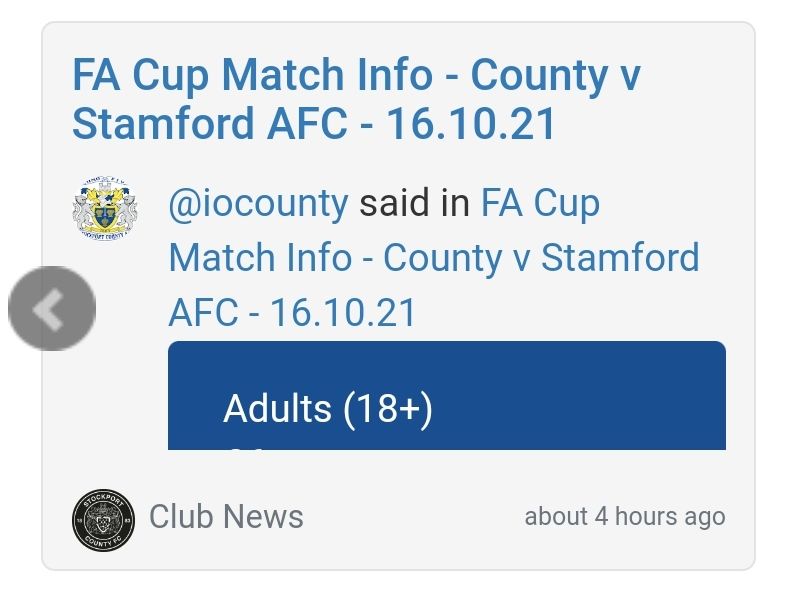
Do you remember how to remove the quote area out of the slider at all Mark?
I remember it being done last time.
Thanks
 .
.@jac said in NodeBB customisation:
Do you remember how to remove the quote area out of the slider at all Mark?
I remember it being done last time.
Thanks
.
-
@jac said in NodeBB customisation:
Do you remember how to remove the quote area out of the slider at all Mark?
I remember it being done last time.
Thanks
.@jac Try this
.recent-card-body blockquote, .recent-card-body blockquote p {
    background: none;
    color: #000000;
    border-left: none;
}
.recent-card-body blockquote:after {
    border: none;
}
Mark Cutting also advises organisations as a Fractional CIO, Fractional CISO and Executive Advisor, helping boards improve technology governance, cyber resilience and executive decision making. Learn more at Gratmore Ltd
-
@jac Try this
.recent-card-body blockquote, .recent-card-body blockquote p { background: none; color: #000000; border-left: none; } .recent-card-body blockquote:after { border: none; }@phenomlab said in NodeBB customisation:
@jac Try this
.recent-card-body blockquote, .recent-card-body blockquote p {
    background: none;
    color: #000000;
    border-left: none;
}
.recent-card-body blockquote:after {
    border: none;
}
Many thanks mate, that’s worked
. -
@phenomlab said in NodeBB customisation:
@jac Try this
.recent-card-body blockquote, .recent-card-body blockquote p {
    background: none;
    color: #000000;
    border-left: none;
}
.recent-card-body blockquote:after {
    border: none;
}
Many thanks mate, that’s worked
.@jac said in NodeBB customisation:
@phenomlab said in NodeBB customisation:
@jac Try this
.recent-card-body blockquote, .recent-card-body blockquote p {
    background: none;
    color: #000000;
    border-left: none;
}
.recent-card-body blockquote:after {
    border: none;
}
Many thanks mate, that’s worked
.Whilst I’m at it am I ok to suggest this change? -
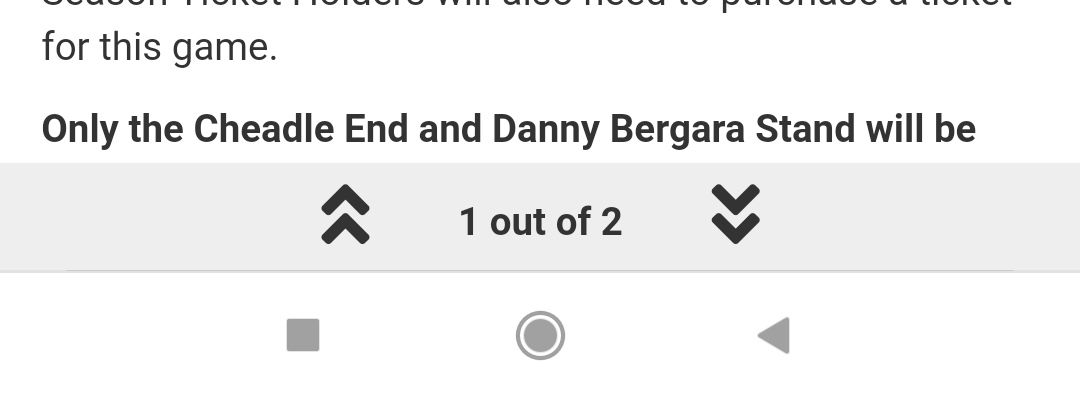 the read posts bar at the bottom of the page?
Maybe have that in a yellow and then changing to blue once it has been read?
Is this possible? I remember it being done last time. What a fool I was to not back it up properly last time, I lost some good CSS changes mate as you know.
-
@jac said in NodeBB customisation:
@phenomlab said in NodeBB customisation:
@jac Try this
.recent-card-body blockquote, .recent-card-body blockquote p {
    background: none;
    color: #000000;
    border-left: none;
}
.recent-card-body blockquote:after {
    border: none;
}
Many thanks mate, that’s worked
.Whilst I’m at it am I ok to suggest this change? -
the read posts bar at the bottom of the page?Maybe have that in a yellow and then changing to blue once it has been read?
Is this possible? I remember it being done last time. What a fool I was to not back it up properly last time, I lost some good CSS changes mate as you know.
@jac Try this
.topic .pagination-block {
    background-color: #ffc557;
}
.topic .pagination-block .progress-bar {
    background-color: #194f90;
}
.topic .pagination-block .wrapper,
.topic .pagination-block .pagination-text  {
    color: #ffffff;
}
Mark Cutting also advises organisations as a Fractional CIO, Fractional CISO and Executive Advisor, helping boards improve technology governance, cyber resilience and executive decision making. Learn more at Gratmore Ltd
-
@jac Try this
.topic .pagination-block { background-color: #ffc557; } .topic .pagination-block .progress-bar { background-color: #194f90; } .topic .pagination-block .wrapper, .topic .pagination-block .pagination-text { color: #ffffff; }@phenomlab said in NodeBB customisation:
@jac Try this
.topic .pagination-block {
    background-color: #ffc557;
}
.topic .pagination-block .progress-bar {
    background-color: #194f90;
}
.topic .pagination-block .wrapper,
.topic .pagination-block .pagination-text  {
    color: #ffffff;
}
Fantastic mate, worked a treat again
.Is the font a little more complicated to do?
-
@phenomlab said in NodeBB customisation:
@jac Try this
.topic .pagination-block {
    background-color: #ffc557;
}
.topic .pagination-block .progress-bar {
    background-color: #194f90;
}
.topic .pagination-block .wrapper,
.topic .pagination-block .pagination-text  {
    color: #ffffff;
}
Fantastic mate, worked a treat again
.Is the font a little more complicated to do?
@jac Nope. Do you want the same as is here, but global (for example, the default everywhere) ?
Mark Cutting also advises organisations as a Fractional CIO, Fractional CISO and Executive Advisor, helping boards improve technology governance, cyber resilience and executive decision making. Learn more at Gratmore Ltd
-
@jac Nope. Do you want the same as is here, but global (for example, the default everywhere) ?
@phenomlab yes please mate, it’s the possible at all? - happy to choose a different font as wary of copying mate.
Many thanks as always!
-
@phenomlab yes please mate, it’s the possible at all? - happy to choose a different font as wary of copying mate.
Many thanks as always!
Although the font did look great last time. I can’t remember if the header was a different font
 .
. -
Although the font did look great last time. I can’t remember if the header was a different font
.@jac Let me have a play around with this.
Mark Cutting also advises organisations as a Fractional CIO, Fractional CISO and Executive Advisor, helping boards improve technology governance, cyber resilience and executive decision making. Learn more at Gratmore Ltd
-
@phenomlab said in NodeBB customisation:
@jac Let me have a play around with this.
Many thanks mate.
-
@jac said in NodeBB customisation:
@jac said in NodeBB customisation:
@jac said in NodeBB customisation:
@phenomlab said in NodeBB customisation:
@jac It’s in the above post

Apologies!
Worked a treat! Many thanks again

 .
.Am ok to keep posting little tweaks that I am looking to change?
Looking to change the font & number of read posts.
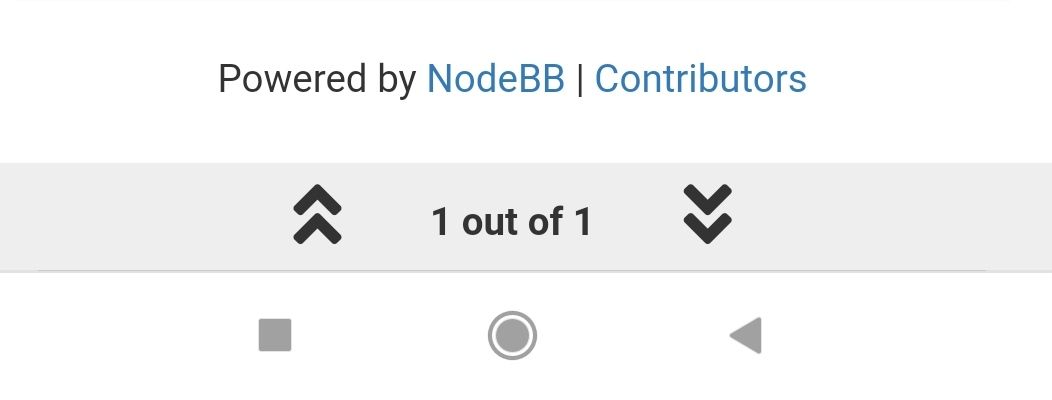
Looking to change this to blue white a white font and then as the posts are read it changes to yellow?
Is this something that is possible? I seem to remember it working out well on the last installation.
Many thanks.
I’ve actually found a screenshot of how grtit looked last time. The font etc and the bottom bar looked great!

Is there any way to change the member name colour on the quote? As this clashes with the colour.
Thanks
.
@jac said in NodeBB customisation:
@jac said in NodeBB customisation:
@jac said in NodeBB customisation:
@jac said in NodeBB customisation:
@phenomlab said in NodeBB customisation:
@jac It’s in the above post
Apologies!
Worked a treat! Many thanks again
.Am ok to keep posting little tweaks that I am looking to change?
Looking to change the font & number of read posts.
Looking to change this to blue white a white font and then as the posts are read it changes to yellow?
Is this something that is possible? I seem to remember it working out well on the last installation.
Many thanks.
I’ve actually found a screenshot of how grtit looked last time. The font etc and the bottom bar looked great!
Is there any way to change the member name colour on the quote? As this clashes with the colour.
Thanks
.Youll see the title don’t appears to be different or bold.
Many thanks as always!
-
@jac said in NodeBB customisation:
@jac said in NodeBB customisation:
@jac said in NodeBB customisation:
@jac said in NodeBB customisation:
@phenomlab said in NodeBB customisation:
@jac It’s in the above post
Apologies!
Worked a treat! Many thanks again
.Am ok to keep posting little tweaks that I am looking to change?
Looking to change the font & number of read posts.
Looking to change this to blue white a white font and then as the posts are read it changes to yellow?
Is this something that is possible? I seem to remember it working out well on the last installation.
Many thanks.
I’ve actually found a screenshot of how grtit looked last time. The font etc and the bottom bar looked great!
Is there any way to change the member name colour on the quote? As this clashes with the colour.
Thanks
.Youll see the title don’t appears to be different or bold.
Many thanks as always!
@jac I fixed that a while back

-
@jac said in NodeBB customisation:
@jac said in NodeBB customisation:
@jac said in NodeBB customisation:
@jac said in NodeBB customisation:
@phenomlab said in NodeBB customisation:
@jac It’s in the above post
Apologies!
Worked a treat! Many thanks again
.Am ok to keep posting little tweaks that I am looking to change?
Looking to change the font & number of read posts.
Looking to change this to blue white a white font and then as the posts are read it changes to yellow?
Is this something that is possible? I seem to remember it working out well on the last installation.
Many thanks.
I’ve actually found a screenshot of how grtit looked last time. The font etc and the bottom bar looked great!
Is there any way to change the member name colour on the quote? As this clashes with the colour.
Thanks
.Youll see the title don’t appears to be different or bold.
Many thanks as always!
@jac said in NodeBB customisation:
@jac said in NodeBB customisation:
@jac said in NodeBB customisation:
@jac said in NodeBB customisation:
@jac said in NodeBB customisation:
@phenomlab said in NodeBB customisation:
@jac It’s in the above post
Apologies!
Worked a treat! Many thanks again
.Am ok to keep posting little tweaks that I am looking to change?
Looking to change the font & number of read posts.
Looking to change this to blue white a white font and then as the posts are read it changes to yellow?
Is this something that is possible? I seem to remember it working out well on the last installation.
Many thanks.
I’ve actually found a screenshot of how grtit looked last time. The font etc and the bottom bar looked great!
Is there any way to change the member name colour on the quote? As this clashes with the colour.
Thanks
.Youll see the title don’t appears to be different or bold.
Many thanks as always!
Apologies it’s this mate, it was hiding at the start of the quote.
-
@jac said in NodeBB customisation:
@jac said in NodeBB customisation:
@jac said in NodeBB customisation:
@jac said in NodeBB customisation:
@jac said in NodeBB customisation:
@phenomlab said in NodeBB customisation:
@jac It’s in the above post
Apologies!
Worked a treat! Many thanks again
.Am ok to keep posting little tweaks that I am looking to change?
Looking to change the font & number of read posts.
Looking to change this to blue white a white font and then as the posts are read it changes to yellow?
Is this something that is possible? I seem to remember it working out well on the last installation.
Many thanks.
I’ve actually found a screenshot of how grtit looked last time. The font etc and the bottom bar looked great!
Is there any way to change the member name colour on the quote? As this clashes with the colour.
Thanks
.Youll see the title don’t appears to be different or bold.
Many thanks as always!
Apologies it’s this mate, it was hiding at the start of the quote.
This post is deleted! -
@jac said in NodeBB customisation:
@jac said in NodeBB customisation:
@jac said in NodeBB customisation:
@jac said in NodeBB customisation:
@jac said in NodeBB customisation:
@phenomlab said in NodeBB customisation:
@jac It’s in the above post
Apologies!
Worked a treat! Many thanks again
.Am ok to keep posting little tweaks that I am looking to change?
Looking to change the font & number of read posts.
Looking to change this to blue white a white font and then as the posts are read it changes to yellow?
Is this something that is possible? I seem to remember it working out well on the last installation.
Many thanks.
I’ve actually found a screenshot of how grtit looked last time. The font etc and the bottom bar looked great!
Is there any way to change the member name colour on the quote? As this clashes with the colour.
Thanks
.Youll see the title don’t appears to be different or bold.
Many thanks as always!
Apologies it’s this mate, it was hiding at the start of the quote.
@jac said in NodeBB customisation:
@jac said in NodeBB customisation:
@jac said in NodeBB customisation:
@jac said in NodeBB customisation:
@jac said in NodeBB customisation:
@jac said in NodeBB customisation:
@phenomlab said in NodeBB customisation:
@jac It’s in the above post
Apologies!
Worked a treat! Many thanks again
.Am ok to keep posting little tweaks that I am looking to change?
Looking to change the font & number of read posts.
Looking to change this to blue white a white font and then as the posts are read it changes to yellow?
Is this something that is possible? I seem to remember it working out well on the last installation.
Many thanks.
I’ve actually found a screenshot of how grtit looked last time. The font etc and the bottom bar looked great!
Is there any way to change the member name colour on the quote? As this clashes with the colour.
Thanks
.Youll see the title don’t appears to be different or bold.
Many thanks as always!
Apologies it’s this mate, it was hiding at the start of the quote.
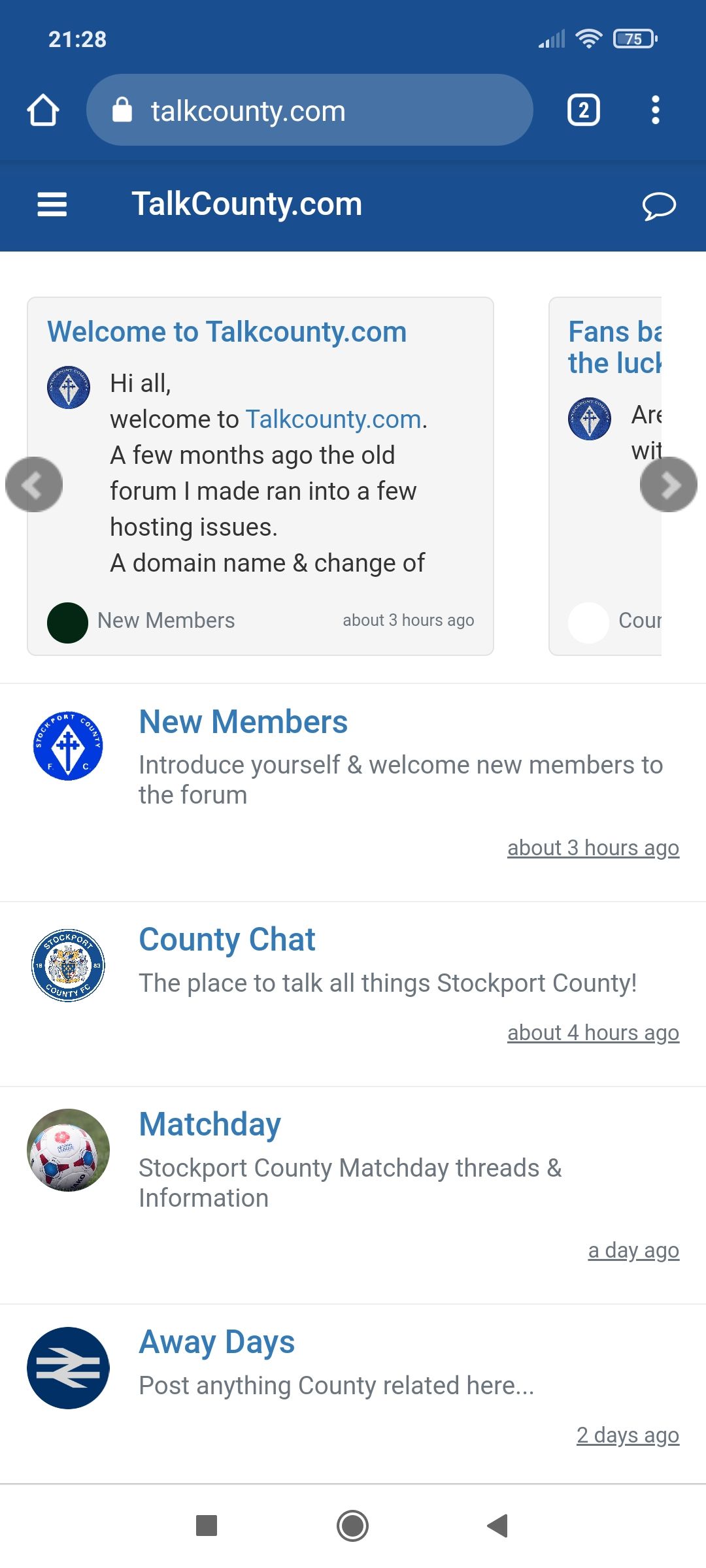

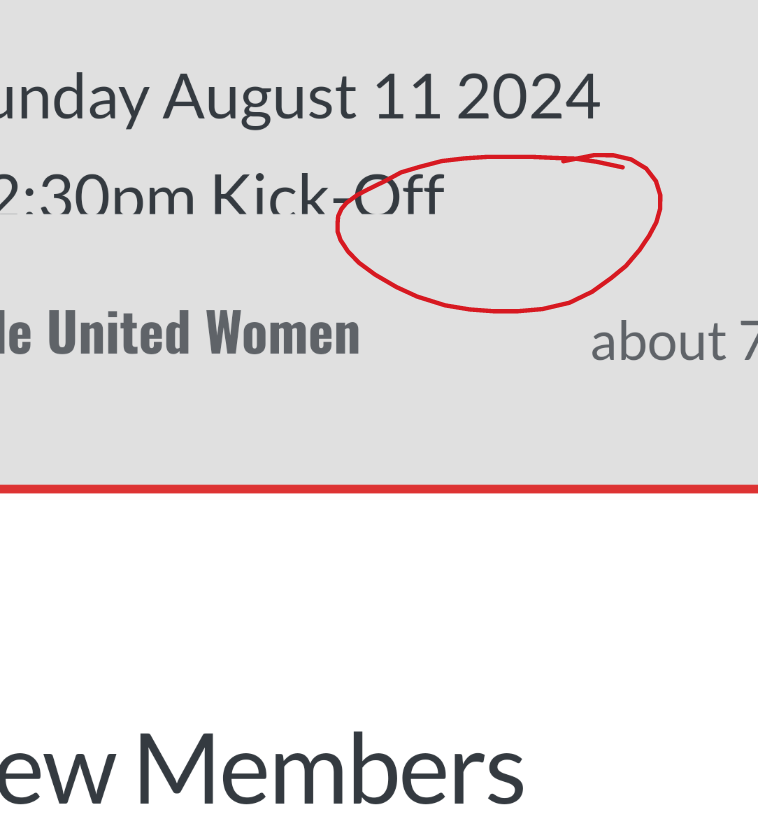
Title font appears to be bold compared? Although possibly same font.
-
@jac said in NodeBB customisation:
@jac said in NodeBB customisation:
@jac said in NodeBB customisation:
@jac said in NodeBB customisation:
@jac said in NodeBB customisation:
@jac said in NodeBB customisation:
@phenomlab said in NodeBB customisation:
@jac It’s in the above post
Apologies!
Worked a treat! Many thanks again
.Am ok to keep posting little tweaks that I am looking to change?
Looking to change the font & number of read posts.
Looking to change this to blue white a white font and then as the posts are read it changes to yellow?
Is this something that is possible? I seem to remember it working out well on the last installation.
Many thanks.
I’ve actually found a screenshot of how grtit looked last time. The font etc and the bottom bar looked great!
Is there any way to change the member name colour on the quote? As this clashes with the colour.
Thanks
.Youll see the title don’t appears to be different or bold.
Many thanks as always!
Apologies it’s this mate, it was hiding at the start of the quote.
Title font appears to be bold compared? Although possibly same font.
@jac said in NodeBB customisation:
Title font appears to be bold compared? Although possibly same font.
Ok, add this
.topic h1 .topic-title {
    font-weight: 600;
}
Mark Cutting also advises organisations as a Fractional CIO, Fractional CISO and Executive Advisor, helping boards improve technology governance, cyber resilience and executive decision making. Learn more at Gratmore Ltd
-
@jac said in NodeBB customisation:
Title font appears to be bold compared? Although possibly same font.
Ok, add this
.topic h1 .topic-title { font-weight: 600; }@phenomlab said in NodeBB customisation:
@jac said in NodeBB customisation:
Title font appears to be bold compared? Although possibly same font.
Ok, add this
.topic h1 .topic-title {
    font-weight: 600;
}
Worked a treat again my friend, thank you very much as always!
-
@phenomlab said in NodeBB customisation:
@jac said in NodeBB customisation:
Title font appears to be bold compared? Although possibly same font.
Ok, add this
.topic h1 .topic-title {
    font-weight: 600;
}
Worked a treat again my friend, thank you very much as always!
There’s probably going to be more changes on the way, if that’s ok? But like I’ve said previously I’m more than happy to put the Phenomlab stamp on it
. -
There’s probably going to be more changes on the way, if that’s ok? But like I’ve said previously I’m more than happy to put the Phenomlab stamp on it
.I think this was done last time… Is there any way to add … To the slider if it has a certain amount of characters?
Many thanks.


Hello! It looks like you're interested in this conversation, but you don't have an account yet.
Getting fed up of having to scroll through the same posts each visit? When you register for an account, you'll always come back to exactly where you were before, and choose to be notified of new replies (either via email, or push notification). You'll also be able to save bookmarks and upvote posts to show your appreciation to other community members.
With your input, this post could be even better 💗
Register LoginRelated Topics
-
-
-
-
-
NodeBB Footer
Solved Customisation -
-
-