Skip to content

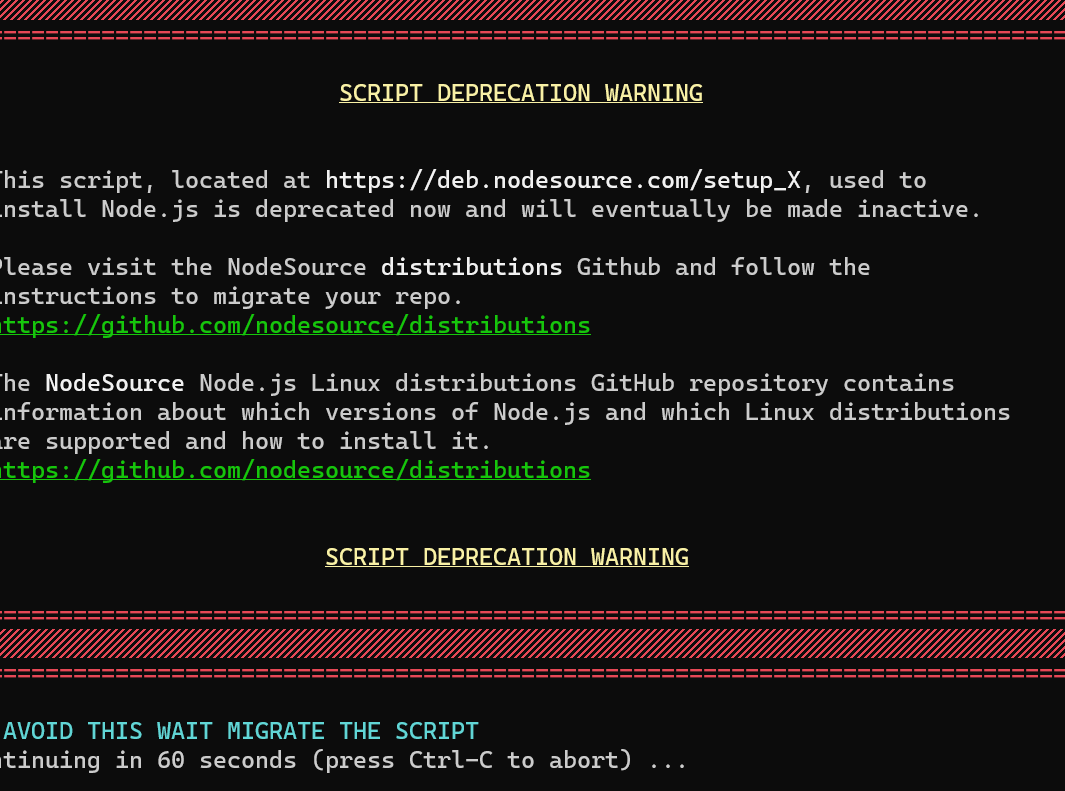
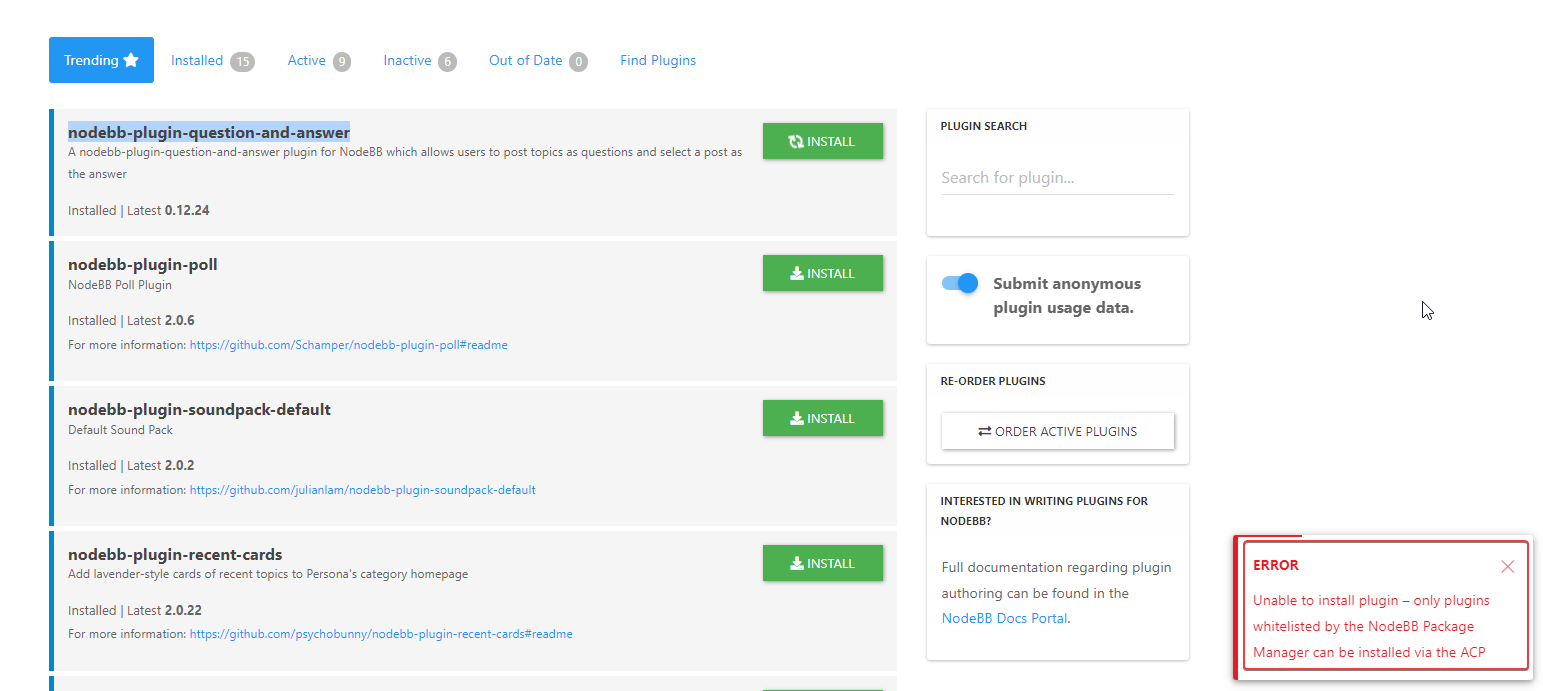
Please help me, I can't install nodebb

Locked Solved Customisation
7 2 1.2k 1

Did this solution help you?
Did you find the suggested solution useful? Support 💗 Sudonix with a coffee
If your organisation needs deeper expertise around infrastructure, security, or technology leadership, learn more about Phenomlab Ltd. Many of the deeper technical guides behind Sudonix are published there.

Related Topics
  • MogoDB v6 to v7 upgrade

    Solved Configure nodebb
    5
    1 Votes
    5 Posts
    1k Views
    @Panda if you used the Ubuntu PPA, I think this only goes as far as 6.x if I recall correctly.
  • Whitespace fixes in Nodebb

    Solved Customisation nodebb
    18
    2
    7 Votes
    18 Posts
    4k Views
    @Panda Just circling back here with something of an update (which I think you’ll like). I’ve completely restructured the ranking system. There are now less ranks, with a higher point threshold to reach them. More importantly, if you reload the site, you’ll notice that the ranks are now icons. I also removed the “Author” badge, and made this a single icon, which (to me) looks much better.
  • Why CSS acts different in Desktop?

    Bugs nodebb
    11
    4 Votes
    11 Posts
    2k Views
    @DownPW I’d have to agree with that.
  • [NODEBB] Help for my custom CSS

    Solved Customisation nodebb css bugfix
    237
    49 Votes
    237 Posts
    93k Views
    @baris said: You should change your selectors so it doesn’t look at the entire document. You probably only want to apply fancybox to stuff inside the #content element which is what changes when the user navigates around the page. So use $('#content a').... for your selectors then the forum logo in the header won’t be selected. I modified the JS Fancybox code now and this code and it seem better // --------------------------------------------- // Fancybox Media Reader (Without Website Logo) // --------------------------------------------- if (top.location.pathname !== '/login') { $(window).on('action:posts.loaded', function(data) { console.log("Polling DOM for lazyLoaded images to apply Fancybox"); $(document).ready(function() { $('#content a').not('.forum-logo').not(".avatar").not(".emoji").not(".bmac-noanimate").each(function() { $('#content a[href*=".jpg"], #content a[href*=".jpeg"], #content a[href*=".png"], #content a[href*=".gif"], #content a[href*=".webp"]').addClass("noanimate"); }); }); }); } if (top.location.pathname !== '/login') { $(document).ready(function() { $(window).on('action:ajaxify.end', function(data) { $('#content a').not('.logo').not(".avatar").not(".emoji").not(".bmac-noanimate").each(function() { $('#content a[href*=".jpg"], #content a[href*=".jpeg"], #content a[href*=".png"], #content a[href*=".gif"], #content a[href*=".webp"]').addClass("noanimate"); data.preventDefault() // Strip out the images contained inside blockquotes as this looks nasty :) $('#content blockquote img').remove(); }); Fancybox.bind( '#content a[href*=".jpg"], #content a[href*=".jpeg"], #content a[href*=".png"], #content a[href*=".gif"], #content a[href*=".webp"]', { groupAll: true, } ); }); }); } // Chat fancybox - fires when chat module loaded and AJAX calls new chat $(document).ready(function() { $(window).on('action:chat.loaded', function(data) { // >>> Se limiter au contenu principal uniquement <<< $('#content img').not('.forum-logo').not(".avatar").not(".emoji").not(".bmac-noanimate").each(function() { var newHref = $(this).attr("src"); $(this).wrap("<a class='fancybox' href='" + newHref + "'/>"); $('#content a[href*=".jpg"], #content a[href*=".jpeg"], #content a[href*=".png"], #content a[href*=".gif"], #content a[href*=".webp"]').addClass("noanimate"); data.preventDefault(); // Strip out the images contained inside blockquotes as this looks nasty :) $('#content blockquote img').remove(); }); Fancybox.bind( '#content a[href*=".jpg"], #content a[href*=".jpeg"], #content a[href*=".png"], #content a[href*=".gif"], #content a[href*=".webp"]', { groupAll: true, } ); }); }); For the logo, I must use overflow: visible !important; on [component="brand/logo"] /* --- Logo --- */ [component="brand/logo"] { max-height: 50px; width: auto; height: auto; max-width: 100%; display: block; object-fit: contain; object-position: left center; overflow: visible !important; } Better result !!
  • NodeBB - Created pages not found?

    General
    20
    3 Votes
    20 Posts
    4k Views
    @jac Exactly. Hard point to argue.
  • NodeBB Discord Plugins

    Unsolved Customisation nodebb discord plugin
    7
    0 Votes
    7 Posts
    2k Views
    @RiekMedia hi. Just following up on this thread (I know it’s old) but was curious to understand if it’s still an issue or not ?
  • nodebb-plugin-customize error

    Solved Customisation
    25
    2 Votes
    25 Posts
    10k Views
    @phenomlab it work, thanks
  • CSS Help on my Flarum

    Solved Customisation
    5
    2
    2 Votes
    5 Posts
    2k Views
    @mike-jones Yes, you’ll typically see this type of behaviour if there is another style that has higher priority in the sense that yours will be overridden. Using !important will override the higher preference, but should be used sparingly rather than everywhere.