speed up my DigitalOcean droplet - Virtualmin
-
how can i speed up my DigitalOcean droplet - Virtualmin
-
@Hari What machine size is the droplet now ?
Mark Cutting also advises organisations as a Fractional CIO, Fractional CISO and Executive Advisor, helping boards improve technology governance, cyber resilience and executive decision making. Learn more at Gratmore Ltd
-
@phenomlab 1gb ram 1vcpu AMD premium
and i am also getting flarum errors sometimes, i have observed when i am opening virtualmin this is happening more frequently while switching between webmin and virtualmin
https://discuss.flarum.org/d/30151-flarum-encountered-a-boot-error
edit:
i am aware that MySQL itself takes about 500mb to run, i have noticed this during the setup of Virtualmin
-
@phenomlab 1gb ram 1vcpu AMD premium
and i am also getting flarum errors sometimes, i have observed when i am opening virtualmin this is happening more frequently while switching between webmin and virtualmin
https://discuss.flarum.org/d/30151-flarum-encountered-a-boot-error
edit:
i am aware that MySQL itself takes about 500mb to run, i have noticed this during the setup of Virtualmin
@Hari said in speed up my DigitalOcean droplet - Virtualmin:
@phenomlab 1gb ram 1vcpu AMD premium
and i am also getting flarum errors sometimes, i have observed when i am opening virtualmin this is happening more frequently
https://discuss.flarum.org/d/30151-flarum-encountered-a-boot-error
This is nowhere near enough to run Webmin / Virtualmin which explains the slowness. You ideally need 2 x CPU and at least 2Gb RAM.
Mark Cutting also advises organisations as a Fractional CIO, Fractional CISO and Executive Advisor, helping boards improve technology governance, cyber resilience and executive decision making. Learn more at Gratmore Ltd
-
@Hari said in speed up my DigitalOcean droplet - Virtualmin:
@phenomlab 1gb ram 1vcpu AMD premium
and i am also getting flarum errors sometimes, i have observed when i am opening virtualmin this is happening more frequently
https://discuss.flarum.org/d/30151-flarum-encountered-a-boot-error
This is nowhere near enough to run Webmin / Virtualmin which explains the slowness. You ideally need 2 x CPU and at least 2Gb RAM.
@phenomlab
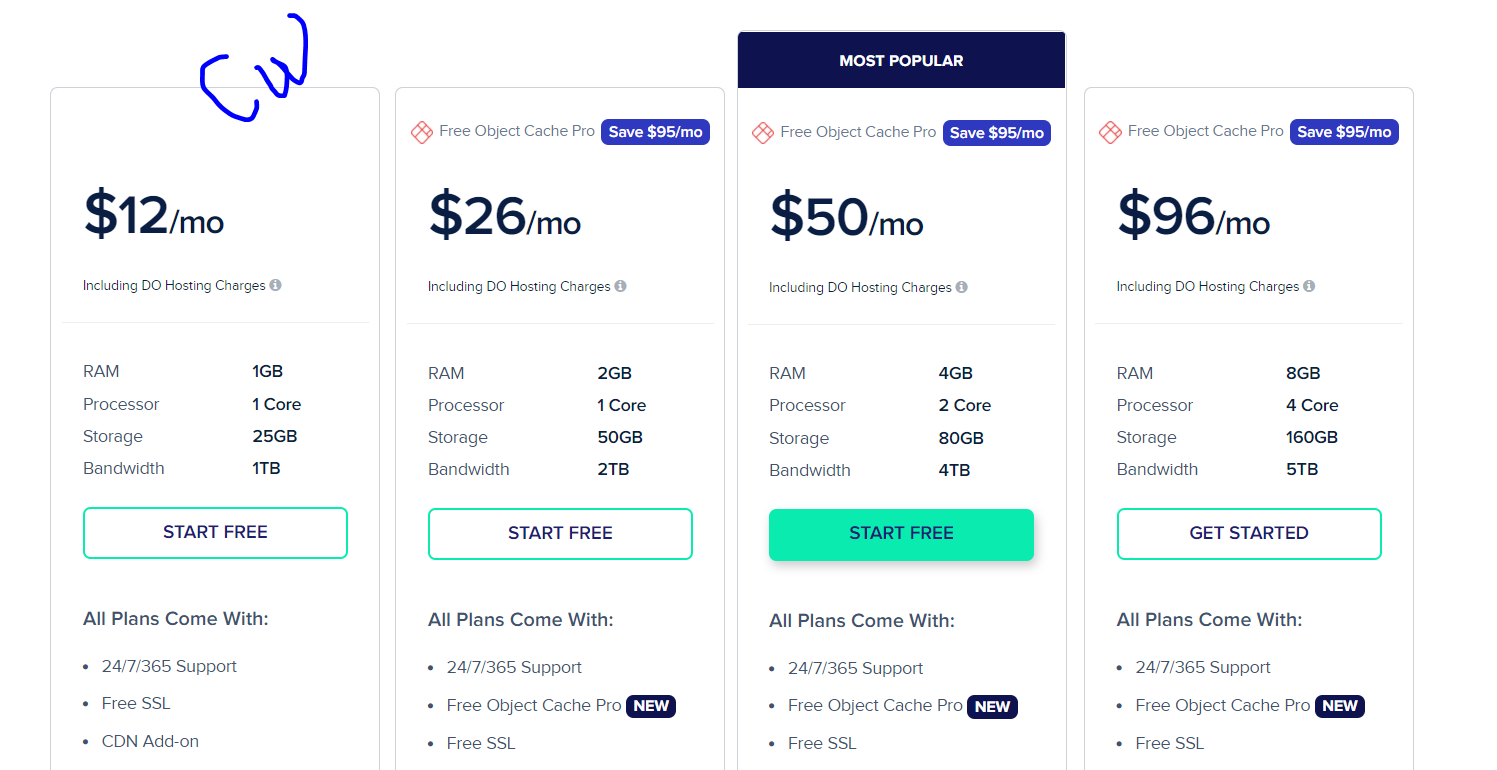
 i am already paying around $50 at cloudways the same server will be continued to use for another 6months. I am thinking to move back to cloudways for now and switch back to virtualmin once we are ready to leave.
so meanwhile I can save 20*6= $120
4gb 2cpu would be great for virtualmin but running flarum is getting more expensive these days. if it is WordPress it would not cost us money et al. each has its own benefits


-
@phenomlab
i am already paying around $50 at cloudways the same server will be continued to use for another 6months. I am thinking to move back to cloudways for now and switch back to virtualmin once we are ready to leave.so meanwhile I can save 20*6= $120
4gb 2cpu would be great for virtualmin but running flarum is getting more expensive these days. if it is WordPress it would not cost us money et al. each has its own benefits
@Hari Is the preference for Cloudways based on geolocation ? $50 is VERY expensive for what you are getting. Below is my system, also running Webmin / Virtualmin
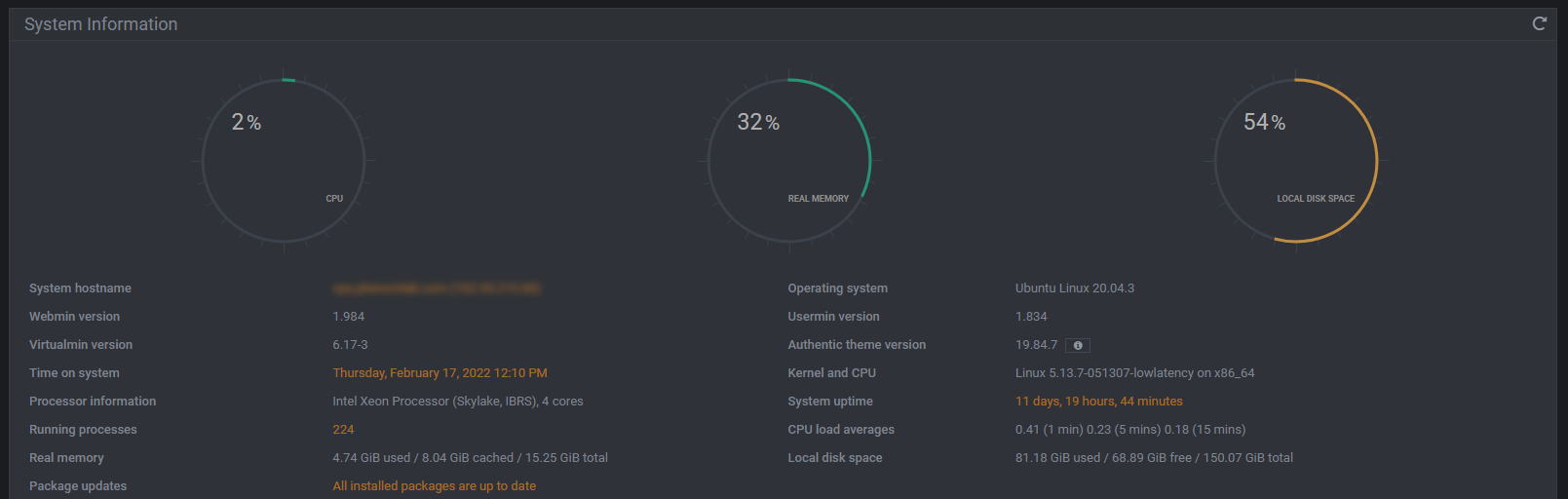
This system costs me €29 per month, so $35

Mark Cutting also advises organisations as a Fractional CIO, Fractional CISO and Executive Advisor, helping boards improve technology governance, cyber resilience and executive decision making. Learn more at Gratmore Ltd
-
@Hari Is the preference for Cloudways based on geolocation ? $50 is VERY expensive for what you are getting. Below is my system, also running Webmin / Virtualmin
This system costs me €29 per month, so $35
@phenomlab yes, we want the server to be in India, digital ocean or aws has data centres here.
it is the thing “we will continue to pay CW for the next 6months whey we need to pay for extra for flarum again, it’s $10 that is not a big deal at this moment” once we cancel CW we can spend $24 USD for flarum 4gb 2cpu
your plan is costing $48 on digital ocean.
-
@phenomlab yes, we want the server to be in India, digital ocean or aws has data centres here.
it is the thing “we will continue to pay CW for the next 6months whey we need to pay for extra for flarum again, it’s $10 that is not a big deal at this moment” once we cancel CW we can spend $24 USD for flarum 4gb 2cpu
your plan is costing $48 on digital ocean.
@Hari said in speed up my DigitalOcean droplet - Virtualmin:
your plan is costing $48 on digital ocean.

-
@phenomlab yes, we want the server to be in India, digital ocean or aws has data centres here.
it is the thing “we will continue to pay CW for the next 6months whey we need to pay for extra for flarum again, it’s $10 that is not a big deal at this moment” once we cancel CW we can spend $24 USD for flarum 4gb 2cpu
your plan is costing $48 on digital ocean.
@Hari I just remembered that there in fact ways to reduce the footprint of VirtualMin to make it run faster on slower machines.
Mark Cutting also advises organisations as a Fractional CIO, Fractional CISO and Executive Advisor, helping boards improve technology governance, cyber resilience and executive decision making. Learn more at Gratmore Ltd
-
@Hari I just remembered that there in fact ways to reduce the footprint of VirtualMin to make it run faster on slower machines.
@phenomlab thanks for sharing, after four or five months I will migrate to DO 2 or 4gb RAM droplet.

-
undefined Hari has marked this topic as solved on

Hello! It looks like you're interested in this conversation, but you don't have an account yet.
Getting fed up of having to scroll through the same posts each visit? When you register for an account, you'll always come back to exactly where you were before, and choose to be notified of new replies (either via email, or push notification). You'll also be able to save bookmarks and upvote posts to show your appreciation to other community members.
With your input, this post could be even better 💗
Register LoginDid this solution help you?
Related Topics
-
-
-
-
-
-
-
-
SASL LOGIN authentication failed: generic failure
Moved Solved Linux