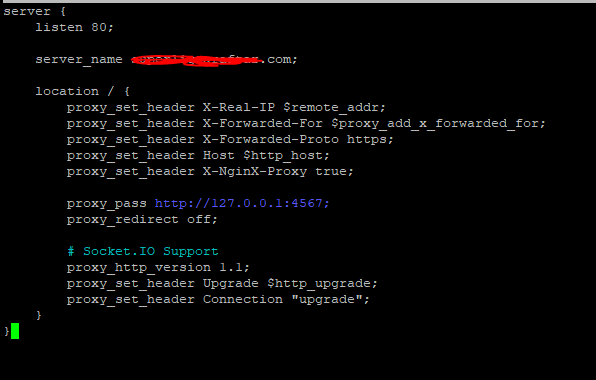
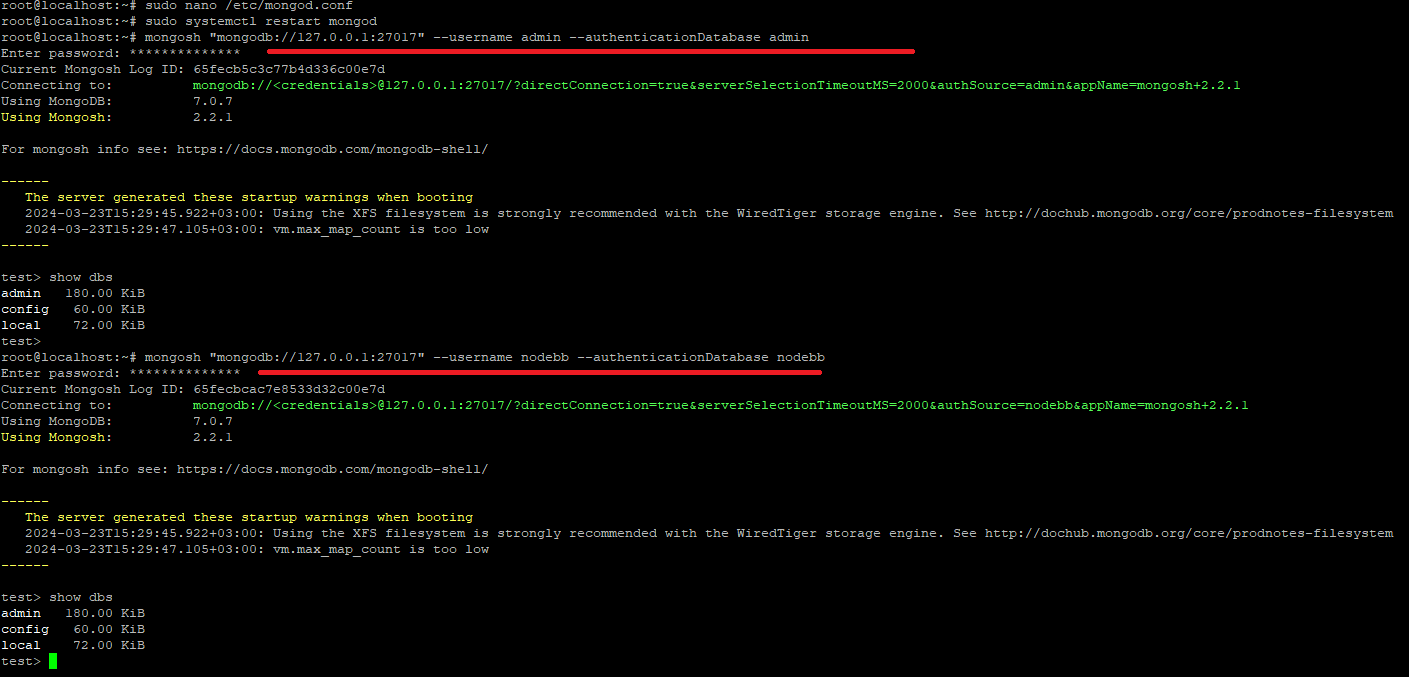
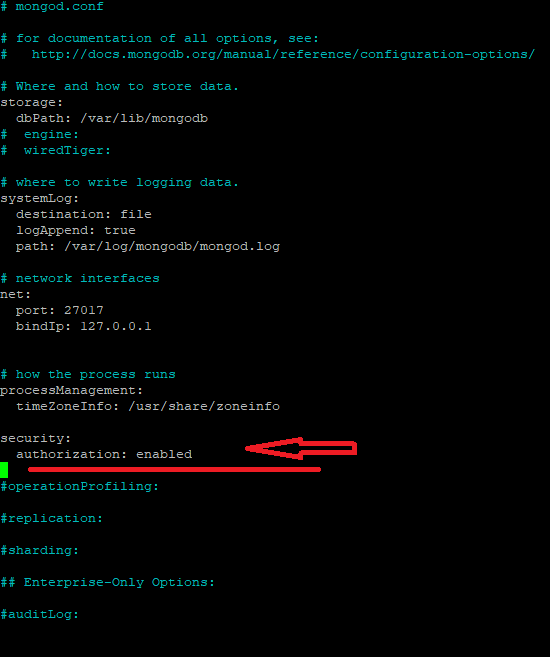
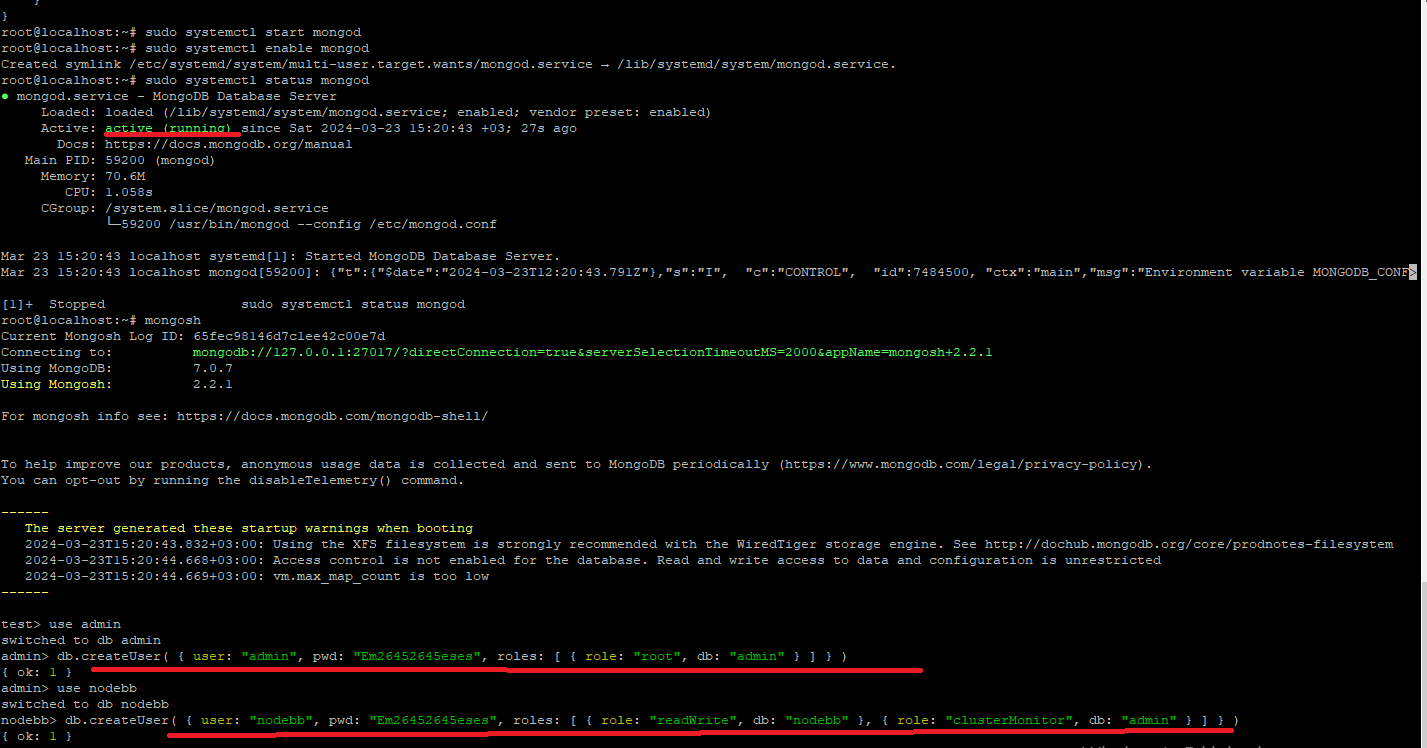
Is my Mongodb installation correct?
-
@phenomlab
I reset my server and set it up again.
save as video
Can you check if it is installed properly?
especially the mongodb part@ahmed thanks for the url. I’ll check this later.
Mark Cutting also advises organisations as a Fractional CIO, Fractional CISO and Executive Advisor, helping boards improve technology governance, cyber resilience and executive decision making. Learn more at Gratmore Ltd
-
@phenomlab
Thank you for taking the time to answer my questions. -
@phenomlab
Thank you for taking the time to answer my questions.@ahmed anytime
Mark Cutting also advises organisations as a Fractional CIO, Fractional CISO and Executive Advisor, helping boards improve technology governance, cyber resilience and executive decision making. Learn more at Gratmore Ltd
-
What could be the reason why mongodb gives this error when trying to take a backup?
root@localhost:~# sudo systemctl stop mongod root@localhost:~# sudo systemctl status mongod ○ mongod.service - MongoDB Database Server Loaded: loaded (/lib/systemd/system/mongod.service; enabled; vendor preset: enabled) Active: inactive (dead) since Sun 2024-03-24 18:48:04 +03; 21s ago Docs: https://docs.mongodb.org/manual Process: 61116 ExecStart=/usr/bin/mongod --config /etc/mongod.conf (code=exited, status=0/SUCCESS) Main PID: 61116 (code=exited, status=0/SUCCESS) CPU: 2.034s Mar 24 18:47:01 localhost systemd[1]: Started MongoDB Database Server. Mar 24 18:47:01 localhost mongod[61116]: {"t":{"$date":"2024-03-24T15:47:01.540Z"},"s":"I", "c":"CONTROL", "id":7484500, "ctx":"main","msg":"Environment variable MON> Mar 24 18:48:04 localhost systemd[1]: Stopping MongoDB Database Server... Mar 24 18:48:04 localhost systemd[1]: mongod.service: Deactivated successfully. Mar 24 18:48:04 localhost systemd[1]: Stopped MongoDB Database Server. Mar 24 18:48:04 localhost systemd[1]: mongod.service: Consumed 2.034s CPU time. lines 1-14/14 (END) [6]+ Stopped sudo systemctl status mongod root@localhost:~# mongodump 2024-03-24T18:49:15.964+0300 Failed: can't create session: failed to connect to mongodb://localhost/: server selection error: server selection timeout, current topology: { Type: Single, Servers: [{ Addr: localhost:27017, Type: Unknown, Last error: connection() error occurred during connection handshake: dial tcp 127.0.0.1:27017: connect: connection refused }, ] } root@localhost:~# root@localhost:~# root@localhost:~# mongodump --port 27017 -u "nodebb" -p "Em26452645" --db=nodebb --out=backup/ahmed 2024-03-24T18:50:25.654+0300 Failed: can't create session: failed to connect to mongodb://localhost:27017/: server selection error: server selection timeout, current topology: { Type: Single, Servers: [{ Addr: localhost:27017, Type: Unknown, Last error: connection() error occurred during connection handshake: dial tcp 127.0.0.1:27017: connect: connection refused }, ] } root@localhost:~# -
What could be the reason why mongodb gives this error when trying to take a backup?
root@localhost:~# sudo systemctl stop mongod root@localhost:~# sudo systemctl status mongod ○ mongod.service - MongoDB Database Server Loaded: loaded (/lib/systemd/system/mongod.service; enabled; vendor preset: enabled) Active: inactive (dead) since Sun 2024-03-24 18:48:04 +03; 21s ago Docs: https://docs.mongodb.org/manual Process: 61116 ExecStart=/usr/bin/mongod --config /etc/mongod.conf (code=exited, status=0/SUCCESS) Main PID: 61116 (code=exited, status=0/SUCCESS) CPU: 2.034s Mar 24 18:47:01 localhost systemd[1]: Started MongoDB Database Server. Mar 24 18:47:01 localhost mongod[61116]: {"t":{"$date":"2024-03-24T15:47:01.540Z"},"s":"I", "c":"CONTROL", "id":7484500, "ctx":"main","msg":"Environment variable MON> Mar 24 18:48:04 localhost systemd[1]: Stopping MongoDB Database Server... Mar 24 18:48:04 localhost systemd[1]: mongod.service: Deactivated successfully. Mar 24 18:48:04 localhost systemd[1]: Stopped MongoDB Database Server. Mar 24 18:48:04 localhost systemd[1]: mongod.service: Consumed 2.034s CPU time. lines 1-14/14 (END) [6]+ Stopped sudo systemctl status mongod root@localhost:~# mongodump 2024-03-24T18:49:15.964+0300 Failed: can't create session: failed to connect to mongodb://localhost/: server selection error: server selection timeout, current topology: { Type: Single, Servers: [{ Addr: localhost:27017, Type: Unknown, Last error: connection() error occurred during connection handshake: dial tcp 127.0.0.1:27017: connect: connection refused }, ] } root@localhost:~# root@localhost:~# root@localhost:~# mongodump --port 27017 -u "nodebb" -p "Em26452645" --db=nodebb --out=backup/ahmed 2024-03-24T18:50:25.654+0300 Failed: can't create session: failed to connect to mongodb://localhost:27017/: server selection error: server selection timeout, current topology: { Type: Single, Servers: [{ Addr: localhost:27017, Type: Unknown, Last error: connection() error occurred during connection handshake: dial tcp 127.0.0.1:27017: connect: connection refused }, ] } root@localhost:~#@ahmed the database needs to be running to use MongoDump.
Mark Cutting also advises organisations as a Fractional CIO, Fractional CISO and Executive Advisor, helping boards improve technology governance, cyber resilience and executive decision making. Learn more at Gratmore Ltd
-
Nodebb.org documentation states that Mongodb must be stopped before backup
nodebb.org documentation should be updated
I think I saw it wrongI will try as you say
-
Nodebb.org documentation states that Mongodb must be stopped before backup
nodebb.org documentation should be updated
I think I saw it wrongI will try as you say
@ahmed I never stop the database when backing up. Never did it with mysql either. I’m not saying it’s right but it’s always worked for me and the backup schedules I’ve created for others who have used that to perform recovery.
Mark Cutting also advises organisations as a Fractional CIO, Fractional CISO and Executive Advisor, helping boards improve technology governance, cyber resilience and executive decision making. Learn more at Gratmore Ltd
-
@ahmed I never stop the database when backing up. Never did it with mysql either. I’m not saying it’s right but it’s always worked for me and the backup schedules I’ve created for others who have used that to perform recovery.
I’m trying to take a backup while Mongodb is running, but this time it gives an authentication error.
root@localhost:~# mongodump --port 27017 -u "nodebb" -p "Em26452645" --db=nodebb --out=backup/ahmed 2024-03-24T19:15:41.690+0300 Failed: can't create session: failed to connect to mongodb://localhost:27017/: connection() error occurred during connection handshake: auth error: unable to authenticate using mechanism "SCRAM-SHA-256": (AuthenticationFailed) Authentication failed. root@localhost:~# root@localhost:~# root@localhost:~# root@localhost:~# mongodump 2024-03-24T19:15:54.554+0300 Failed: error creating intents to dump: error getting database names: (Unauthorized) Command listDatabases requires authentication -
I’m trying to take a backup while Mongodb is running, but this time it gives an authentication error.
root@localhost:~# mongodump --port 27017 -u "nodebb" -p "Em26452645" --db=nodebb --out=backup/ahmed 2024-03-24T19:15:41.690+0300 Failed: can't create session: failed to connect to mongodb://localhost:27017/: connection() error occurred during connection handshake: auth error: unable to authenticate using mechanism "SCRAM-SHA-256": (AuthenticationFailed) Authentication failed. root@localhost:~# root@localhost:~# root@localhost:~# root@localhost:~# mongodump 2024-03-24T19:15:54.554+0300 Failed: error creating intents to dump: error getting database names: (Unauthorized) Command listDatabases requires authentication@ahmed are you backing up remotely?
Try this - obviously, substitute where necessary to match your environment
mongodump -u root --password 'secret' --authenticationDatabase adminMark Cutting also advises organisations as a Fractional CIO, Fractional CISO and Executive Advisor, helping boards improve technology governance, cyber resilience and executive decision making. Learn more at Gratmore Ltd
-
@ahmed are you backing up remotely?
Try this - obviously, substitute where necessary to match your environment
mongodump -u root --password 'secret' --authenticationDatabase admin@phenomlab
I think it finally happened
mongodump --port 27017 -u "nodebb" -p "Em26452645eses" --db=nodebb --out=backup/ahmed 2024-03-24T20:39:20.788+0300 writing nodebb.sessions to backup/ahmed/nodebb/sessions.bson 2024-03-24T20:39:20.792+0300 done dumping nodebb.sessions (21 documents) 2024-03-24T20:39:20.805+0300 writing nodebb.objects to backup/ahmed/nodebb/objects.bson 2024-03-24T20:39:20.811+0300 done dumping nodebb.objects (714 documents) -
@phenomlab
I think it finally happenedmongodump --port 27017 -u "nodebb" -p "Em26452645eses" --db=nodebb --out=backup/ahmed 2024-03-24T20:39:20.788+0300 writing nodebb.sessions to backup/ahmed/nodebb/sessions.bson 2024-03-24T20:39:20.792+0300 done dumping nodebb.sessions (21 documents) 2024-03-24T20:39:20.805+0300 writing nodebb.objects to backup/ahmed/nodebb/objects.bson 2024-03-24T20:39:20.811+0300 done dumping nodebb.objects (714 documents)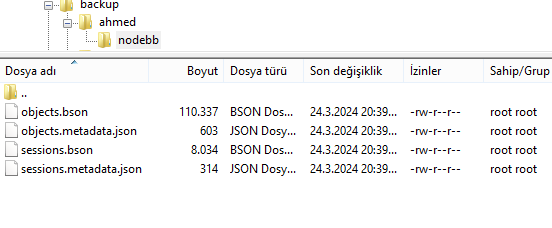


Hello! It looks like you're interested in this conversation, but you don't have an account yet.
Getting fed up of having to scroll through the same posts each visit? When you register for an account, you'll always come back to exactly where you were before, and choose to be notified of new replies (either via email, or push notification). You'll also be able to save bookmarks and upvote posts to show your appreciation to other community members.
With your input, this post could be even better 💗
Register Login