Upload Problem
-
When i trying to upload photos, i see the eror as below;
error uploading, code : 413 -
When i trying to upload photos, i see the eror as below;
error uploading, code : 413@cagatay said in Upload Problem:
When i trying to upload photos, i see the eror as below;
error uploading, code : 413log file;
aaaaa
tids []
aaaaa
tids []
aaaaa
tids []
aaaaa
tids []
aaaaa
tids []
aaaaa
tids []
aaaaa
tids [] -
@cagatay said in Upload Problem:
When i trying to upload photos, i see the eror as below;
error uploading, code : 413log file;
aaaaa
tids []
aaaaa
tids []
aaaaa
tids []
aaaaa
tids []
aaaaa
tids []
aaaaa
tids []
aaaaa
tids []@cagatay is this in your own site, or on here?
Mark Cutting also advises organisations as a Fractional CIO, Fractional CISO and Executive Advisor, helping boards improve technology governance, cyber resilience and executive decision making. Learn more at Gratmore Ltd
-
-
@phenomlab my site which is uzayyolu.
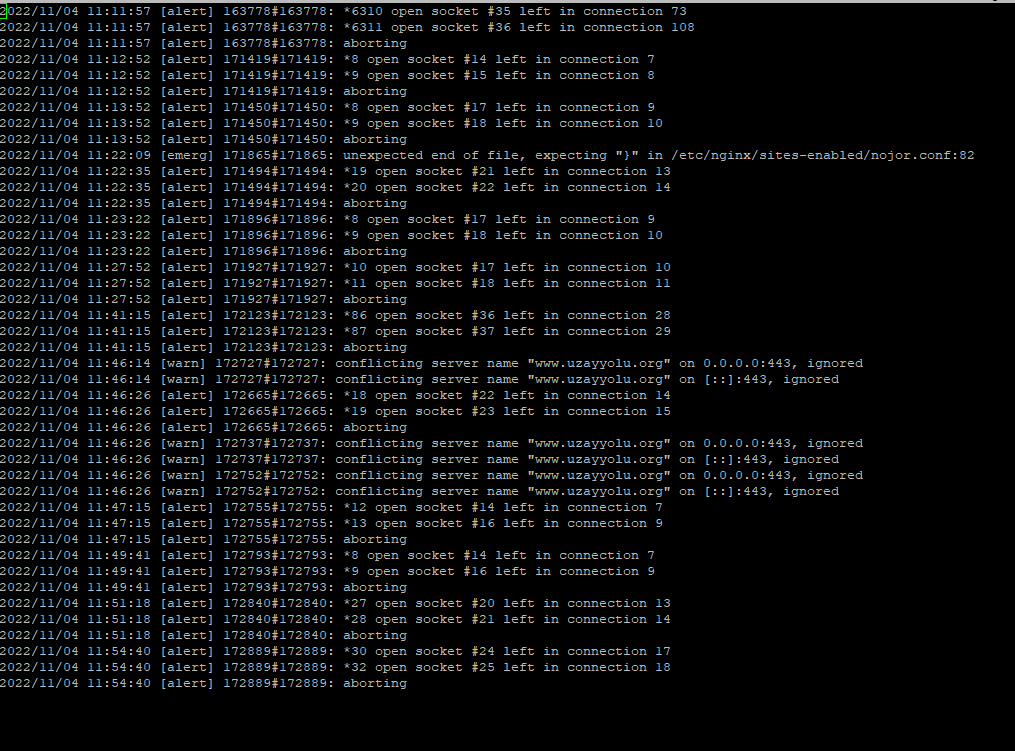
@cagatay anything in the
nginxerror log ?Mark Cutting also advises organisations as a Fractional CIO, Fractional CISO and Executive Advisor, helping boards improve technology governance, cyber resilience and executive decision making. Learn more at Gratmore Ltd
-
-
@cagatay there didn’t seem to be any new entries in that log file since this morning. Did you check the permissions?
Mark Cutting also advises organisations as a Fractional CIO, Fractional CISO and Executive Advisor, helping boards improve technology governance, cyber resilience and executive decision making. Learn more at Gratmore Ltd
-
@cagatay there didn’t seem to be any new entries in that log file since this morning. Did you check the permissions?
@phenomlab all checked no problem with permissions. (775 all of upload)
-
@phenomlab all checked no problem with permissions. (775 all of upload)
@cagatay so you see anything in
./nodeBB log?Mark Cutting also advises organisations as a Fractional CIO, Fractional CISO and Executive Advisor, helping boards improve technology governance, cyber resilience and executive decision making. Learn more at Gratmore Ltd
-
-
@phenomlab just it
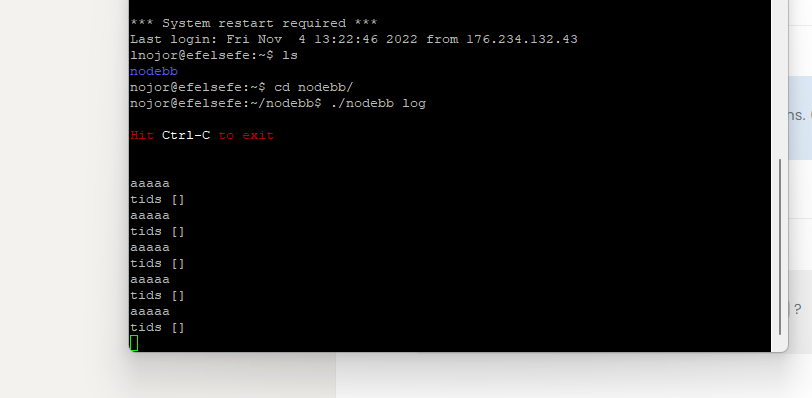
@cagatay that’s the log from the console which will likely be truncated. Have a look at
/admin/advanced/logsto get a better idea.Mark Cutting also advises organisations as a Fractional CIO, Fractional CISO and Executive Advisor, helping boards improve technology governance, cyber resilience and executive decision making. Learn more at Gratmore Ltd
-
@cagatay that’s the log from the console which will likely be truncated. Have a look at
/admin/advanced/logsto get a better idea.@phenomlab same;
aaaa
tids []
aaaaa
tids []
aaaaa
tids []
aaaaa
tids []
aaaaa
tids []
aaaaa
tids []
aaaaa
tids []
aaaaa
tids [ -
@phenomlab same;
aaaa
tids []
aaaaa
tids []
aaaaa
tids []
aaaaa
tids []
aaaaa
tids []
aaaaa
tids []
aaaaa
tids []
aaaaa
tids [@cagatay is that all that is in the log ? There should be much more than that.
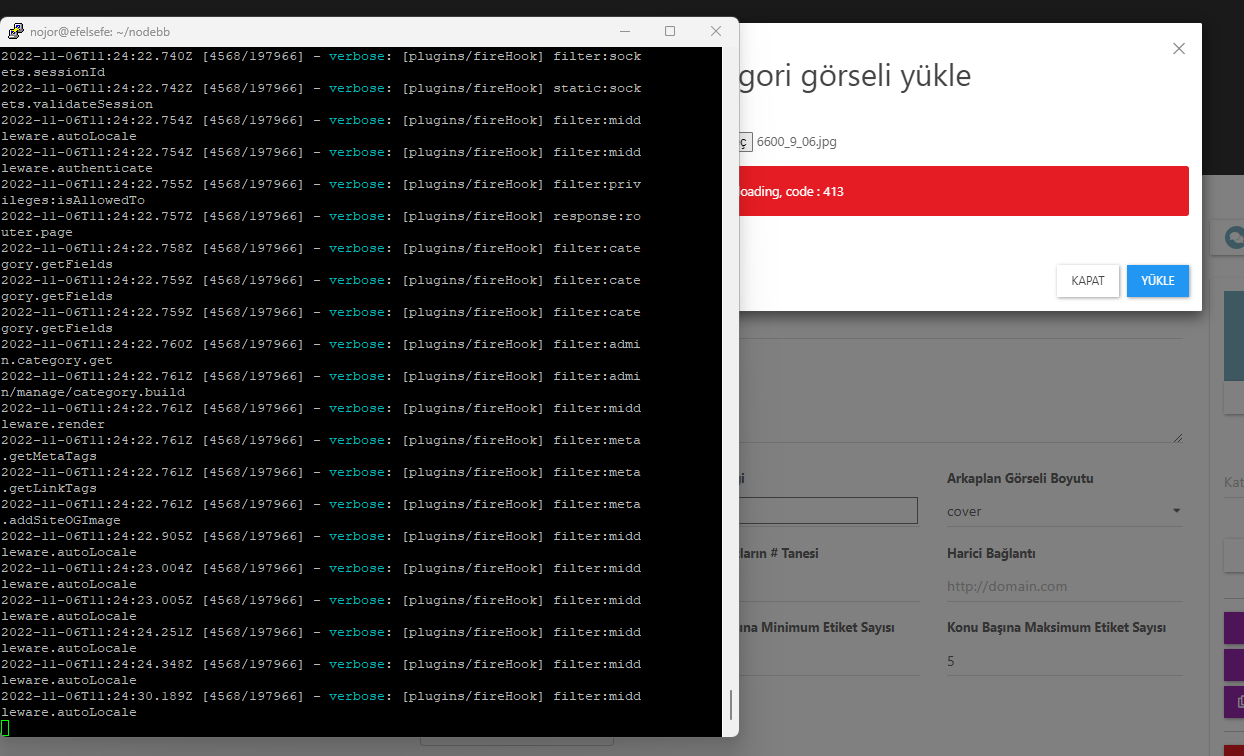
Let’s test this
- Stop NodeBB from running by using
./nodebb stopin the console - Start NodeBB in verbose DEV mode by using
./nodebb dev - Wait for the instance to start and then attempt an upload
- Report any errors being generated
Thanks
Mark Cutting also advises organisations as a Fractional CIO, Fractional CISO and Executive Advisor, helping boards improve technology governance, cyber resilience and executive decision making. Learn more at Gratmore Ltd
- Stop NodeBB from running by using
-
@cagatay is that all that is in the log ? There should be much more than that.
Let’s test this
- Stop NodeBB from running by using
./nodebb stopin the console - Start NodeBB in verbose DEV mode by using
./nodebb dev - Wait for the instance to start and then attempt an upload
- Report any errors being generated
Thanks
- Stop NodeBB from running by using
-
@cagatay thanks. HTTP 413 it’s being generated because the file you are uploading is too large for
nginxto process.See below
https://www.cyberciti.biz/faq/linux-unix-bsd-nginx-413-request-entity-too-large/
Mark Cutting also advises organisations as a Fractional CIO, Fractional CISO and Executive Advisor, helping boards improve technology governance, cyber resilience and executive decision making. Learn more at Gratmore Ltd
-
@cagatay thanks. HTTP 413 it’s being generated because the file you are uploading is too large for
nginxto process.See below
https://www.cyberciti.biz/faq/linux-unix-bsd-nginx-413-request-entity-too-large/
@phenomlab ok i m going to change size of picture which trying to upload.
-
@phenomlab ok i m going to change size of picture which trying to upload.
@cagatay ok
-
 undefined cagatay has marked this topic as solved on

Hello! It looks like you're interested in this conversation, but you don't have an account yet.
Getting fed up of having to scroll through the same posts each visit? When you register for an account, you'll always come back to exactly where you were before, and choose to be notified of new replies (either via email, or push notification). You'll also be able to save bookmarks and upvote posts to show your appreciation to other community members.
With your input, this post could be even better 💗
Register LoginDid this solution help you?
Related Topics
-
-
-
navbar
Solved Customisation -
Please help me, I can't install nodebb
Locked Solved Customisation -
-
-
-